When did I last do it? How to track the last time you did anything
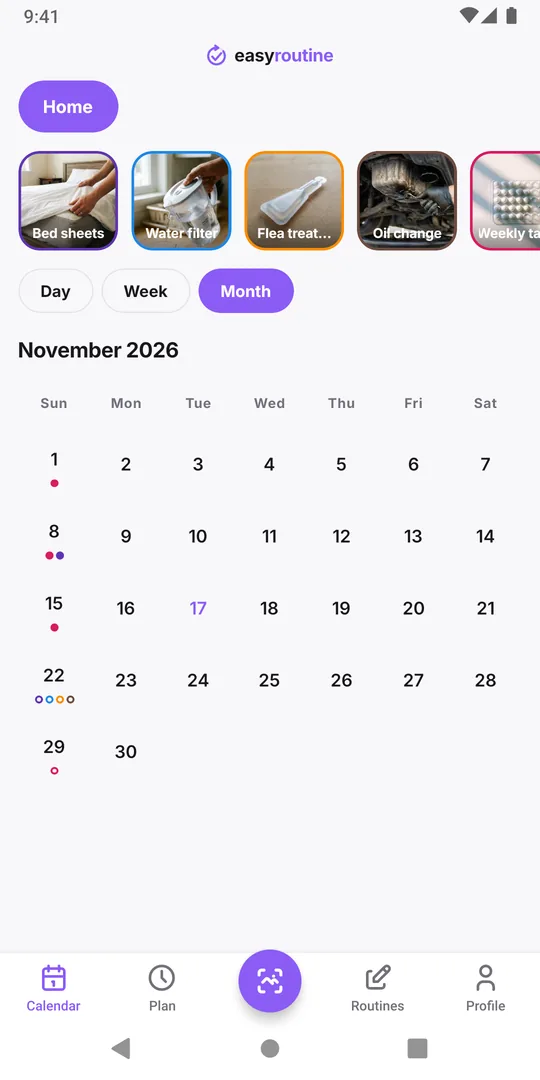
You answer "when did I last do it?" with a dated record, not with memory: write down the day each time you do the task, and the latest entry is the answer. EasyRoutine keeps that record for free: log the task when you do it, then tap its tile in the Month view to see every date at once.
Why is it hard to remember when you last did something?
Daily tasks blur because every day looks the same. Long-cycle tasks fail the other way: they happen so rarely that there is nothing to anchor them to. Changing the sheets, swapping the water filter, the dog's flea treatment, an oil change. Each one is a single afternoon among dozens of ordinary ones, and by the time the question comes up, "a couple of weeks ago" might really be six.
Uneven cycles make it worse. A task you do "when it needs it" has no fixed day to count from, so you cannot work it out from the calendar either. And the cost of guessing differs by task: sheets a week late are harmless, a pet treatment or a medicine given at the wrong interval is not.
The fix is a record written at the moment you do the task, kept in one place you always check.
What should you record when tracking the last time?
It does not need to be fancy. A notebook, a sheet on the inside of a cupboard door or an app all work if they follow a few rules:
- One line per task, not per area. "Cleaned the kitchen" does not tell you when the oven was last done. Split tasks that run on their own cycles.
- The date, every time. A tick without a date answers "did I?", not "when?".
- A short detail when it matters. The filter size, which product you used, "left side only". That is what you will want to know next time.
- Written right away. A record filled in from memory at the end of the month has the same gaps as your memory.
- The interval comes from the source. How often to replace a filter or repeat a pet treatment comes from the manufacturer, the label or your vet, not from the record. The record only tells you how long it has really been.
How to track the last time you did something in an app
In EasyRoutine, make a routine for an area of your life, for example Home, and add one activity per task: Bed sheets, Water filter, Flea treatment, Oil change. When you do one, tap + Log on today and pick it. Logging is free and needs no schedule. Did it last Saturday and forgot? Add the log to that day. Past days are allowed, future ones are not.
To find the last time you did a task:
- Open the Calendar tab, pick the routine and switch to Month.
- Tap the task's tile above the calendar. Its dots stand out, so you see every day it was logged.
- Scroll up to earlier months if the last dot is not in this one.
- Tap the latest day to open it and see the entry with its time.
Tap the tile again to clear the highlight. The day, week and month views guide shows each screen.
How notes help you remember exactly what you did
Often the date is only half the question. "When did I last change the filter, and which cartridge was it?" Add a comment to the log: the cartridge model, "1 cartridge left", the product name of the flea treatment, "flannel set on". Open any log of the same activity and its last five comments show above the comment field, so the previous details are there without a search. For older ones, see how to find an old note on a log.
A flag helps too. Mark a log amber when something was off, such as a very dirty filter, so it stands out next time you look back.
What tasks can you track with a last-done record?
The same pattern works for any task on a long or uneven cycle. These guides go deeper on one task each:
- Sheets and towels: bed sheets reminder and laundry routine tracker.
- Filters: water and air filter replacement, plus a replacement schedule for household items.
- Pets: last flea treatment and daily meals, dog grooming and nail trims, aquarium water changes and litter box cleaning.
- Car and house: car maintenance reminder, home maintenance schedule and pool maintenance log.
- Personal care: contact lens replacement and guitar string changes.
- Medication: for a weekly tablet, the Month view shows the last dose. If a dose is not logged and you are not sure, do not guess: check the leaflet or ask your pharmacist. See how to avoid a double dose.
For the same question about today, rather than weeks ago, see did I already do it?
How to plan the next date (Premium)
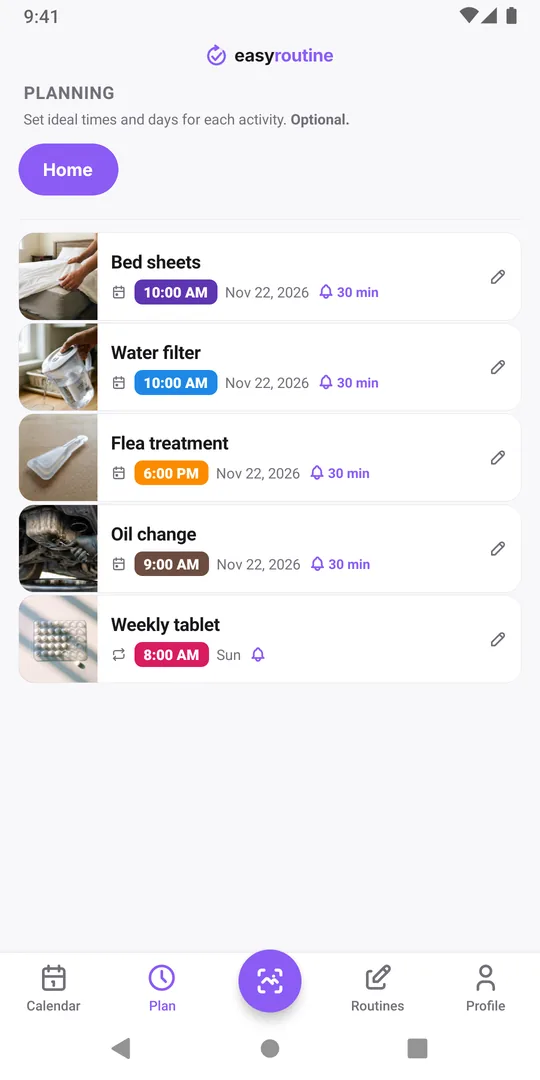
Knowing the last date tells you when the next one is due. With Premium you can put that date on the calendar. Schedules repeat on weekdays, so there is no "every 6 weeks" rule; instead, open the Plan tab, pick the task and add a Single day plan for the next due date, with a time and a reminder. Each activity holds up to 20 single dates, but planning just the next one and adding the following date when you log it keeps the plan in step with when you really did it.
A task on a fixed weekday, such as a weekly tablet every Sunday at 8:00, gets a recurring schedule instead. Planned but unlogged entries show as hollow rings in the Month view, so an overdue task is visible at a glance. More about scheduling.
Common questions
Is there an app to track the last time I did something?
Yes. Any habit or log app that records dates works, and EasyRoutine does it for free. Log the task when you do it, then open the Month view and tap the task's tile to highlight every day it was done.
How do I check when I last changed my sheets?
Make a Bed sheets activity and log it each time you change them. Open the Calendar, pick the routine, switch to Month and tap the Bed sheets tile. The latest highlighted day is the last change.
Does the app show how many days ago I last did it?
No. It shows the dates you logged on the calendar, not a counter of days since. The latest highlighted day in the Month view is your answer.
Can I get a reminder every few weeks?
Not as a repeating rule, because recurring schedules use weekdays. Add single-day plans for the next due dates instead, each with its own timed reminder. Scheduling and reminders are Premium features; logging is free.
Keep reading
- What can I track with EasyRoutine?What can I track with EasyRoutine? Plants, pets, bills, filters, chores, water, flossing and more. Pick the guide that matches how often the task comes round.
- Find a routine tracker for your needs and daily lifeFind a routine tracker for ADHD, studying, kids' chores, newborn care, medication, shift work or surgery recovery. See what EasyRoutine can and cannot do.
- How EasyRoutine compares to what you use nowCompare EasyRoutine with a calendar, paper, a spreadsheet, a reminders app or other trackers. Find the page for your situation and when to keep your tool.
- Find a routine tracker for the moment you're inFind a routine tracker for New Year's resolutions, back to school, post-holiday resets, travel, and a year-end review with practical setup guides.
- A simple habit tracker app with a calendar of what you actually didA simple habit tracker app for iPhone and Android: tap to log, see what you actually did on a day, week or month calendar. Free, Premium adds reminders.
- Routine planner app: Plan your day and track what you doPlan a daily routine with weekday and weekend times, activity reminders on Premium, and free logging in EasyRoutine. See a practical weekly example.
- Don't know what to track or where to start with a routine tracker?Not sure what to track in a routine tracker? Start with two or three actions you already do, log them today, and use your first week to choose what comes next.
- I keep switching habit apps and losing my historyKeep switching habit apps and losing your history? Learn why logs disappear, what to check before switching, and how EasyRoutine keeps data in your account.
- I get upset when my routine changes: what can I do?Get upset when your routine changes? Plan a smaller version for disrupted days, keep one anchor habit, and see that a reset streak is not a lost record.
- Is there an app that can track any habit, even a weird one?Need an app that tracks any habit, even an unusual one? EasyRoutine lets you name it, add an optional photo, and log it on your calendar, for free.
- Did I actually do it yesterday, or did I just plan to?Can't remember if you did something yesterday or only planned it? Learn how to tell, check your calendar, and record a task you did but forgot to log.
- I don't know if I'm actually being consistentNot sure if you're actually being consistent? Use a four-week habit check, compare your logs, and see where EasyRoutine's calendar shows gaps.
- I forget what I'm supposed to track todayForget which habits you're supposed to do today? Group them into routines, tie each to its days, and let the calendar show today's list instead of your memory.
- I stopped tracking for a while and don't know where to restartStopped tracking for a while and don't know where to restart? Skip the rebuild: pick one habit, log today, and let the gap stay empty. Your old logs are still there.
Free on iPhone and Android. Sign in with Apple, Google or your email to start.