I stopped tracking for a while and don't know where to restart
Restart with today, not with the gap. Open the tracker, log one thing you did today, and leave the missing days empty. In EasyRoutine your routines, activities and old logs are exactly where you left them, so there is nothing to rebuild.
Why restarting feels harder than starting
Coming back to a tracker after a break means facing the gap: two weeks, two months of empty days. It is tempting to treat that as a verdict and either fill it in, delete everything and start fresh, or keep putting the restart off until a "good" day like a Monday or the first of the month.
None of that is needed. The gap is just a record of a period when you were not tracking. It does not have to be fixed before today can count.
What not to do
- Do not back-fill from memory. Guessed logs for days you cannot remember make the record less useful, not more. Only add a past log when you are sure, for example yesterday's walk.
- Do not delete and rebuild. A clean slate feels good for a day, but you lose the history that shows what used to work.
- Do not restart everything at once. Coming back to all eight habits on day one is how the last break started.
- Do not wait for Monday. The best restart day is the day you open the app.
A restart in three steps
- Look before you change anything. Scroll back to the weeks before the break. Which activities were logged most? Those are your restart habits.
- Pick one or two and log them today. Even a small version counts. One log is a restart.
- Tidy up after a week, not before. Once you are logging again, archive the activities you no longer do and add anything new.
If the break came from holidays or travel, getting back into your routine after the holidays has a two-week restart plan.
What EasyRoutine kept while you were away
Nothing in EasyRoutine expires or resets when you stop using it:
- Routines and activities are unchanged, with their photos and colors.
- Every log from before the break is still in the calendar, with its notes and flags.
- The Completed total on the Profile tab still counts all of them.
Only the Day streak will be back at zero, because it counts days in a row with a log. Your next log starts it again at 1. The rest of the record is untouched, and the empty stretch simply shows as days without dots in the month view.
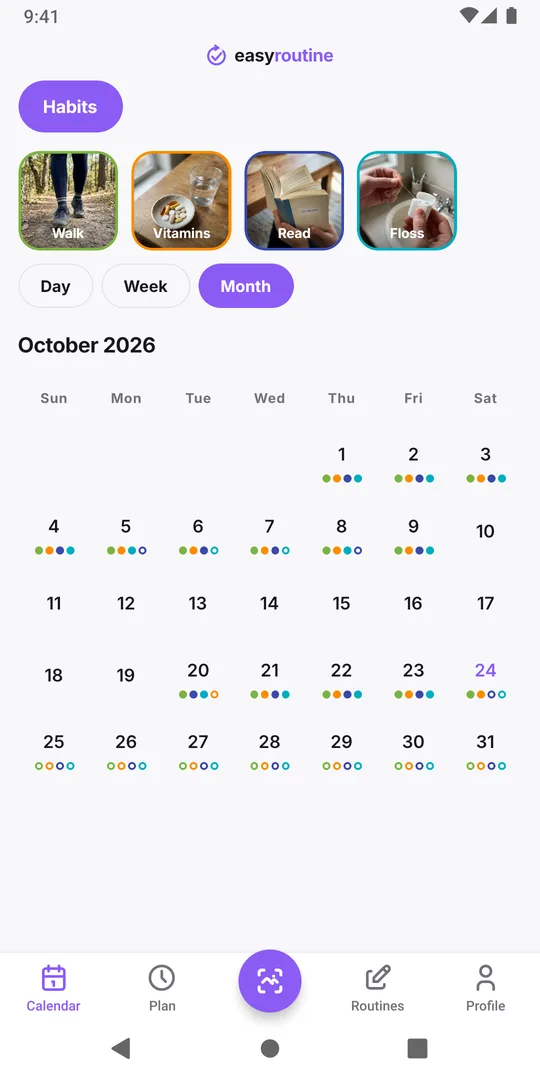
If you used schedules
With Premium scheduling, planned activities you did not log during the break show as faded entries on those days. They are not marked as failed and do not need clearing. If the old plan was part of why you stopped, give it a lighter version with a start date from today, so the calendar fits the week you have now. Re-planning a schedule shows how.
If your Premium ended during the break, your schedules are still there; only editing them is locked. Logging, the photo scan and the calendar are free either way.
Coming back on a new phone
If you also changed phones during the break, install the app and sign in with the same email address you used before. Everything comes back from your account. If the app opens empty, you probably signed in with a different address; see routines empty after sign-in.
Common questions
Are my old logs still there after weeks without opening the app?
Yes. Logs, routines and activities stay in your account until you delete them yourself.
Should I fill in the days I missed?
Only for things you are sure you did. Leaving the gap empty keeps the record honest.
Do I need to delete my routines and start over?
No. Log today in the routines you have, and archive activities you no longer do once you are back into it.
How do I restart my Day streak?
Log any activity. The streak starts again at 1 with that log and grows from there.
Keep reading
- What can I track with EasyRoutine?What can I track with EasyRoutine? Plants, pets, bills, filters, chores, water, flossing and more. Pick the guide that matches how often the task comes round.
- Who it's for: find the routine tracker for your situationADHD, exams, kids' chores, a newborn, a parent's medication, shift work or surgery recovery: how EasyRoutine fits your situation, and where it does not.
- How EasyRoutine compares to what you use nowCompare EasyRoutine with a calendar, paper, a spreadsheet, a reminders app or other trackers. Find the page for your situation and when to keep your tool.
- The right routine tracker for this time of yearNew Year's resolutions, back to school, the week after the holidays, a trip, a look back at December: how to set up EasyRoutine for the moment you are in.
- A simple habit tracker app with a calendar of what you actually didA simple habit tracker app for iPhone and Android: tap to log, see what you actually did on a day, week or month calendar. Free, Premium adds reminders.
- A routine planner app that also shows what you actually didHow to plan a daily routine that holds up, with a weekday and weekend example, and how EasyRoutine plans each activity (Premium) and logs it for free.
- Don't know what to track or where to start with a routine tracker?Not sure what to track or where to start with a routine tracker? Pick one small routine you half do already, add two or three steps and log them today.
- I keep switching habit apps and losing my historySwitching habit tracker apps and losing your data each time? Why history gets lost, what to check before the next switch, and how EasyRoutine keeps your log.
- I get upset when my routine changes: how to keep it going anywayGet upset when your routine changes? Plan a smaller version for disrupted days, keep one anchor habit, and see that a reset streak is not a lost record.
- Is there an app that can track any habit, even a weird one?Looking for an app to track something unusual that no dedicated tracker covers? If it repeats, it can be logged: a name, a photo and a color are all it takes.
- Did I actually do it yesterday, or did I just plan to?Can't remember if you actually did something yesterday or only planned to? Why memory mixes the two up, and how a log separates planned from done.
- I don't know if I'm actually being consistentDon't know if you're actually being consistent with your routine? How to check with a simple four-week count, and where EasyRoutine's calendar shows it.
- I forget what I'm supposed to track todayForget which habits you're supposed to do today? Group them into routines, tie each to its days, and let the calendar show today's list instead of your memory.
Free on iPhone and Android. Sign in with Apple, Google or your email to start.