An aquarium water change reminder app that also answers "when did I last do it?"
A water change is easy to forget because nothing looks different the day it is due, and a week later you cannot say whether it was one week or three. EasyRoutine keeps a free log of every change, so the calendar shows the last one, and with Premium it reminds you on the day the next one is planned.
Why water changes slip
Feeding happens every day, so it sticks. A water change comes round every week or two, which is just long enough to lose count. The tank still looks clear, the fish still eat, and by the time the glass needs wiping nobody remembers when the bucket last came out.
A few patterns make it worse:
- A busy weekend. The change moves to "tomorrow" and then to next weekend.
- Two people looking after the tank. Each thinks the other did it.
- Several tanks. The shrimp tank and the community tank run on different rhythms, and they blur together.
- Holidays. Whoever looked after the fish fed them but did not do the change, and the cycle restarts from a date nobody wrote down.
Decide your rhythm before you track it
How much water to change and how often depends on the tank size, how many fish live in it, the plants, the filter and what your test results show. Take the schedule from your fish shop, an aquatic vet or the guide for the species you keep, not from an app. Write it down in one line so everyone in the house does the same thing, for example: "a quarter of the water every Saturday, gravel vacuum every other week, test the water first".
Useful to decide at the same time:
- The day. A fixed weekday is easier to keep than "every seven days", because it lands on the same free morning.
- What a change includes. Topping up, conditioning the new water, vacuuming the gravel, wiping the glass. Say which of these happen every time and which only now and then.
- What you test. If you use a test kit, note the readings next to the change, so you can see later whether the water was drifting before you changed it.
Log every water change (free)
In EasyRoutine, create a routine called Aquarium and add an activity Water change. Add Test water, Rinse filter and Clean glass if you want the jobs that come round on different rhythms in the same place. Running two tanks? Give each its own routine, such as Shrimp tank and Living room tank, so their dates never mix.
When the bucket is back in the cupboard, tap + Log on today, pick Water change and save. Did it yesterday and forgot to log? Add it to yesterday and set the time. A short note keeps the details you would otherwise lose, like "30%, nitrate high" or "new conditioner", and a red, amber or green flag marks a change that went wrong or a reading to watch.
Give the activity a photo of your bucket or siphon and you can log it with the free AI photo scan: point the camera at it and the change is logged with the current time.
When did I last change the water? Check the month
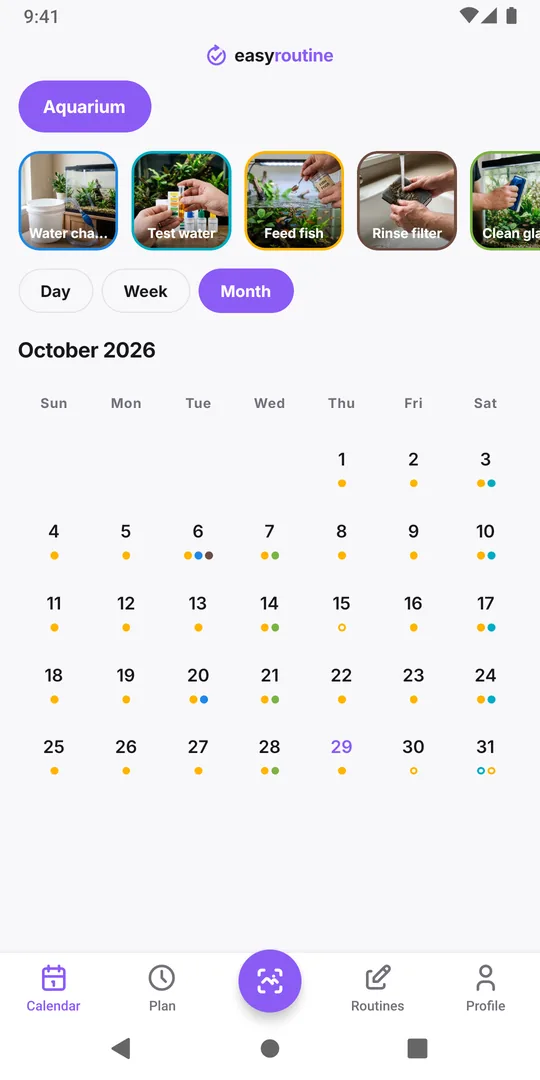
Open the Month view and tap the Water change tile to highlight it: its dots get bigger and move to the front, while the other activities stay visible. Each change is a dot, so the last one is the latest dot, and the gaps between dots are your real rhythm. A row of dots a week apart, then a gap of three weeks, is the answer to "has it been long?". The notes on each log tell you what you found when you did it.
This works on the free plan. Logging, notes, flags and the calendar are all free; only planning ahead and reminders need Premium.
Get a reminder before the next change (Premium)
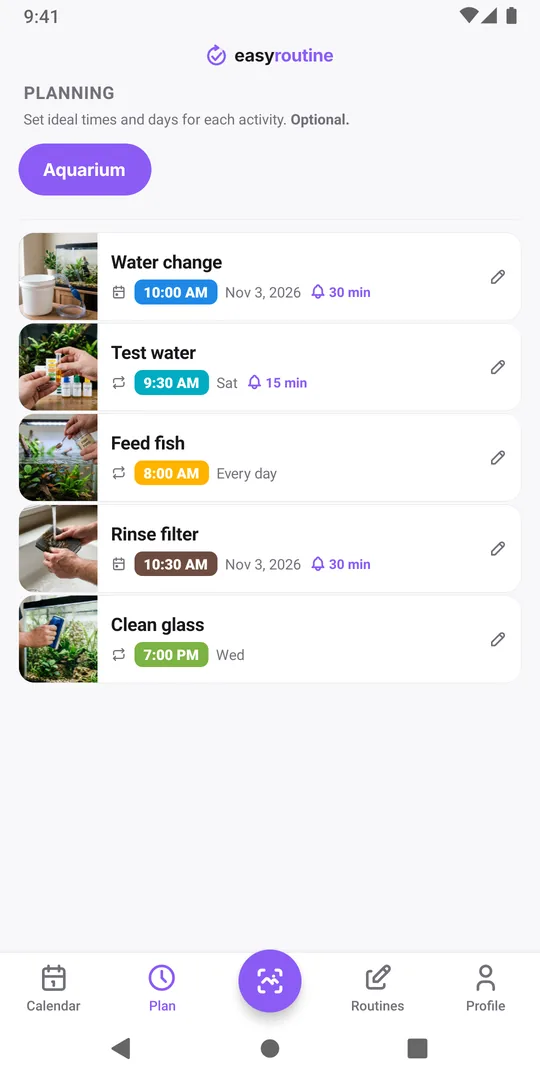
With Premium, open the Plan tab and tap Water change. For a weekly change, add a Recurring plan on your day, such as Saturday at 10:00, and turn on the reminder. Until you log it, the planned change shows as a hollow ring in the Month view and a faded entry in the Week and Day views, so a missed week stands out.
Repeating plans use weekdays, so there is no "every 14 days" setting. For a change every two weeks, add Single day plans for the next dates instead, each with its own time and reminder. One activity holds up to 20 of them, which covers most of a year. If you change the water a few days late, log it on the real day and move the remaining dates so the plan follows what you actually did.
Pick a reminder time when you are home with half an hour to spare. A reminder at 07:00 on a workday only reminds you that you cannot do it now. More on scheduling and reminders.
Sharing the tank with your household
If two people look after the fish, sign in on both phones with the same email address. Both see every logged change, and a note like "done by Alex" says who did it. Everyone signed in can also edit everything in that account, so share it only with people you trust. Each phone sets its own reminders, so both get the nudge. See how sync works.
Common questions
Is there a free aquarium water change log?
Yes. Logging water changes, adding notes and flags, and reading the calendar are free in EasyRoutine. Planned dates and reminders need Premium.
Can it remind me every two weeks?
Not with a repeating rule, because repeating plans use weekdays. Add single-day plans for the next change dates instead, up to 20 per activity, each with its own reminder.
How often should I change my aquarium water?
That depends on your tank, fish, plants and filter, so follow your fish shop, an aquatic vet or the care guide for your species. The app records when you did it and reminds you on the days you choose.
Can I record my water test results?
As a note on the log, yes, for example "nitrate 20, pH 7.2". The app keeps the note with the date but does not chart or analyse the numbers.
Keep reading
Free on iPhone and Android. Sign in with Apple, Google or your email to start.