Did I already take it? How to avoid taking medication twice
To avoid taking medication twice, stop relying on memory and give yourself something to check: a pill organizer, a weekday-labeled blister strip, or a log you write to the moment you take each dose. Look at it before every dose, and if it cannot tell you, ask your pharmacist instead of guessing.
Why "I think I took it" is not good enough
A daily dose is the same small action at the same counter every day, so one morning can feel very much like the last. "I remember taking it" might be today, or it might be yesterday.
Guessing is the real problem. Guess no and you might take it twice; guess yes and you might skip it. Every method below works the same way: it gives you something to look at instead of something to remember.
Low-tech checks that work without an app
- A pill organizer with a compartment per day (or per morning and evening): an empty compartment means the dose is gone, and MedlinePlus suggests one as a way to keep medicines organized. How to fill it safely is in our pill organizer comparison.
- Weekday blister strips. Some packs print the day above each tablet. Always press out today's, never "the next one", and a gap above today tells you it is done.
- Turn the box over or move it to a second spot after taking the dose, and put it back in the evening. It costs nothing, but it only works if nobody else touches the box.
- A paper list on the fridge with a tick per dose. MedlinePlus also recommends keeping a written list of all the medicines you take, which is worth having for appointments anyway.
- Ask for a dosing card. Ask your pharmacist to write down, for each medicine, when to take it and what to do if you are not sure you took it. Keep it next to the medicines so the answer is there when you need it.
These all have one weak spot: they show that a tablet is gone, not when. If you need the time, or you take medicines on different days, a log helps.
A dose log: write it down the moment you take it
A log records each dose with the time, so the question becomes "is today's dose written down?" In EasyRoutine you make a routine called Medication and add one activity per medicine, named as on the box. Keep one per medicine, not one for "all my pills", so a missing one stands out.
The log only helps if you write to it with the glass of water still in your hand:
- Tap Log on today's calendar, pick the medicine and save. It is logged with the current time, and you can pick several medicines at once if you take them together.
- Or point the camera at the box with the free photo scan, if the activity has a photo. It logs straight away. Boxes that look alike are safer to log by hand.
Each log stores that you took it and when, plus an optional note. The app does not record amounts or doses; if you want to remember "half tablet as instructed", write it in the note.
Check before every dose
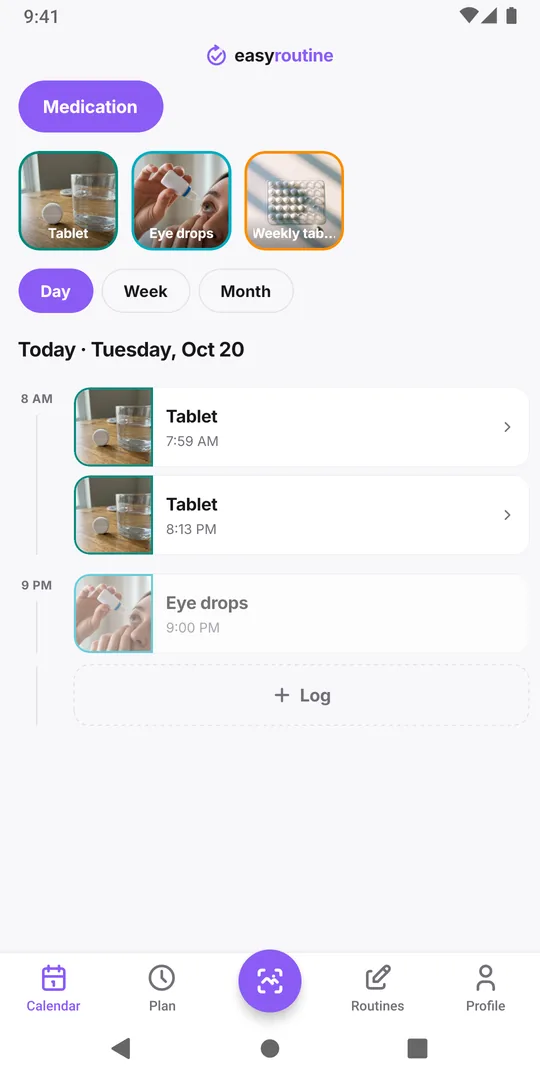
Make checking the habit. Before a dose, open today on the calendar:
- A solid, colored entry for that medicine means it is already logged, with the time.
- A faded entry means it is planned but not logged yet (planned entries need Premium, see below).
- Nothing at all means no log exists today.
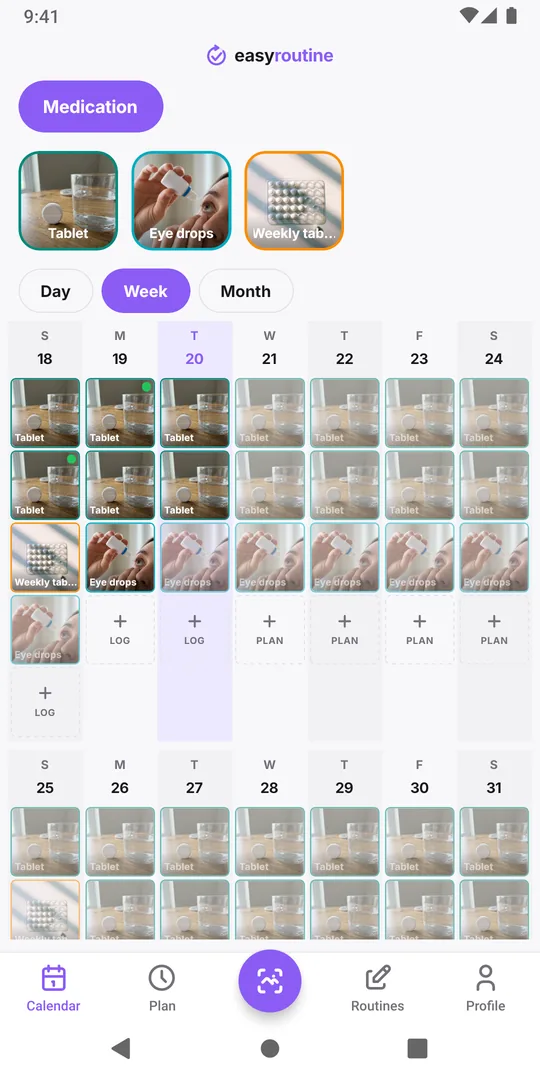
For a medicine you take once a week, switch to the week or month view to find the last entry. See how it works for the calendar views.
The log is only as good as your logging. If you logged nothing, the app cannot tell you whether you took it, only that you did not record it. That is the moment to check the leaflet or ask your pharmacist, not to guess.
Planned doses and reminders (Premium)
With Premium, the Plan tab gives each medicine its weekdays and dose times, still one activity per medicine even if you take it twice a day. Each planned dose then sits on the calendar as a faded entry until you log it, which makes "done" and "still open" easy to tell apart, and a reminder can go off at the dose time. A reminder only nudges you; the log is still what tells you later that it happened. A faded entry on a past day is a dose that was never logged. Details are on the scheduling page.
Common mistakes that cause double doses
- Logging later. "I will log it after breakfast" is how the gap opens. Log, or tick, or turn the box, before you put the medicine away.
- Two people, one medicine. If a partner sometimes hands you the tablet, agree who records it. Caring for someone else? See the guide for caregivers.
- A changed routine. Travel, a late night or a new pack size is when doses get repeated. Check the record on those days especially.
- Fixing the record wrongly. Logged by mistake? Delete the entry. Took it but forgot to log? Add the log afterwards with the real time, so the record stays true.
Common questions
What should I do if I think I took my medicine twice?
Contact your pharmacist or doctor, or the out-of-hours service your country uses, and tell them which medicine and when. Keep the box or leaflet with you when you call. If you feel unwell, get urgent help.
How do I avoid a double dose when I travel across time zones?
Before the trip, ask your pharmacist or doctor how to time each dose in the new time zone; the app does not work that out for you. On the trip, log each dose right after you take it, and before the next one check the time of the last logged dose instead of counting by days.
Can EasyRoutine tell me if a dose is safe to take?
No. It only shows what you logged and when. It knows nothing about medicines, doses or interactions, so questions about what to take belong with your pharmacist or doctor.
Do I need Premium to avoid a double dose?
No. Logging each dose and checking the calendar are free. Premium adds planned dose times, shown as faded entries until logged, and reminders at those times.
Keep reading
Free on iPhone and Android. Sign in with Apple, Google or your email to start.