Is there an app that can track any habit, even a weird one?
A general routine tracker can log anything that repeats, because it does not need to know what the habit is. In EasyRoutine an activity is just a name, an optional photo and a color, so turning the compost, checking the tire pressure or practicing card tricks is logged the same way as a vitamin or a gym session.
Why dedicated apps do not fit odd habits
Most tracker apps are built around a category: water, workouts, sleep, medication. They ask for the things that category needs, such as glasses, sets, hours or doses, and they have no place for "descale the kettle" or "call grandma".
For many unusual habits you do not need a category at all. What you want to know is usually the same two things: did I do it, and when did I last do it. Any tracker that records a simple yes with a date and time can answer that for anything.
Examples people rarely find a tracker for
- Home and garden: turning the compost, descaling the kettle, cleaning the hood filter, feeding the sourdough starter.
- Things you keep forgetting when you last did: checking the tire pressure, testing the smoke alarm, flipping the mattress.
- Small personal practices: a gratitude line, a daily Spanish lesson, five minutes of drawing, a cold shower.
- Hobbies: juggling, chess puzzles, piano scales, a coin collection you sort on Sundays.
- Things you want to do less: logging each time you order takeaway or check social media at night shows the real pattern.
If you can name it and you do it more than once, it can be tracked.
How to make an unusual habit trackable
- Name the action, not the goal. "Turn compost" rather than "be greener". You can only log something you actually did.
- Decide what counts as done. One page? Ten minutes? Write it in the name if it helps: "Spanish, 1 lesson".
- Add a note when the detail matters. If you want to remember which chess opening you studied or how much starter you discarded, a short note on the log keeps it.
- Group it with similar things. Odd jobs around the house fit in a Home routine; hobbies can share a Practice routine.
How EasyRoutine handles any habit
EasyRoutine does not have categories or templates you have to fit into. An activity is:
- A name, up to 80 characters, whatever you like.
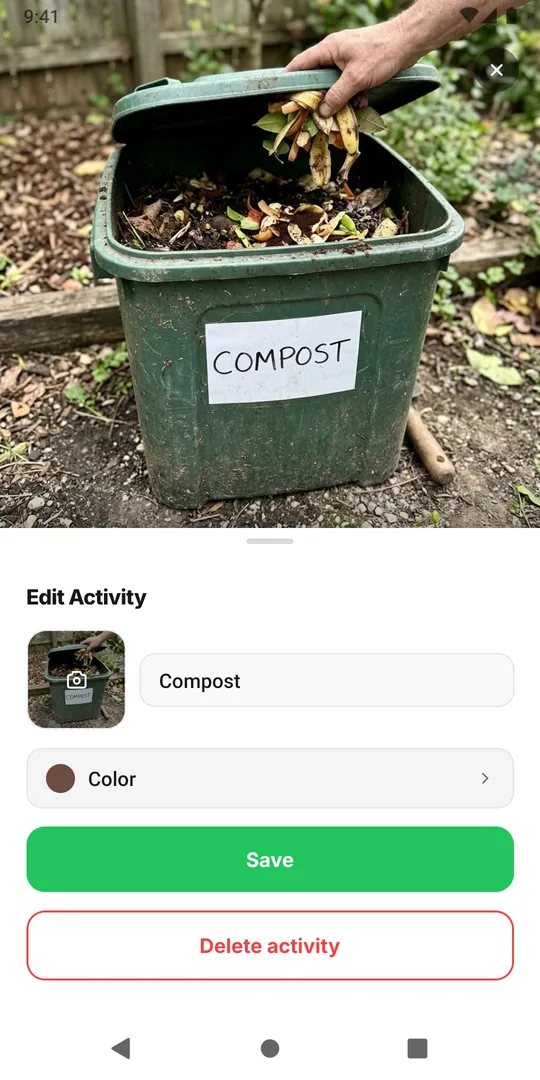
- A photo, optional. Take one of the actual thing: your compost bin, the kettle, the chessboard. If you add a photo and leave the name empty, the app names the activity from the picture.
- A color, from 16 preset swatches or any shade you pick on the color field, so it stands out on the calendar.
You log it with a tap on the day, or by taking a photo with the AI photo scan, which matches the picture to one of your activities that has a photo. The scan does not recognize objects in general; it picks between your own activities. All of this is free, with no limit on routines or activities.
Seeing it on the calendar
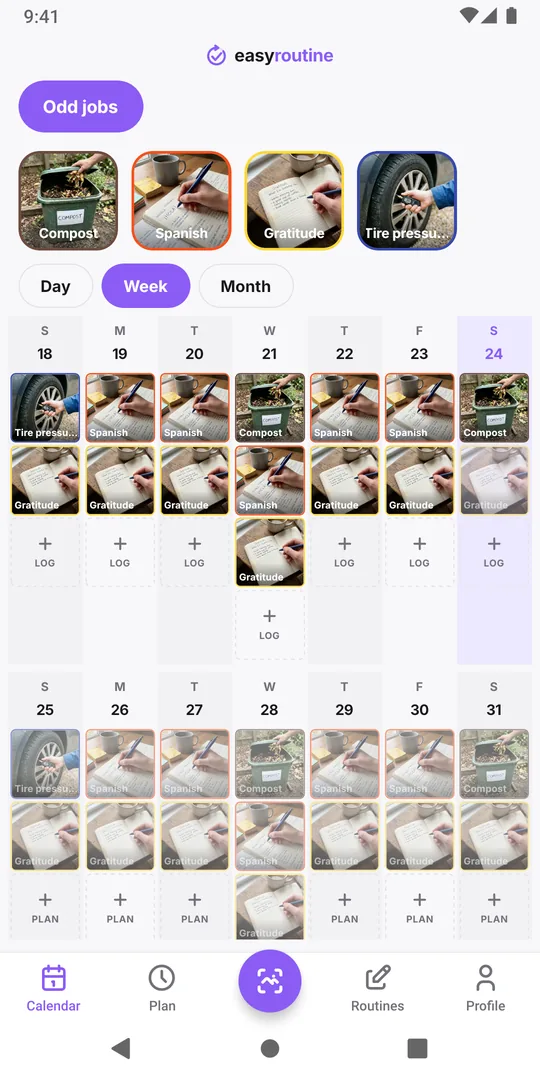
Once logged, an unusual habit sits on the calendar like any other. The week view shows which days you did it; the month view shows the rhythm over weeks. For things you do rarely, like the smoke alarm, the calendar answers "when did I last...?" by scrolling back to the last dot.
If the habit needs a nudge on certain days, Premium lets you schedule it on chosen weekdays or single dates with a reminder. Logging itself never needs a schedule. See scheduling.
What it will not do
EasyRoutine records that and when something was done, plus an optional note and flag. It does not count quantities, show charts or measure anything. If your habit lives on numbers, like distances, weights or money, a specialized app or a spreadsheet will serve you better for that part.
Common questions
Do I have to choose a category for each habit?
No. There are no categories. You name the activity yourself and put it in any routine you like.
Can the photo scan recognize anything I photograph?
No. It only matches a photo to one of your own activities that has a photo, or says there is no match.
Can I track something I want to do less often?
Yes. Log it each time it happens. The calendar then shows how often it really occurs.
Is there a limit on how many activities I can add?
No. Routines, activities and logs are unlimited on both the free plan and Premium.
Keep reading
- What can I track with EasyRoutine?What can I track with EasyRoutine? Plants, pets, bills, filters, chores, water, flossing and more. Pick the guide that matches how often the task comes round.
- Who it's for: find the routine tracker for your situationADHD, exams, kids' chores, a newborn, a parent's medication, shift work or surgery recovery: how EasyRoutine fits your situation, and where it does not.
- How EasyRoutine compares to what you use nowCompare EasyRoutine with a calendar, paper, a spreadsheet, a reminders app or other trackers. Find the page for your situation and when to keep your tool.
- The right routine tracker for this time of yearNew Year's resolutions, back to school, the week after the holidays, a trip, a look back at December: how to set up EasyRoutine for the moment you are in.
- A simple habit tracker app with a calendar of what you actually didA simple habit tracker app for iPhone and Android: tap to log, see what you actually did on a day, week or month calendar. Free, Premium adds reminders.
- A routine planner app that also shows what you actually didHow to plan a daily routine that holds up, with a weekday and weekend example, and how EasyRoutine plans each activity (Premium) and logs it for free.
- Don't know what to track or where to start with a routine tracker?Not sure what to track or where to start with a routine tracker? Pick one small routine you half do already, add two or three steps and log them today.
- I keep switching habit apps and losing my historySwitching habit tracker apps and losing your data each time? Why history gets lost, what to check before the next switch, and how EasyRoutine keeps your log.
- I get upset when my routine changes: how to keep it going anywayGet upset when your routine changes? Plan a smaller version for disrupted days, keep one anchor habit, and see that a reset streak is not a lost record.
- Did I actually do it yesterday, or did I just plan to?Can't remember if you actually did something yesterday or only planned to? Why memory mixes the two up, and how a log separates planned from done.
- I don't know if I'm actually being consistentDon't know if you're actually being consistent with your routine? How to check with a simple four-week count, and where EasyRoutine's calendar shows it.
- I forget what I'm supposed to track todayForget which habits you're supposed to do today? Group them into routines, tie each to its days, and let the calendar show today's list instead of your memory.
- I stopped tracking for a while and don't know where to restartStopped tracking for a while and don't know where to restart? Skip the rebuild: pick one habit, log today, and let the gap stay empty. Your old logs are still there.
Free on iPhone and Android. Sign in with Apple, Google or your email to start.