Did I already feed the dog? Track pet feeding and medication
The bowl is empty and the dog looks hungry, but did you feed him an hour ago or not? Log every feeding and every dose in EasyRoutine in a few taps, and the answer is on today's calendar before you open the food bag.
The question an empty bowl cannot answer
Dogs are very good at looking unfed. An empty bowl tells you nothing either: it is empty both when he has eaten and when he has not. Medication is worse. Was the joint pill this morning, or was that yesterday? Giving it twice is a real worry, and so is skipping it.
A record answers this better than memory. Logging takes a second when it happens, and from then on you can check instead of guessing.
Set up one routine per pet
Create a routine for each pet, named after them, and add the things you want to keep track of as activities:
- Breakfast and Dinner as two separate activities, so you can see at a glance which meal is still open
- a daily medication, such as Joint pill
- a monthly task like Flea treatment
With two pets, give each its own routine: Rex and Mia each get their own Breakfast and Dinner. There is no limit on routines or activities, so a household with three dogs and a cat fits fine. If you also want to keep track of walks, grooming and vet visits, the pet care tracker guide covers the whole routine.
Log it when it happens, check before you feed
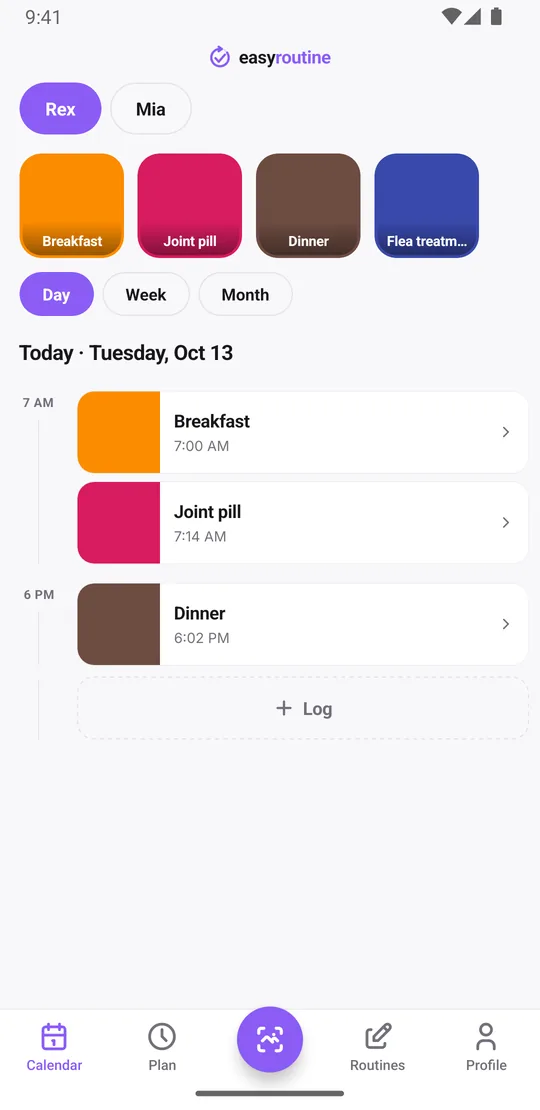
Right after feeding, tap the faded Breakfast entry on the calendar: the Log Entry sheet opens with the planned time, and you save it. Without a schedule, tap Log on the day, pick Breakfast and tap OK, and it is logged with the current time. Next time you wonder, open the day view: a solid Breakfast tile means it is done, with the time it was logged. A faded entry means it is planned but nobody logged it yet.
Tap any logged entry to add a note, such as "ate only half" or "pill hidden in cheese", and flag it green, amber or red. When you log the next one, the last few notes for that activity show up, so a pattern like a dog leaving food is easy to notice and mention to the vet.
Fed the dog but forgot to log it? Add the log afterwards on that day and set the time it really happened. Logs can go on any earlier day and time, never in the future, so the record stays honest.
When was the last flea treatment?
Daily meals are easy to check on today's calendar. Monthly treatments are where memory really fails. Tap the Flea treatment tile at the top of the calendar and the calendar shows only that activity, so the last entry is the last time you gave it. Switch to the month view to see the whole pattern at once, with up to four dots per day, and spot a month where the treatment never happened.
The notes help here too. Write down what is worth remembering next time: which product you used, "switched to the new food", "vomited after dinner", or what the vet said at the last check. The log sheet shows the last few notes for that activity, so before the next dose you see what happened after the previous ones.
If tapping feels slow with a bowl in one hand, add a photo to an activity, such as the pill pack, and use the free photo scan: point the camera at the pack and the app logs that activity with the current time. The scan only matches your own activities that have a photo, so give Rex's and Mia's food different photos or log those by tap.
All of this, logging, notes, flags, the scan and the full history, is free.
Reminders at feeding and dosing times
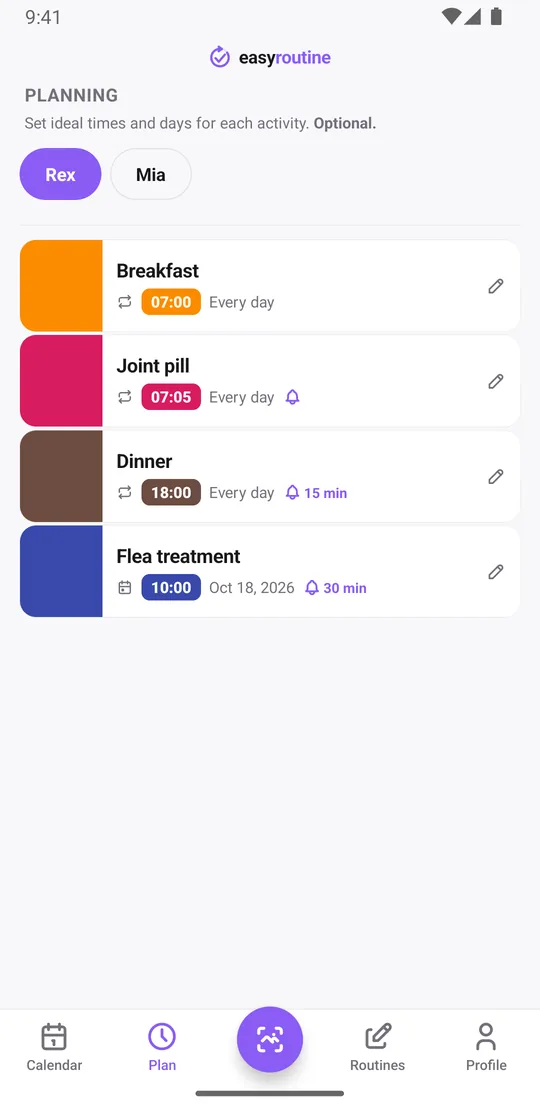
With Premium, open the Plan tab and give each activity its time and days. Breakfast every day at 7:00, the joint pill at 7:05, dinner at 18:00. Each timed schedule can carry a reminder that goes off on time or 5, 10, 15 or 30 minutes before. The notification names the activity and the routine, so you know it is Rex's pill and not Mia's.
For something monthly, like a flea or worming treatment, there is no "every 30 days" rule because schedules repeat on weekdays. Add a single day plan for the next treatment date instead, with a time and a reminder. Each activity holds up to 20 such dates, so you can plan the coming months in one go.
Pick the lead time to fit the task. A pill you give with breakfast works well with a reminder on time, while a reminder 15 minutes before dinner gives you time to get home or thaw the food. Missed one? The planned entry stays faded on the calendar until it is logged, so the gap shows the next time you look.
Scheduling and reminders are part of Premium. Logging and checking the calendar are free. How reminders work.
Feeding the pet with someone else
EasyRoutine is built around one account. Your routines and logs sync to every phone and tablet you sign in on, iPhone or Android. There is no feature for sharing a log between two separate accounts, so it works best when the person who usually feeds the pet keeps the log.
What it does not do
EasyRoutine records that a feeding or dose happened and when. It does not track amounts or dosages, and it does not give advice about food or medication. For how much and how often, follow your vet's instructions. The app makes sure you remember what you already did.
Common questions
How do I know if the dog was already fed today?
Log each feeding when it happens, from its faded planned entry or with the Log button on the day. Before feeding again, open today's day view: a solid tile means that meal was logged, a faded entry means it is still open.
How do I see when my pet last had a treatment?
Tap that activity's tile at the top of the calendar to show only its entries; the last one is the last time. The month view shows the longer pattern, and the log sheet shows your last few notes for it.
Can I set reminders for my pet's medication?
Yes, with Premium. Give the medication a time and days in the Plan tab and turn on a reminder, on time or up to 30 minutes before. Monthly treatments use single-day plans with their own reminder.
Can I track more than one pet?
Yes. Create one routine per pet, each with its own activities and reminders. There is no limit on routines or activities.
Can the app track the dose or amount of food?
No. It records that something was given and when, plus an optional note. Dosing questions belong with your vet.
Keep reading
Free on iPhone and Android. Sign in with Apple, Google or your email to start.