Pool maintenance app: a log and schedule for weekly pool care
When did I last backwash the filter, and what was the pH on Monday? EasyRoutine works as a pool maintenance log: you record each job when you do it, for free, with your readings in a note. With Premium it also becomes your pool maintenance schedule, with set days for each job and a reminder before the water test.
Set it up: one activity per pool job
Create a routine called Pool and add each job as its own activity:
- Test water
- Skim
- Add chlorine
- Backwash filter
- Brush walls
- Shock
One activity per job matters because they run on different rhythms. A single "Pool done" task tells you that you did something on Saturday, but not whether that included the backwash. Give each a color so the calendar reads at a glance. If you also look after a hot tub, give it a second routine so the two logs stay apart.
Free: log each job and see when you last did it
After a job, open the day on the calendar, tap + Log and pick it. Skimmed, tested and added chlorine in one go? Tick all three at once. Forgot to log Saturday's backwash? Logs can be added for any earlier day and time.
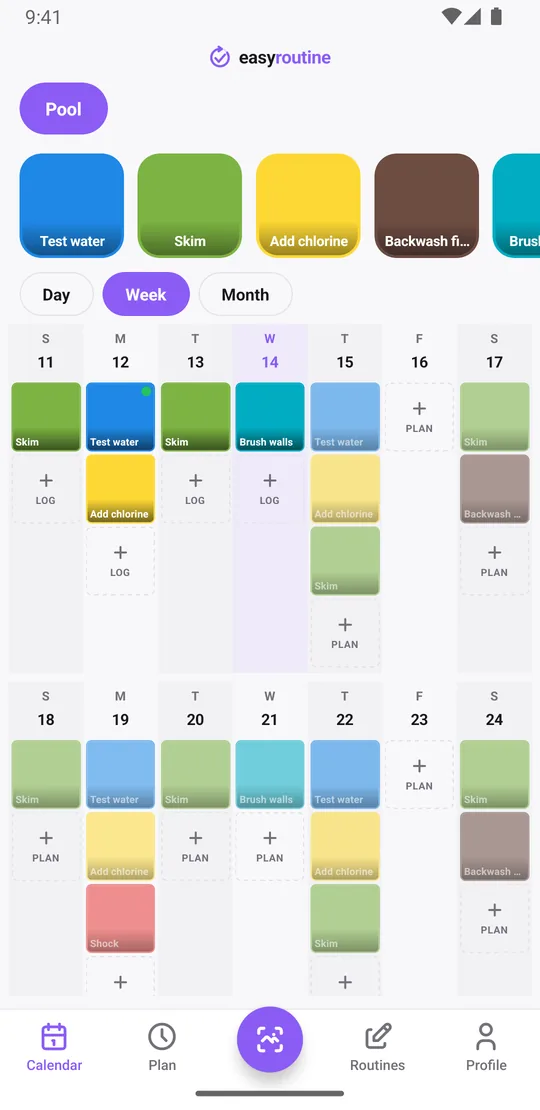
The week view shows a colored tile for each job on the day you did it. Tap an activity's tile at the top, like Backwash filter, to show only that job: the last tile is the last time. The month view shows up to four dots per day, so you can see the whole season: steady weeks, and the week of the heatwave when you skipped the brushing.
Logging, the calendar and the history are free, with no limit on activities or logs. More about the calendar.
Free: readings in notes, flags for out of range
EasyRoutine has no fields for pH, chlorine or alkalinity, and it does not chart readings. What it has is a note and a green, amber or red flag on every log, which is enough for a pool log. Type your readings into the note when you log Test water:
- "pH 7.4, free chlorine 2 ppm"
- "pH 7.8, alkalinity 90, water 27°C"
- "cloudy after the storm, added clarifier"
Then flag it: green when everything is in your target range, amber when one value is drifting, red when something needs action today. Your target ranges come from your test kit, your pool builder or your pool shop; the app does not know them and gives no chemical advice.
When you open the log sheet for Test water, it shows your last few notes, so before adding chlorine you can see Monday's and Thursday's readings side by side. Notes on other jobs help too: how much chlorine you added, the filter pressure before and after a backwash, a pump noise worth watching. Notes stay with each log; they are not shown on the calendar itself.
Premium: your weekly pool maintenance schedule
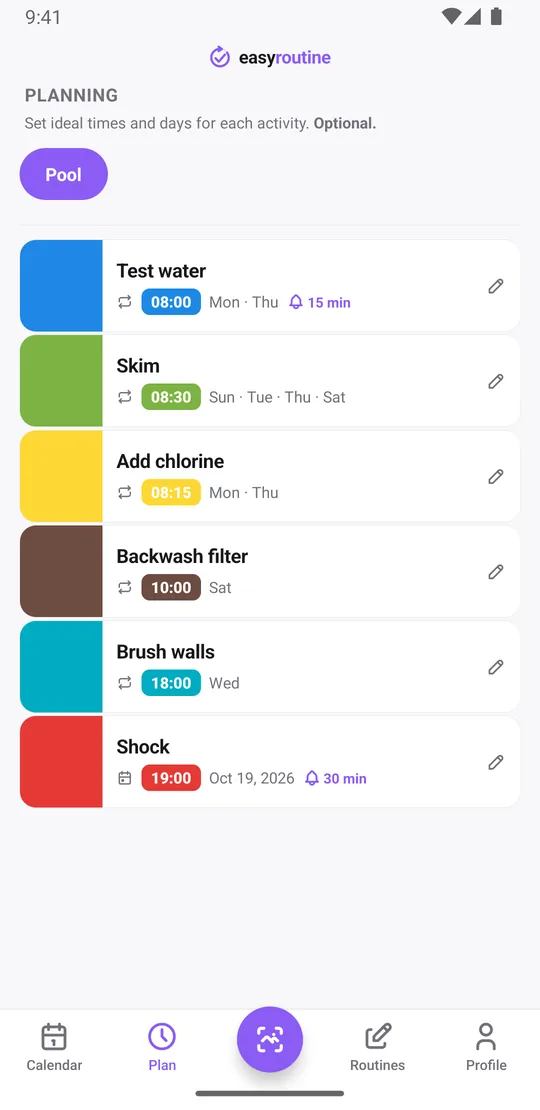
With Premium, open the Plan tab and give each job its days and time:
- Test water: Monday and Thursday at 8:00
- Add chlorine: Monday and Thursday at 8:15
- Skim: Sunday, Tuesday, Thursday and Saturday at 8:30
- Brush walls: Wednesday at 18:00
- Backwash filter: Saturday at 10:00
Planned jobs show as faded entries on the calendar until you log them, so a faded backwash on Saturday afternoon means it is still waiting. A start and end date can limit the weekly jobs to the swimming season, so they stop showing up in winter.
Schedules repeat on weekdays, not on a count of days. For jobs on longer cycles, like a shock every two weeks, a filter cartridge clean, opening the pool in spring or closing it in autumn, add single-day plans for the dates instead. Each activity holds up to 20 of them. More about scheduling.
Premium: a reminder before the water test
Each scheduled time can carry a reminder, on time or 5, 10, 15 or 30 minutes before. The water test is where it pays off: a reminder 15 minutes before Monday's test gives you time to find the kit before the day gets away. Because reminders belong to each job's schedule, Saturday morning reminds you about the backwash and nothing else. A single-day plan for closing the pool can carry its own reminder too. Premium also removes ads. How reminders work.
What it does not do
EasyRoutine is a log and a reminder. It does not read test strips, calculate chemical doses, connect to pumps or chlorinators, or tell you what your levels should be. Those stay with your test kit and your pool professional. What it does well is remember what you did and what you measured, so you can stop guessing.
Common questions
Is there a free pool maintenance app for logging jobs?
Yes. In EasyRoutine, logging each job, notes, flags and the calendar are free, with no limit on activities or logs. A weekly schedule and reminders need Premium.
Can I record pH and chlorine readings?
Yes, as text in a note on each log, plus a green, amber or red flag. There are no dedicated fields for readings and no charts, but the log sheet shows your last few notes for that job.
Can I set up a pool maintenance schedule with different days per job?
Yes, with Premium. Each job gets its own weekdays and time. Jobs on longer cycles, like a shock every two weeks or opening and closing the pool, use single-day plans.
Does the app tell me how much chlorine to add?
No. It does not calculate doses or know your target ranges. Follow your test kit, product label or pool professional, and use the app to record what you did.
Can I stop the weekly jobs over winter?
Yes. Give the recurring schedule a start and end date for the swimming season. Logging stays free all year.
Keep reading
Free on iPhone and Android. Sign in with Apple, Google or your email to start.