Laundry schedule app: know which loads you ran this week
Did I wash the towels on Monday, or is that last week I am thinking of? EasyRoutine keeps a free record of every load you run, so a glance at the calendar settles it. With Premium, it becomes a weekly laundry schedule: each type of load gets its own day and a reminder.
One routine, one activity per load type
Create a routine called Laundry and add an activity for each kind of load you run:
- Towels
- Clothes
- Delicates
- Bed sheets
Splitting loads this way is what makes the record useful. "Did laundry" on Thursday does not tell you whether the towels got washed. A separate Towels activity does. Give each load type its own color so the calendar reads at a glance. There is no limit on how many activities a routine holds, so add darks, whites or gym kit if that is how you sort. If you live with others, one activity per person's basket works the same way.
Log a load in a few taps
When the machine is running, or when the load is done, tap + Log on the day and pick the load; it is logged with the current time. Ran towels and sheets together? Pick both in + Log and log them in one go. Logging is free and needs no schedule.
If you washed on Tuesday instead of Monday, log it on Tuesday. The record shows what really happened, and if you forgot to log a load you can add it to an earlier day afterwards.
Notes and flags worth keeping
Tap a logged entry to add a comment and a green, amber or red flag. A few things worth writing down for laundry:
- the program or temperature, like "40 °C, short cycle"
- a new detergent or softener you are trying
- a stain you treated, like "wine on the white shirt, soaked first"
- a problem, like "towels still damp, ran the dryer again"
Use the flag for how the load turned out: green when all was fine, amber for "rewash", red for "something shrank or ran". The next time you log the same load type, the log sheet shows your last few comments for it, so before starting the delicates you can see which program you used last time. Comments do not appear on the calendar itself; tap an entry to read its note.
Logging from the laundry room with a photo
If your hands are full, the free AI photo scan is an alternative to the log button. Give each load type a photo first, for example the towel shelf or the delicates bag. Then, in the Scan tab, point the camera at it and EasyRoutine logs the matching activity at the current time. The scan only compares against your own activities that have a photo, so two loads that look alike, such as two baskets of clothes, are easier to log by hand. If the scan is unsure, it asks you to pick the activity yourself.
When did I last wash the sheets?
Tap the Bed sheets tile at the top of the calendar. The calendar then shows only that activity, so the most recent entry is the last time you washed them.
The month view shows the longer rhythm, with up to four colored dots per day. Flip back a few months and you can see whether the sheets really get washed every other week, or which load type keeps slipping while the others run on time.
Premium: build a weekly laundry schedule
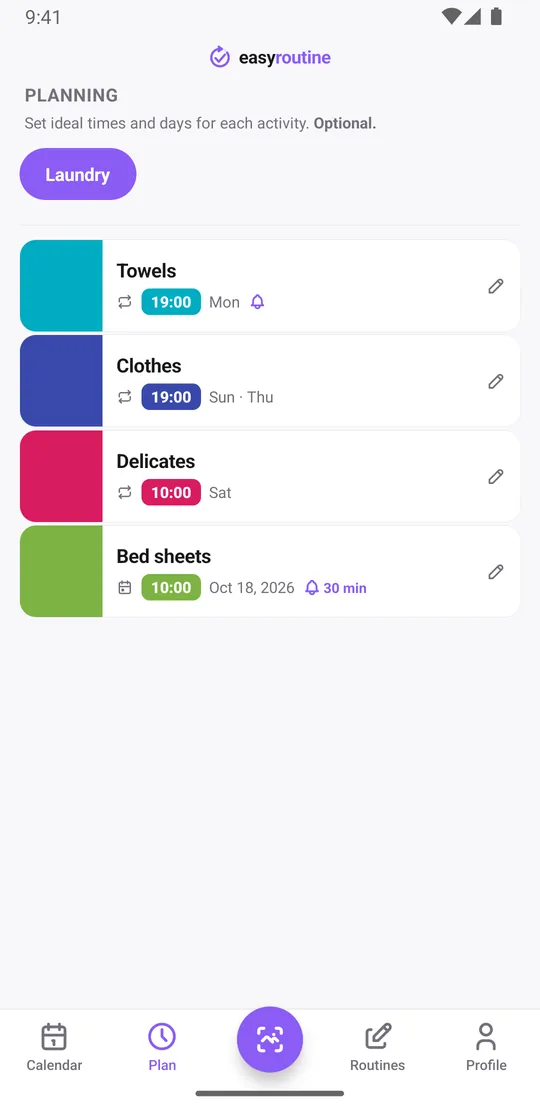
With Premium, open the Plan tab and give each load its weekdays and a time:
- Towels: Monday at 7:00 pm
- Clothes: Thursday and Sunday at 7:00 pm
- Delicates: Saturday at 10:00 am
Each activity can have up to four recurring time slots, so a load you run twice a week at different times fits in one activity.
Bed sheets are often every other week, and EasyRoutine's repeating schedules work on weekdays, not on a count of days, so there is no "every two weeks" rule. Plan sheets with single-day plans instead: add the next few wash dates at once (each activity holds up to 20). The bed sheets reminder page covers that in more detail. More about scheduling.
Premium: get reminded on laundry day
Each timed slot can carry a reminder, on time or 5, 10, 15 or 30 minutes before. Set one on Towels at 7:00 pm on Monday and your phone reminds you when you are home and can actually start the machine. Because reminders belong to each load type, Monday is about towels and Thursday about clothes, not a vague daily "laundry?".
If you want to remember to move the wet load to the dryer, add a separate activity for it with its own time. How reminders work.
Check whether you ran a load this week
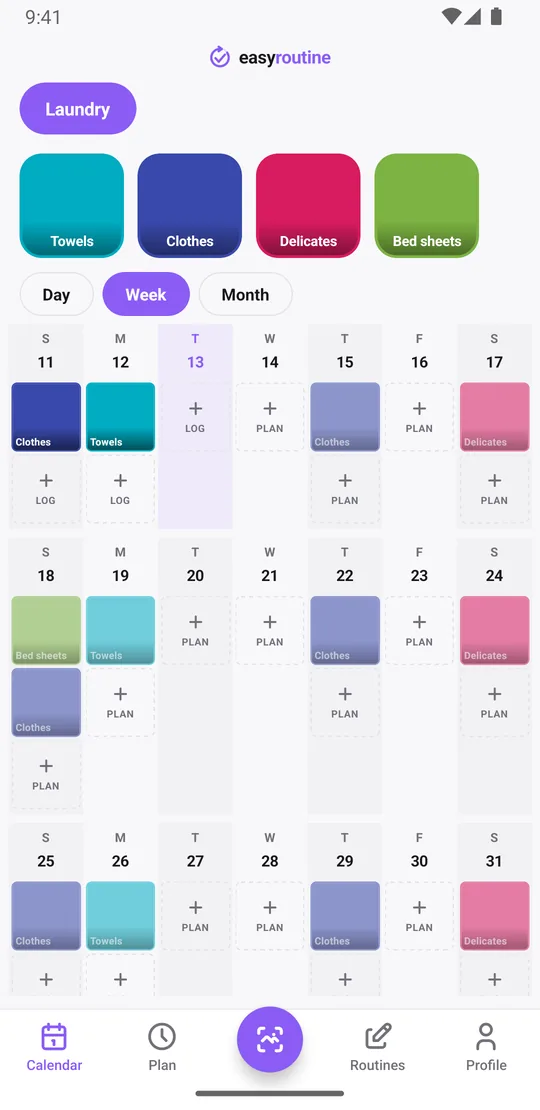
Open the week view. Each load you logged shows as a solid tile in its color on the day you ran it. With a schedule, loads you planned but have not logged yet show faded, and tapping one opens the log sheet with the planned time filled in. So on Friday you can see that towels and Thursday's clothes are done and the delicates are still ahead on Saturday.
A faded entry on a day that has already passed is a skipped load. That is the one to catch up on before the laundry basket overflows.
What it does not do
EasyRoutine is a log and, with Premium, a schedule. It does not connect to your washing machine, know how long a cycle takes or tell you when a load has finished. For that, use the machine's own timer or a phone timer. What EasyRoutine adds is the record: which load types you ran, on which days, how they turned out, and which ones keep slipping.
Common questions
Do I need Premium to track laundry?
No. Creating activities, logging loads, comments, flags, the photo scan and the calendar are free. Premium adds weekly schedules, reminders and removes ads.
How do I see when I last washed the towels or sheets?
Tap that load's tile at the top of the calendar. The calendar then shows only that activity, and the latest entry is the last time you ran it.
Can I schedule laundry for specific days of the week?
Yes, with Premium. Pick the weekdays and time for each load type in the Plan tab. Each activity can have up to four recurring time slots.
Can towels, clothes and sheets each have their own schedule?
Yes. Make each load type its own activity and give it its own days. Loads on a two-week cycle, like sheets, use single-day plans.
How do I set up a laundry schedule for a family?
Create one activity per load type or per person's basket, such as Towels, Kids' clothes and Work shirts, and give each its weekdays in the Plan tab (Premium). The schedule lives on your account only; there is no sharing with other family members.
Keep reading
Free on iPhone and Android. Sign in with Apple, Google or your email to start.