How do I check if I already did something today?
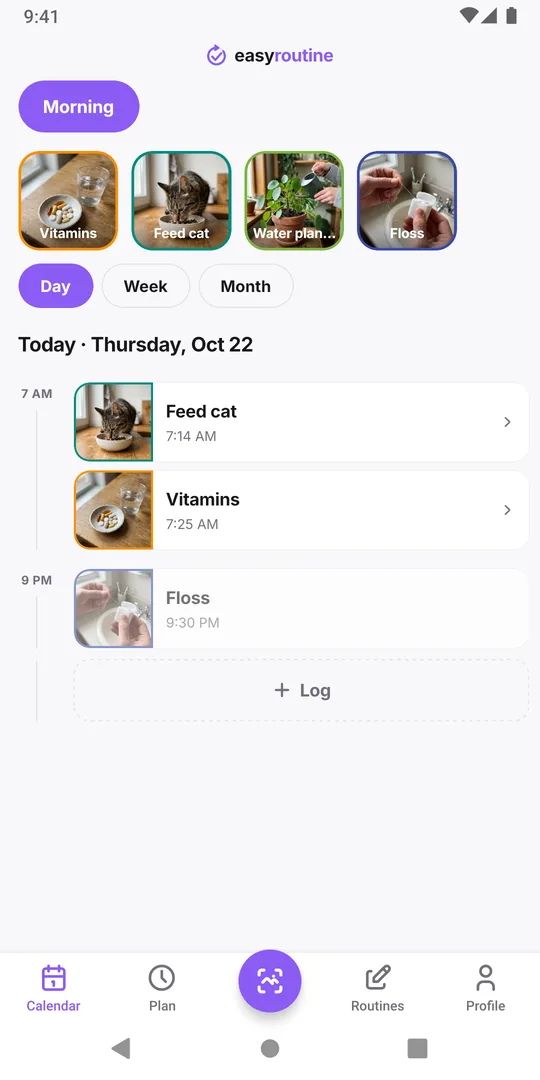
The reliable answer comes from a record made at the moment you did it, not from memory. In EasyRoutine, open the Calendar tab, pick the routine and switch to Day: every activity logged today is listed with its time. If it is there, it is done; if it is not, it was not logged.
Why you cannot remember
Things you do every day at the same time blend together. Yesterday's morning and today's morning feel the same, so "I'm sure I took it" may be a memory from yesterday. That is normal, and it is exactly why checking beats trying harder to remember.
The question usually comes up at the worst moment: standing at the cupboard, not sure whether the cat had breakfast or the plant had water. Doing it twice can be harmless (an extra walk) or not (a second dose, a second feed). Skipping it can be harmless too, or not. So the check should take seconds.
Ways to make "did I already?" answerable
Whatever you use, the trick is the same: leave a trace at the moment you do it.
- A physical sign. A pill organizer with a compartment per day, a card you flip after feeding the dog, the watering can left by the door. Good for one task in one place.
- A written or tapped log. A note on the fridge, a paper checklist, or an app. Better when there are several tasks, or several people.
- Log right away. A record made "later" is how the doubt starts. Log right after, before you put the bottle back.
Pick one place for each task and use only that one. Two half-used systems are worse than one.
Check today in EasyRoutine
- Open the Calendar tab.
- Pick the routine with the buttons above the calendar. The calendar shows one routine at a time, so pick the one the task belongs to.
- Tap Day. Today opens, with today's logged activities on a timeline, each with the time it was logged.
If the activity is there with a time, it is done. If it is not there, it was not logged today. If the activity has a schedule (Premium), a planned but not yet logged entry shows faded at its planned time, so you can see what is still open. A small colored dot on an entry is a flag, if you set one.
The Week view answers the same question at a glance (today's column is highlighted), but the Day view shows the times, which matters for anything you do more than once a day.
Make the answer trustworthy
The calendar only knows what was logged. To be able to trust "not there means not done":
- Log at the moment, not in the evening. Tap the faded entry or use Log on today as soon as you are done. The photo scan is quick too: point the camera at the bottle and it logs the matching activity with the current time.
- Fix late logs to the real time. If you log at noon what you did at 7:30, open the entry and set 7:30. Forgot to log?
- Keep one record per task. If two people feed the dog, both have to log in the same place, or each of you only sees half the answer. Sharing a routine by link does not do this: it gives the other person their own copy of the activities, never your logs.
For medication, the log shows what was entered, nothing more. If the dose is not logged and you are not sure whether you took it, do not guess and do not take another dose to be safe: ask your pharmacist or doctor. Avoiding a double dose has more on this.
Common questions
Where do I see what I logged today?
On the Calendar tab: pick the routine, then tap Day. Today's logs are listed with their times.
I have several routines. Do I need to check each one?
Yes. The calendar shows one routine at a time, so switch with the buttons above it. Grouping tasks you check together in one routine saves taps.
What does a faded entry on today mean?
It is a planned activity that has not been logged yet. Planned entries only appear for activities with a schedule, which is a Premium feature.
Can someone else see whether I already did it?
Not through sharing. A shared routine link only shows the routine's name and its activities' names, colors and photos, never your logs.
How do I check if I already worked out today?
Keep all your training in one routine with an activity per session type, such as Upper body, Lower body or Morning run, and log each one when you finish. The Day view then lists today's sessions with their times, so you can see whether this morning's run really was today and which part of your split is still to do.
Keep reading
- I missed a day and lost my habit streak: what now?Missed a day and lost your habit streak? Why one miss does not undo a habit, how to restart without missing twice, and what EasyRoutine keeps when it resets.
- Can't tell which habit you're slipping on? Read the month, one habit at a timeFeel behind on your habits but can't say which one? Read a month of logs habit by habit, find the one that thins out, and fix that habit, not the whole routine.
- Can't see future scheduled days on your calendar?Only past logs on your calendar and nothing for the week ahead? Why future days stay empty, what makes them fill in, and what to check when a plan is missing.
- Want a completion percentage or streak per habit?Want a completion rate or a streak for each habit? How to work one out by hand in a few minutes, and what EasyRoutine shows instead of per-habit statistics.
- Can you compare habits from different routines on one calendar?Want your gym days next to your skincare nights on one calendar? Why EasyRoutine shows one routine at a time, and how to group habits you want to compare.
- Compare this week to last week: are you doing better?Want to know if this week went better than last week? What to compare, what to ignore, and how to read two weeks side by side in EasyRoutine's calendar.
- How to find an old note you left on a logTrying to find what you wrote weeks ago, like "tingling" or "dry patch on chin"? How to track down an old note in EasyRoutine and keep notes easy to find.
- What do the flag colours mean on my log?Red, amber and green flags on your logs mean whatever you decide. Common ways to use them, how to pick one meaning and stick to it, and where the dots show up.
- Which days did I actually miss this week?Hectic week and not sure what slipped? How to find the days you missed for each habit, tell a real miss from a forgotten log, and decide what to do about it.
Free on iPhone and Android. Sign in with Apple, Google or your email to start.