I forget what I'm supposed to track today
If you track habits that happen on different days, memory is a poor place to keep the plan. Group them into a few named routines, write down which days each one belongs to, and check one list each morning. In EasyRoutine, Premium scheduling puts each activity on its days and times, so today's calendar shows what is due.
Why "what's on today" is hard to remember
Daily habits are easy: they are always on. The trouble starts when things repeat on different rhythms. Gym on Monday, Wednesday and Friday. Plants on Monday and Thursday. Bins out on Tuesday evening. A face mask on Sunday. Each one is simple, but together they form a timetable you are trying to hold in your head.
Add a second or third area of life, like medication or a child's school week, and the question "what am I supposed to do today?" gets a different answer every day. Forgetting is not a lack of discipline. The plan is just in the wrong place.
Get the plan out of your head
- List everything you track and next to each one, the days it happens. Be honest: if you water plants "about twice a week", pick the two days.
- Group by area or time of day. Morning, Gym, Home, Skincare. Each group should fit on one screen.
- Give every item a time or a moment. "After breakfast" or "18:00". Habits without a moment float around the day and get forgotten.
- Check one list at one fixed point, such as with your first coffee. The point is to look once, not to keep remembering.
Paper, a fridge sheet or a calendar app can all do this. What matters is that today's list exists somewhere other than your memory.
Common mistakes
- One long list for everything. Daily and weekly items mixed together hide the one thing that is only on today.
- No days, just "regularly". If a task has no set day, every day is the wrong day to remember it.
- Plans that no longer match your week. If you keep skipping the same item, the day is wrong. Re-plan it instead of trying harder.
Routines and schedules in EasyRoutine
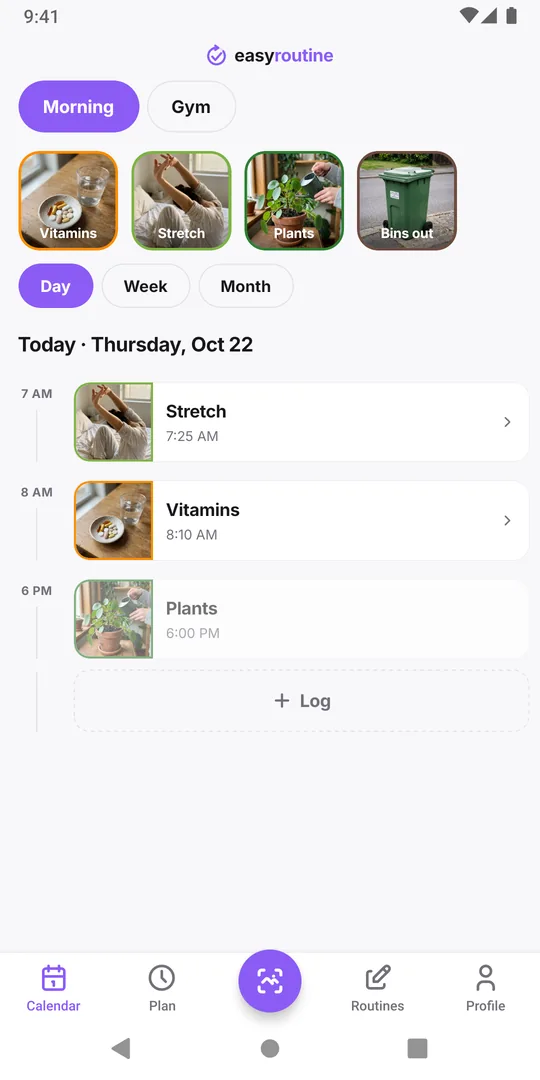
In EasyRoutine you group activities into named routines, such as Morning, Gym or Home. You can have as many as you like, for free. The calendar shows one routine at a time, picked from the pills at the top.
With Premium, you give each activity its days in the Plan tab: chosen weekdays at a time (Plants on Monday and Thursday at 18:00), or single dates for one-off tasks. A time is optional; untimed items show as "Any time" at the top of the day. Planned items then appear as faded entries on the calendar, and today's view becomes your list. Tap a faded entry when it is done to log it.
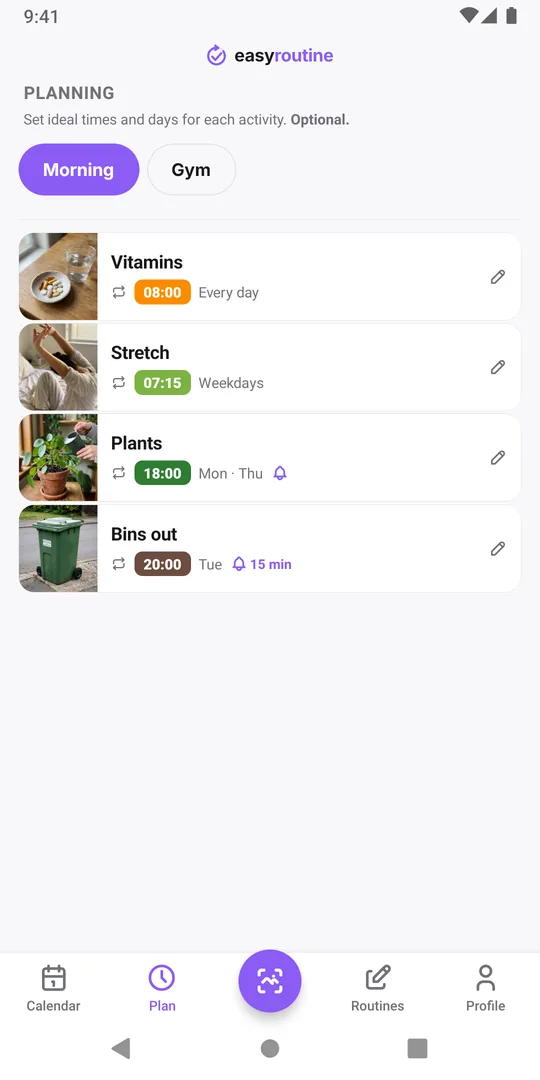
Let a reminder do the remembering (Premium)
A timed schedule can also carry a reminder, on time or a few minutes before. Use reminders for the items you actually forget, like the Tuesday bins, not for everything; too many alerts get swiped away. See reminders.
On the free plan there are no schedules or reminders, but logging, the photo scan and the calendar still work. A simple workaround is to keep your weekly list on paper or in your phone's calendar, and log in EasyRoutine when you do each thing.
Common questions
Can I see everything due today across all my routines at once?
No. The calendar shows one routine at a time. Switch between routines with the pills at the top to check each one.
Can an activity repeat every few days instead of on set weekdays?
Not as an interval. Schedules repeat on chosen weekdays, or you plan single dates one by one.
Do I need Premium to see today's plan?
Yes. Schedules and reminders are Premium. On the free plan the calendar shows what you logged, not what is planned.
Can one activity have different times on different days?
Yes. With Premium an activity can have up to four recurring time slots, each on its own weekdays.
Keep reading
- What can I track with EasyRoutine?What can I track with EasyRoutine? Plants, pets, bills, filters, chores, water, flossing and more. Pick the guide that matches how often the task comes round.
- Who it's for: find the routine tracker for your situationADHD, exams, kids' chores, a newborn, a parent's medication, shift work or surgery recovery: how EasyRoutine fits your situation, and where it does not.
- How EasyRoutine compares to what you use nowCompare EasyRoutine with a calendar, paper, a spreadsheet, a reminders app or other trackers. Find the page for your situation and when to keep your tool.
- The right routine tracker for this time of yearNew Year's resolutions, back to school, the week after the holidays, a trip, a look back at December: how to set up EasyRoutine for the moment you are in.
- A simple habit tracker app with a calendar of what you actually didA simple habit tracker app for iPhone and Android: tap to log, see what you actually did on a day, week or month calendar. Free, Premium adds reminders.
- A routine planner app that also shows what you actually didHow to plan a daily routine that holds up, with a weekday and weekend example, and how EasyRoutine plans each activity (Premium) and logs it for free.
- Don't know what to track or where to start with a routine tracker?Not sure what to track or where to start with a routine tracker? Pick one small routine you half do already, add two or three steps and log them today.
- I keep switching habit apps and losing my historySwitching habit tracker apps and losing your data each time? Why history gets lost, what to check before the next switch, and how EasyRoutine keeps your log.
- I get upset when my routine changes: how to keep it going anywayGet upset when your routine changes? Plan a smaller version for disrupted days, keep one anchor habit, and see that a reset streak is not a lost record.
- Is there an app that can track any habit, even a weird one?Looking for an app to track something unusual that no dedicated tracker covers? If it repeats, it can be logged: a name, a photo and a color are all it takes.
- Did I actually do it yesterday, or did I just plan to?Can't remember if you actually did something yesterday or only planned to? Why memory mixes the two up, and how a log separates planned from done.
- I don't know if I'm actually being consistentDon't know if you're actually being consistent with your routine? How to check with a simple four-week count, and where EasyRoutine's calendar shows it.
- I stopped tracking for a while and don't know where to restartStopped tracking for a while and don't know where to restart? Skip the rebuild: pick one habit, log today, and let the gap stay empty. Your old logs are still there.
Free on iPhone and Android. Sign in with Apple, Google or your email to start.