Contact lens replacement tracker: know when you put in this pair
Did I open this pair last Monday or the Monday before? EasyRoutine logs the day you put in fresh lenses and keeps every change on a calendar, so the date is a quick look away instead of a guess.
The problem is the start date
Two-week and monthly lenses are easy to replace on time if you know when you started the pair. The trouble is that nobody remembers that date. By day ten it could be day eight or day fifteen.
EasyRoutine fixes that by keeping a log: log it on the day you put in a new pair, and the date is recorded for good. The calendar then answers both questions at once: when did I change them, and how long ago was that?
Set up a Lenses routine
Create a routine called Lenses and add an activity named New pair. That is the one you log every time you open a fresh pair. A few more activities can live alongside it:
- New case, if you replace your lens case every few months
- Lenses out, if you want to log taking them out each night
- New solution, if you want to know when you opened the current bottle of lens solution
If you change the left and right lens on different days, give each eye its own activity. A photo of your lens box on the activity makes the tile easy to spot, and lets you log with the AI photo scan by pointing the camera at the box.
Log a fresh pair
When the new lenses are in, use the "+ Log" button on today and pick New pair; it is logged with today's date and the current time. With a Premium plan for that date, you can instead tap the faded planned entry and save the Log Entry sheet. If you forgot, add it later with "+ Log" on the day you actually changed them (past days start at 12:00) and tap the entry to adjust the time.
The log sheet has room for a comment. Useful notes are "last pair from this box" (time to reorder) or "right lens torn, replaced early". Flag a log amber or red if something felt off. The log sheet shows your last few comments each time you log, so you see when the box last ran out. It is also worth noting which box you started and anything unusual, like a lens that felt dry all day.
Plan the next change date
EasyRoutine's repeating schedules work on weekdays, not on a count of days, so there is no "every 14 days" rule. A two-week cycle is planned with single-day plans instead, and that works well because you can plan many at once.
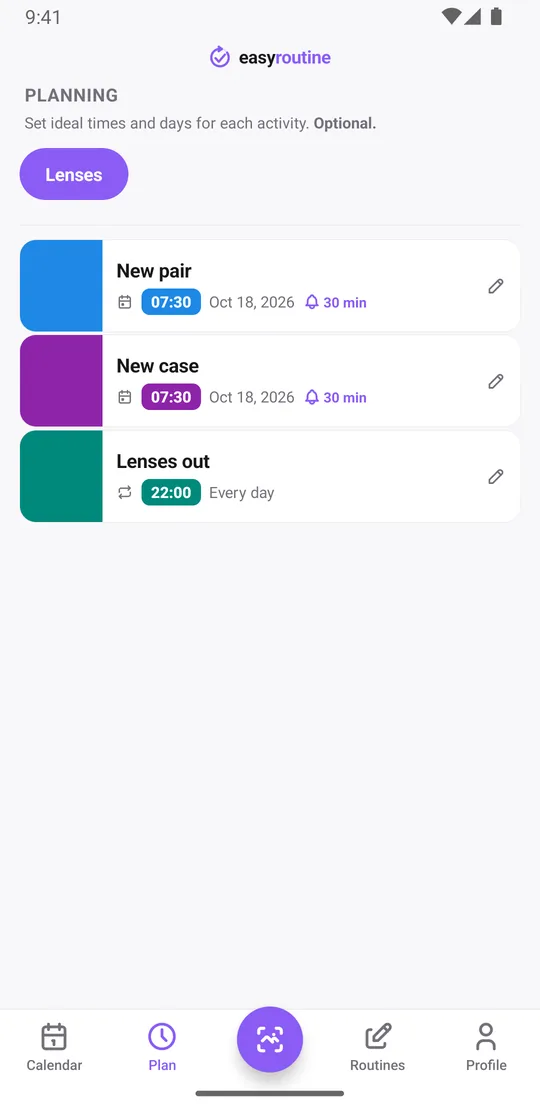
With Premium, open the Plan tab, pick New pair, choose Single day and add the next change date with a time, for example 7:30 am. Each activity can hold up to 20 single-day plans, so you can enter the next change dates for most of a year in one sitting. Planned changes show faded on the calendar until you log them.
Turn on a reminder for each plan, on time or 5, 10, 15 or 30 minutes before, and your phone tells you on the morning the pair is due. Scheduling and reminders are part of Premium; logging is free. For a step-by-step on the reminder side, see the contact lens reminder page.
Did you change them on the right day?
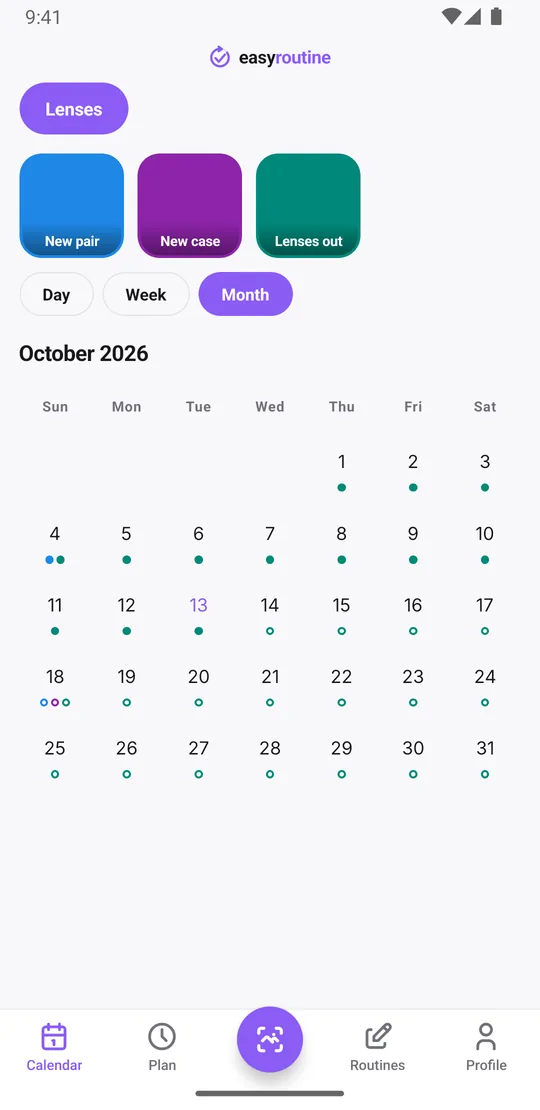
The quickest answer to "when did I open this pair?" is free. Tap the New pair tile at the top of the calendar and the calendar shows only that activity: the latest entry is the day you put in the current pair, so you can count which day of the cycle you are on. Tap the tile again to see everything.
The month view shows every change you logged as a dot in the activity's color. On a two-week cycle that is a steady line of dots fourteen days apart. A gap that stretches to 18 or 20 days means you wore a pair too long, and a dot after ten days means you changed early.
In the week and day views, a planned change you have not logged stays faded on its date. If it is still faded the day after, you missed it, and the log you add once you change them shows how late you were. Over months, the calendar is an honest record of your replacement dates, which is useful to have when your optician asks.
A routine tracker, not a medical device
EasyRoutine is a general routine tracker. It does not know your lens type, your prescription or how long your lenses are meant to be worn. Follow the replacement schedule from your optician or the lens packaging, and ask them about anything that hurts, itches or looks wrong. The app only remembers the dates for you.
Common questions
Can I get reminded exactly when my contact lenses are due to be changed?
Yes, with Premium. Add the change date as a single-day plan with a time and turn on a reminder on time or up to 30 minutes before.
How do I check when I last changed my contacts?
Tap the New pair tile at the top of the calendar to show only that activity. The latest entry is the day you opened the current pair. Logging and the history are free.
Can I track a two-week replacement cycle?
Yes, by planning each change date as a single-day plan. There is no every-14-days rule, but each activity holds up to 20 dates, enough for most of a year.
How do I know I actually changed them on the right day?
Log the change when you do it. The month view shows each logged change, so you can see whether they are two weeks apart, and planned changes you have not logged stay faded on their date.
Can I log the left and right lens separately?
Yes. Create one activity per eye and log each on the day you change it.
Keep reading
Free on iPhone and Android. Sign in with Apple, Google or your email to start.