A routine planner app that also shows what you actually did
A good routine plan is a short list of activities, each tied to the days and times it really fits, plus a way to check whether it happened. EasyRoutine plans each activity on chosen weekdays, times or dates with reminders (Premium), and logging what you did is free.
How to plan a daily routine that lasts
Before you open any routine planner app, decide what goes in the plan. A few rules keep it realistic:
- Start with three to five activities. Pick the ones you already want to do most days, like a stretch, a focus block and an evening wind-down. A plan with twelve items on day one leaves no room for a bad day.
- Hang each activity on something that already happens. "Stretch after I make coffee" is easier to keep than "stretch at some point in the morning". Choose the time the anchor usually happens.
- Plan weekdays and weekends separately. Your Tuesday and your Saturday are different days. Give an activity a different time on the weekend, or leave it out, instead of forcing the weekday time.
- Leave gaps. If the commute usually ends at 18:30, plan the run for 18:45, not 18:30, so one late train does not cancel it. Keep at least one evening free of plans.
- Plan short periods for short goals. A ten week course or a two week trial should end on its own, so it does not linger in the plan afterwards.
- Review once a week. Look at what you planned and what you actually did, then move the times that keep slipping.
How planning works in EasyRoutine (Premium)
In EasyRoutine a routine (like My day) holds activities (Morning stretch, Focus block, Run), and the plan belongs to each activity, not to the routine. With Premium, open the Plan tab and pick an activity.
Each activity gets Recurring weekdays and times (tap Add another time for up to 4 slots), Single day dates for things that do not repeat weekly (there is no "every 3 days" setting), an optional From and Until period for a course or trial, or Any time with no clock time.
A timed plan can carry a reminder, which your phone schedules itself. Details in Scheduling and Reminders. Without Premium you can still build routines and log everything, but nothing is planned ahead; see Pricing.
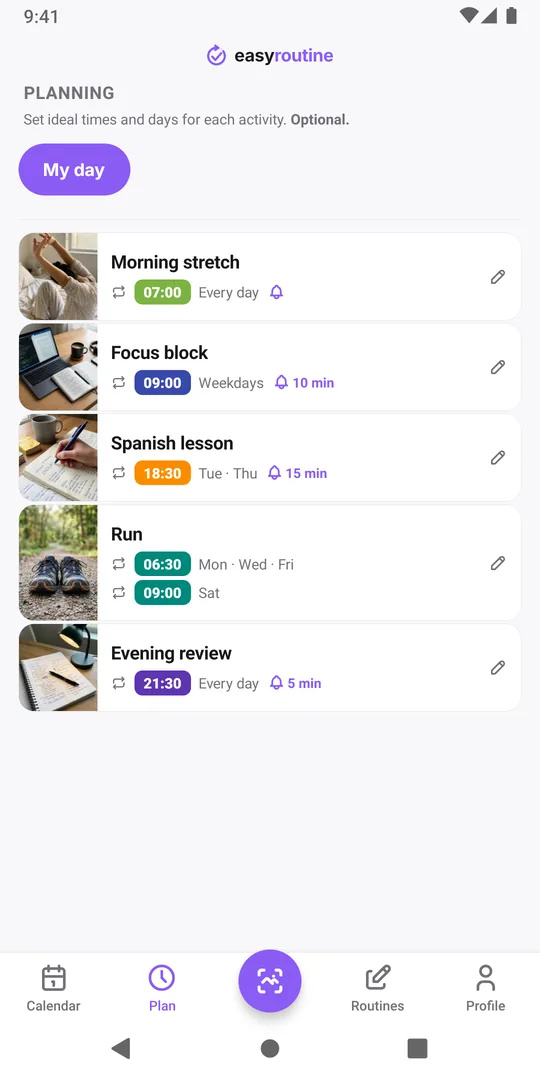
Worked example: a weekday and weekend plan
Take a run. On workdays it has to happen before work; on Saturday you can sleep in. Instead of two activities, give the one Run activity two recurring slots:
- Slot 1: Monday, Wednesday and Friday at 6:30
- Slot 2: Saturday at 9:00
Both slots log to the same activity, so the history of your runs stays in one place whichever day you went. The rest of the routine follows the same idea:
Routine: My day
- Morning stretch: every day, 7:00
- Focus block: Monday to Friday, 9:00, reminder 10 minutes before
- Spanish lesson: Tuesday and Thursday, 18:30, from the first lesson to the last week of the course
- Run: the two slots above
- Evening review: every day, 21:30
If you keep separate areas of life apart, such as My day and Household, make a routine for each. The calendar shows one routine at a time, and you switch between them with the routine buttons above it. See how to set up routines and activities.
The planner that keeps the record
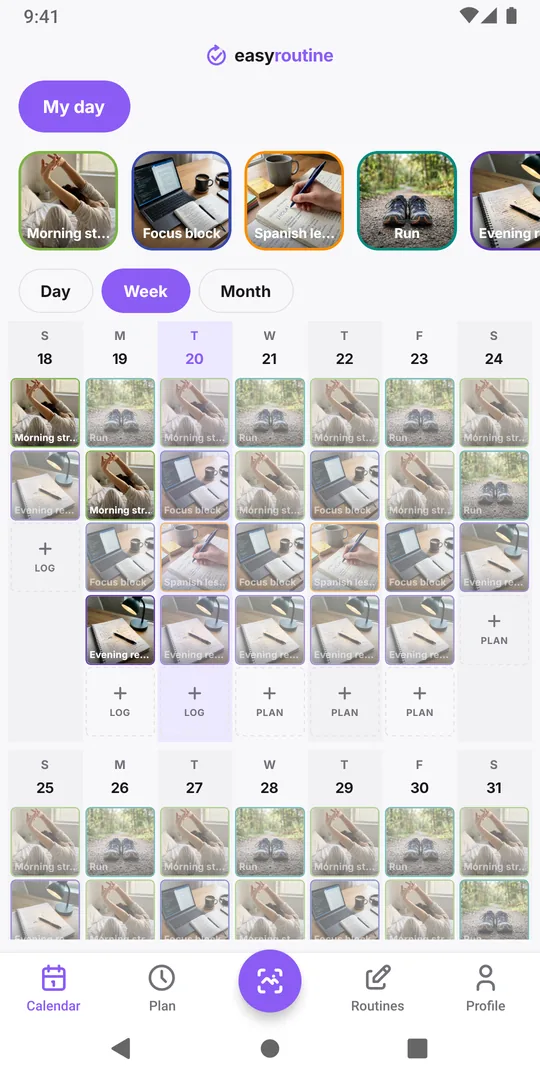
Planned activities show on the calendar as faded entries. When you do one, tap the faded entry to log it and it turns into a colored tile. A faded entry on a past day is a plan you skipped. So the week view answers both questions at once: what was planned, and what really happened.
Logging is free and does not depend on the plan. Did a run on Sunday that was not planned? Log it on that day. Forgot this morning's stretch? Add it afterwards with the right time. A short note such as "focus block cut short by a meeting" tells next week's you why the plan slipped. More in Calendar & streaks.
Common routine planning mistakes
- Planning the ideal day, not the usual one. If you are rarely home before 19:00, an 18:00 workout will show as missed most weeks. Plan for the day you normally have.
- One time for every day. A weekday time on Sunday is the first plan to break. Use a second slot or leave the weekend out.
- Reminders on everything. Ten reminders a day turn into noise you swipe away. Keep them for the one or two activities that slip, and drop them once a habit runs on its own.
- Never changing the plan. If the calendar shows the same faded entry every Thursday, move it to a day that works rather than keeping a plan you do not follow.
When another tool fits better
A routine planner is not a full calendar. If your day is mostly meetings, shared events or invitations, keep those in your calendar app: EasyRoutine has no shared calendars or invitations. You can share a routine as a link or QR code, which lets someone else add a copy of its activity names, colors and photos, but your logs, notes, schedules and reminders are never shared. For one-off projects with subtasks and deadlines, a task manager does better. EasyRoutine is for the things you repeat, and for knowing whether you did them. See also EasyRoutine vs a calendar app.
Common questions
Can I plan routines on the free plan?
No. Scheduling and reminders are part of Premium. On the free plan you build routines and activities and log them whenever you do them, with notes, flags and the full calendar history.
Can I see all my routines on one calendar?
No. The calendar shows one routine at a time. Tap another routine above the calendar to switch. If two things belong in the same day view, put them in the same routine.
What happens to the plan when a course or trial ends?
If you gave the recurring time an Until date, the activity stops showing as planned after that day and its reminder stops. The logs from the period stay on the calendar.
How much does Premium cost?
$1.49 a month in the US, billed monthly by the App Store or Google Play. In other countries the store shows the local price before you buy. There is no yearly plan.
Keep reading
Free on iPhone and Android. Sign in with Apple, Google or your email to start.