A reminder app for replacing water and air filters
When did I last change the water filter? If you have to read a date written on the cartridge with a marker, there is an easier way. EasyRoutine keeps the date of every change you log for free, and with Premium it reminds you on the day each filter is due.
Why filters are so easy to forget
A pitcher filter lasts about a month, an air purifier filter a few months, a furnace filter a season. Nothing reminds you when the time is up. The water still tastes fine for a while, the purifier keeps humming, and by the time you think of it you have no idea whether it has been six weeks or six months.
The fix is two things: a reminder on the day a filter is due, and a record of the last change you can look up in a second.
One activity per filter
Create a routine called Filters and add each filter as its own activity: Water filter, Purifier filter, Furnace filter, Hood filter, the fridge, the vacuum. Each one gets its own color, so the calendar stays readable. There is no limit on activities on any plan.
Keeping filters apart matters because they run on different cycles. One shared "change filters" task would remind you about all of them every time, and tell you nothing about which one you actually changed.
Add a photo of the filter or the device to its activity if you like. Then you can log a change with the free AI photo scan: point the camera at the purifier and it matches one of your own activities that has a photo.
Log the change and see when you last did it
Logging is free. After swapping a filter, tap + Log on the day and pick it, then save the Log Entry sheet. Changed it last weekend and forgot to log? Add it to that earlier day afterwards.
To answer "when did I last change it?", tap the filter's tile at the top of the calendar. The calendar then shows only that filter, so the last tile is the last change. The month view shows the longer pattern, with a dot in the filter's color on each day you changed it, so you can see whether the furnace filter really got swapped every season.
Notes and flags for each change
Every log can carry a comment and a green, amber or red flag. For filters, the useful notes are the cartridge type or size you bought, where you got it, "2 cartridges left", or "filter was very dirty". A red or amber flag works well for a filter that came out much dirtier than expected, a hint to change it sooner next time.
When you log the next change, your last few notes for that filter appear in the log sheet, a handy reminder to restock or to buy the right size. Notes stay on the log; the calendar itself shows only the colored entry.
Plan the next change with single dates
Filters do not follow weekdays, and EasyRoutine schedules repeat on weekdays, so there is no "every 2 months" or "every 3 months" setting. Instead, with Premium you plan the actual dates.
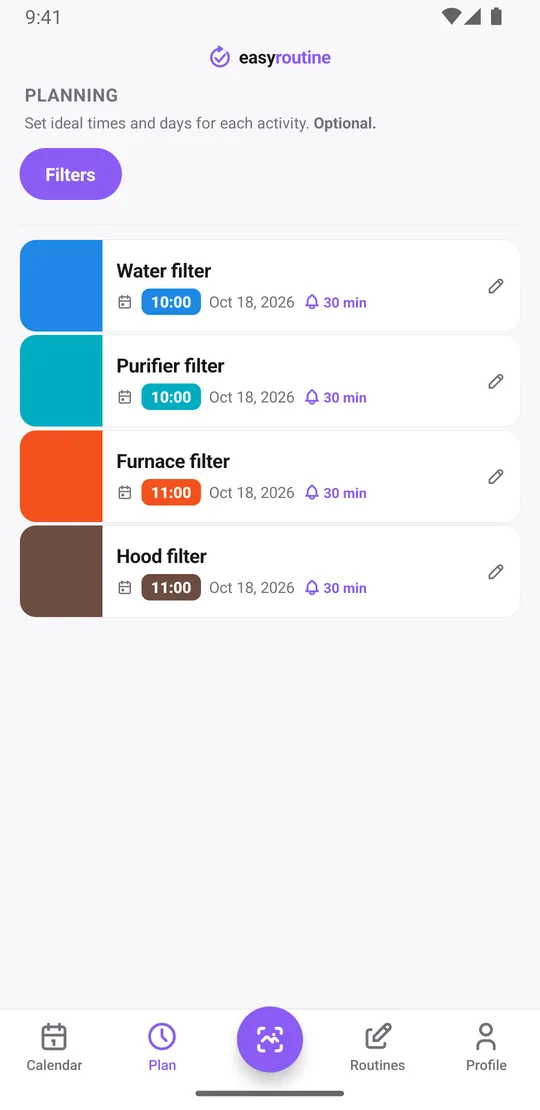
Open the Plan tab, tap a filter and add a single day plan for its next change, with a time and a reminder:
- Water filter: the first Saturday of each month at 10:00
- Purifier filter: every second month, on a Saturday at 10:00
- Furnace filter: the start of each season at 11:00
Each filter can hold up to 20 single-day plans. For a filter you change every two months, that is more than three years of dates entered in one sitting. You can also add just the next date and plan the following one when you do the change, which keeps the plan honest if you changed a filter late.
Get a reminder on the day it is due
Each timed plan can carry a reminder: on time, or 5, 10, 15 or 30 minutes before. Pick a time when you are usually home and have a few minutes, like Saturday morning, so the reminder arrives when you can act on it. The notification names the filter, so you know it is the purifier and not the water pitcher.
The longest lead time is 30 minutes, so the app cannot remind you a week ahead. If you need to buy a cartridge first, add a second activity like Order filters with its own single-day plan a week before the change.
Once a plan exists, tap its faded entry on the calendar when you do the change, and the Log Entry sheet opens with the planned time.
Scheduling and reminders are part of Premium. Logging, notes and the calendar are free. More about reminders.
Good to know
- Reminders are local notifications on your phone, so they arrive even without an internet connection once they are scheduled. Changing a plan needs a connection.
- A planned change you have not logged stays faded on the calendar, so an overdue filter is visible when you open the app.
- EasyRoutine does not know your filter model or tell you how often to change it. Use the interval from the manufacturer; the app remembers it for you.
- Moved out or sold the purifier? Archive the activity. Its history stays and it stops showing in your plans and reminders.
Other long-cycle jobs work the same way. See the car maintenance reminder and bill payment reminder guides.
Common questions
How do I remember when to change my water or air filter?
Add each filter as an activity and plan its next change as a single day with a time and a reminder in the Plan tab. Scheduling and reminders are part of Premium.
Can I note which cartridge I used?
Yes. Every log can have a comment and a green, amber or red flag, and the log sheet shows your last few notes for that filter.
Can I set a reminder for every 2 or 3 months?
Not as a repeating rule, because recurring schedules use weekdays. Add single-day plans for the next change dates instead. Each filter can hold up to 20 of them, each with its own reminder.
Can the reminder come a few days before the filter is due?
No. The longest lead time is 30 minutes. To get a heads-up earlier, add a separate activity such as Order filters with its own date a few days before.
How do I know the last time I changed it?
Tap the filter's tile at the top of the calendar to show only that filter. The last entry is your last change. Logging and this history are free.
Keep reading
Free on iPhone and Android. Sign in with Apple, Google or your email to start.