Did I actually do it yesterday, or did I just plan to?
Memory is bad at telling "I meant to" from "I did", especially for small daily tasks. The reliable fix is to record the task at the moment you do it, in a place that keeps plans and done things apart. In EasyRoutine a planned activity stays faded on the calendar until it is actually logged.
Why planned and done blur together
Routine tasks are done on autopilot: the vitamin, the plant, the back door lock. Because you did them yesterday and the day before, each day leaves a very similar memory, and it is hard to tell which one you are remembering.
Planning makes it worse. If you thought clearly about watering the fern at 18:00, that thought can feel just like a memory of doing it. By the next morning, "I was going to" and "I did" sit side by side, and you cannot tell which is which.
For most tasks the answer does not matter much. For some it does: a medication, feeding a pet that someone else may also feed, a plant that hates being overwatered.
Habits that stop the guessing
- Record it right after you do it, not in the evening. A record written from memory has the same problem as the memory.
- Keep the plan and the record in different places, or at least in different forms. A to-do list you tick off works; a list you only wrote in the morning does not.
- Use a physical cue for the most important things, such as a weekly pill organizer or turning the plant's tag around after watering.
- When you really cannot tell, follow the safe rule for that task. For a medicine, that means asking your pharmacist or checking the leaflet, not guessing. See how to avoid taking medication twice.
Planned versus done in EasyRoutine
EasyRoutine keeps the two apart by design:
- A log is only created when you log. Tap Log on the day and pick the activity, tap a planned entry, or scan a photo of the item. Nothing turns into "done" on its own.
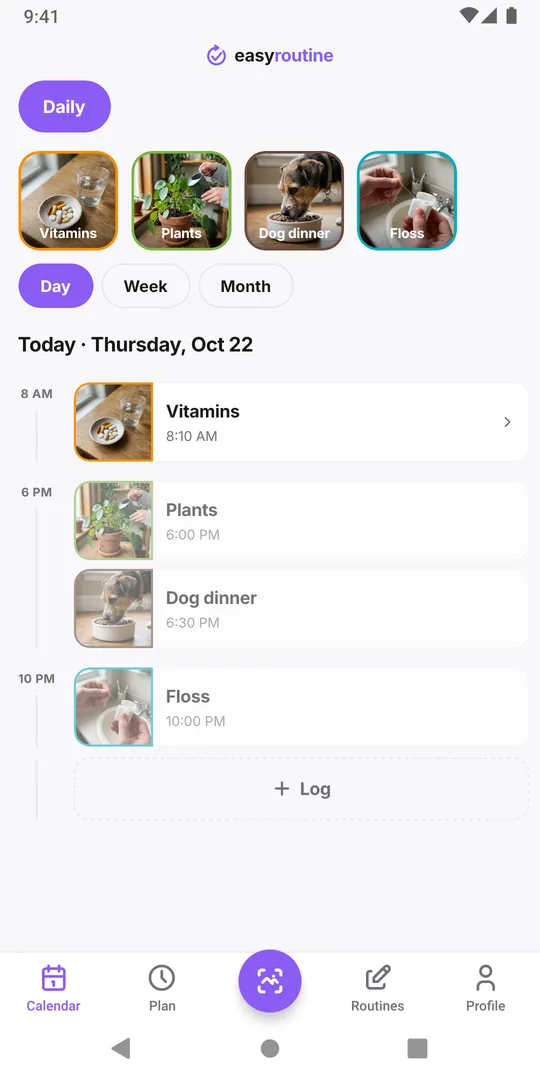
- Plans look different from logs. With Premium scheduling, an activity planned for a day shows as a dimmed "ghost" entry. Once you log it, it shows in full color with the time you logged it.
- Yesterday stays honest. A planned entry you never logged stays faded on yesterday's calendar. There is no automatic tick at the end of the day.
Without a schedule, which is the free way to use the app, the calendar shows only what you logged. That is the simplest answer of all: if it is on the calendar, you did it.
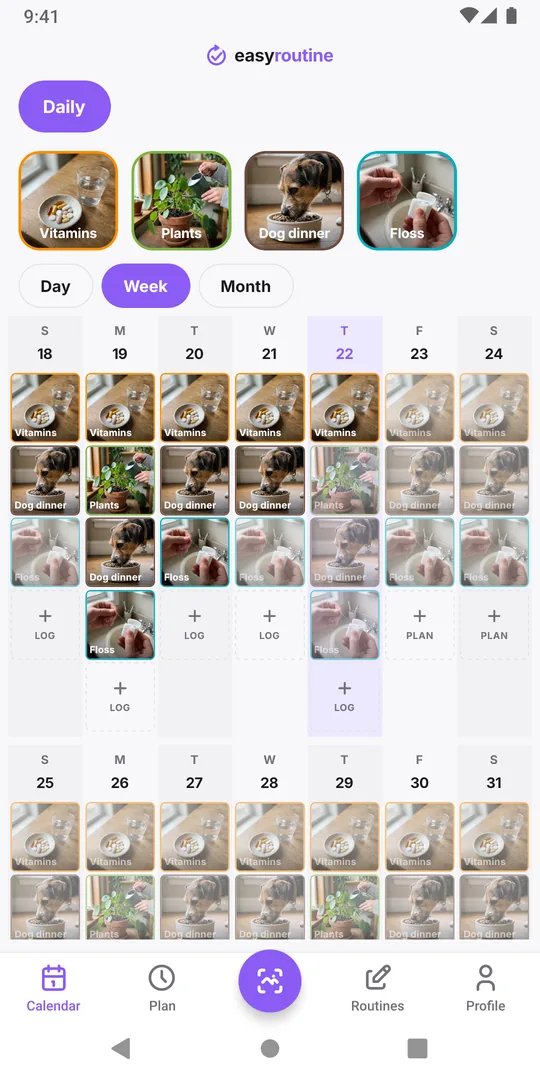
Checking yesterday in ten seconds
- Open the Calendar tab and pick the routine in the pills at the top.
- Switch to Day and go back one day, or look at yesterday's column in the week view.
- A solid entry with a time means it was logged. A faded one means it was only planned.
Tap a logged entry to see its exact time and any note you added. If it turns out you did do the task but forgot to log it, add it now on yesterday and set the real time: logging later is free. Only do that when you are sure.
When two people share a task
Logs are tied to your account, and routines shared by link do not share logs. If you and a partner both feed the dog, the safest setup is that both of you sign in to the same account on your own phones, so either of you can see whether the other already logged it. See has the dog been fed?.
Common questions
Does EasyRoutine mark a scheduled activity as done automatically?
No. It only counts as done when you log it. A planned entry you did not log stays faded.
Do I need Premium to see planned versus done?
Planned entries come from schedules, which are Premium. On the free plan the calendar shows only what you logged, which already answers whether you did it.
Can I see the time I did something yesterday?
Yes. Every log has a time. Tap the entry on the calendar to see it, along with any note.
What if I did it but forgot to log it?
Open that day, log the activity and set the time it really happened. Only add logs for things you are sure you did.
Keep reading
- What can I track with EasyRoutine?What can I track with EasyRoutine? Plants, pets, bills, filters, chores, water, flossing and more. Pick the guide that matches how often the task comes round.
- Who it's for: find the routine tracker for your situationADHD, exams, kids' chores, a newborn, a parent's medication, shift work or surgery recovery: how EasyRoutine fits your situation, and where it does not.
- How EasyRoutine compares to what you use nowCompare EasyRoutine with a calendar, paper, a spreadsheet, a reminders app or other trackers. Find the page for your situation and when to keep your tool.
- The right routine tracker for this time of yearNew Year's resolutions, back to school, the week after the holidays, a trip, a look back at December: how to set up EasyRoutine for the moment you are in.
- A simple habit tracker app with a calendar of what you actually didA simple habit tracker app for iPhone and Android: tap to log, see what you actually did on a day, week or month calendar. Free, Premium adds reminders.
- A routine planner app that also shows what you actually didHow to plan a daily routine that holds up, with a weekday and weekend example, and how EasyRoutine plans each activity (Premium) and logs it for free.
- Don't know what to track or where to start with a routine tracker?Not sure what to track or where to start with a routine tracker? Pick one small routine you half do already, add two or three steps and log them today.
- I keep switching habit apps and losing my historySwitching habit tracker apps and losing your data each time? Why history gets lost, what to check before the next switch, and how EasyRoutine keeps your log.
- I get upset when my routine changes: how to keep it going anywayGet upset when your routine changes? Plan a smaller version for disrupted days, keep one anchor habit, and see that a reset streak is not a lost record.
- Is there an app that can track any habit, even a weird one?Looking for an app to track something unusual that no dedicated tracker covers? If it repeats, it can be logged: a name, a photo and a color are all it takes.
- I don't know if I'm actually being consistentDon't know if you're actually being consistent with your routine? How to check with a simple four-week count, and where EasyRoutine's calendar shows it.
- I forget what I'm supposed to track todayForget which habits you're supposed to do today? Group them into routines, tie each to its days, and let the calendar show today's list instead of your memory.
- I stopped tracking for a while and don't know where to restartStopped tracking for a while and don't know where to restart? Skip the rebuild: pick one habit, log today, and let the gap stay empty. Your old logs are still there.
Free on iPhone and Android. Sign in with Apple, Google or your email to start.