Car maintenance reminder and log app: know when the next oil change is due
When did I last change the oil? Instead of a fading sticker on the windshield, EasyRoutine works as a car maintenance log app: it keeps a free record of every job with your notes on mileage and cost. With Premium, it also plans the next due date and reminds you.
One routine, one activity per job
Create a routine called Car and add each maintenance job as its own activity:
- Oil change
- Tire rotation or the seasonal tire swap
- Inspection or annual service
- Tire pressure check
- Car wash, if you want to keep that regular too
Each job has its own rhythm, so each needs its own activity. Give them different colors and, if you like, a photo (the oil filler cap, a tire) so the tiles are easy to tell apart. Two cars? Give each its own routine, so the history of one never mixes with the other.
Free: a car maintenance log, one entry per job
After the service, open the Calendar, use + Log on the day and pick the job, then save. If you have planned the job (see below), you can also tap its faded entry and save that.
Forgot to log it, or want your history from before you had the app? Logs can be added for past days. Go back to the day the oil was changed, add the log there and set the time. Your service booklet or old receipts are enough to fill in the last few oil changes and inspections, so the record starts with real dates instead of today.
For the quick weekly jobs, the free photo scan saves a few taps. Give Tire pressure a photo of your gauge, and after the check, open Scan and photograph the gauge: if it matches the activity, the log is saved right away with the current time. The scan only compares against your own activities that have a photo, and it needs an internet connection.
Free: note the mileage, garage and cost
Every log has a comment field and a green, amber or red flag. This is the place for what you would otherwise scribble on the receipt: the odometer reading, the garage, what was done, what it cost. For example, "84,200 km, synthetic oil, receipt in glovebox". Flag the log amber or red if the garage mentioned something to watch, like worn brake pads, and green when everything was fine.
When you open the log sheet for Oil change, it shows the comments from your last few oil changes. That puts the previous mileage right next to the one you are about to enter, so you can see how far you drove between services. Comments stay in the log sheet; the calendar itself shows only which job was done on which day.
You cannot attach a photo of the receipt or the odometer to a log. Photos in EasyRoutine belong to the activity itself, not to individual logs. Keep receipts in your photo album or a folder, and put the key numbers in the comment.
Free: see when a job was last done
Tap Tire rotation in the activity tiles at the top of the Calendar and the calendar shows only that job. The latest entry is the last time the tires were rotated. Switch to the month view to see the longer pattern: the months between oil changes, or whether the car wash really happens every Saturday.
That answers the questions a car owner actually has. Is the inspection due this year? Look for last year's entry. Did the winter tires go on before the first frost last time? The calendar shows the date. All of this history is free. Only planning future dates and reminders need Premium.
Premium: plan the next due date for each job
Car maintenance runs on long cycles: an oil change every six months, an inspection once a year. EasyRoutine's repeating schedules work on weekdays (every Sunday, every Saturday), not on intervals of months. Recurring slots can have a start and end date, but within that period they still repeat every week, so they are not the tool for a six-monthly job.
Use single-day plans instead. With Premium, open the Plan tab, pick Oil change, choose Single day and set the date the next one is due, with a time. When you have done it, plan the one after. Each activity can hold up to 20 single-day plans, so you can also enter the next few dates at once if you know them.
Short, regular jobs fit the weekly schedule well: Tire pressure every Sunday at 10:00 am, Car wash on Saturday at 11:00 am. More about scheduling.
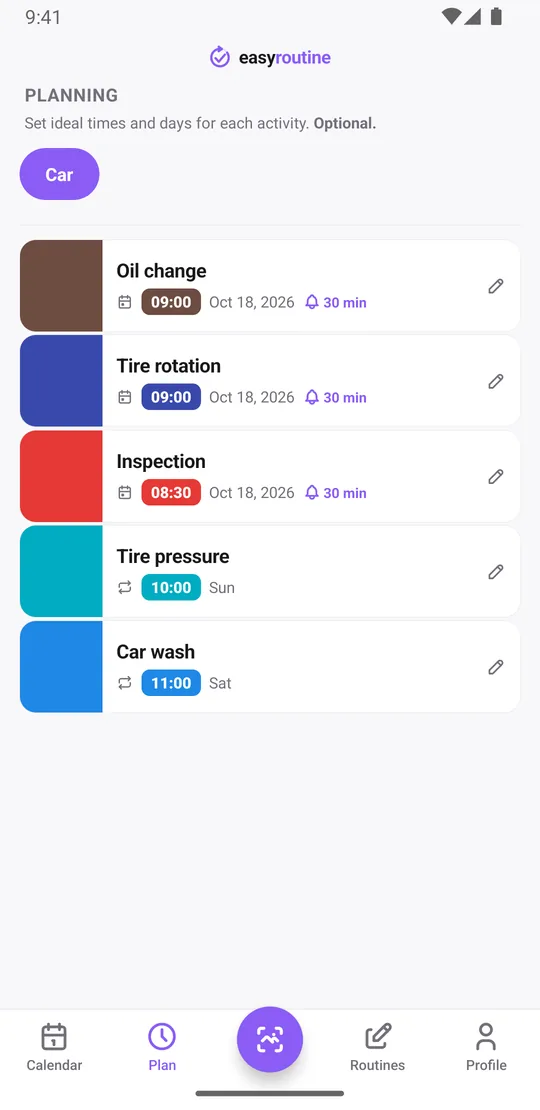
Premium: get a reminder when it is due
Turn on a reminder for the plan: on time, or 5, 10, 15 or 30 minutes before. On the morning the oil change is due, your phone tells you. If you need time to book the garage, plan the reminder a week ahead of the real due date, because the reminder fires on the day of the plan, not days before it.
Reminders are local notifications on your phone. The app schedules the 60 soonest ones and adds the later ones when it syncs again, so a date half a year away is no problem. Scheduling and reminders are part of Premium. How reminders work.
Premium: a car maintenance reminder when a job is due
EasyRoutine does not connect to your car, read the mileage or know your manufacturer's service schedule. It cannot remind you by distance driven, only by date. Use your owner's manual or your garage to decide how often each job is due, then put those dates into EasyRoutine.
Common questions
Is EasyRoutine a free car maintenance tracker app?
The tracking part is free: logging each job, notes with mileage and cost, flags and the calendar history. Planning due dates and reminders are part of Premium. It is a general routine app, so it does not know your car model or its service schedule.
Can I be reminded when my next oil change or tire rotation is due?
Yes, with Premium. Add the due date as a single-day plan with a time and a reminder. Repeating schedules work on weekdays, so long intervals like six months are planned date by date.
Can a schedule cover a six-month interval?
Not as a repeating rule. Recurring slots repeat weekly within their active period. For a six-monthly job, add the next due date as a single-day plan; each activity can hold up to 20.
Can I log maintenance with a photo of the receipt or odometer?
Not as an attachment. Logs have a comment and a flag but no photo. Type the odometer reading and cost into the comment instead.
How do I see when a maintenance job was last done?
Tap that job in the activity tiles at the top of the Calendar to show only its logs; the latest one is the last time. The log sheet for the job also shows your last few comments, such as the mileage.
Can it remind me based on mileage?
No. EasyRoutine works with dates and times only and does not know how far you have driven.
Keep reading
Free on iPhone and Android. Sign in with Apple, Google or your email to start.