I missed a day and lost my habit streak: what now?
One missed day resets a streak counter, not the habit. Log something today and the streak starts again; what matters now is not missing a second day. In EasyRoutine every past log, the calendar and your total stay exactly as they were.
How the Day streak is counted
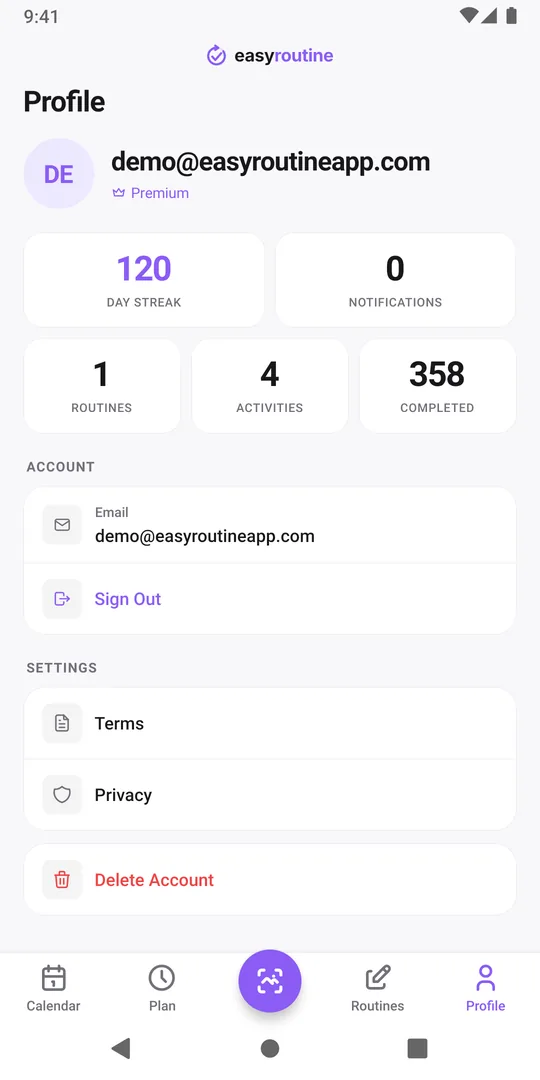
The Day streak tile on the Profile tab counts the days in a row, in your phone's time zone, on which you logged at least one activity:
- Any activity counts. It is one streak for your whole account, not one per habit. If you skipped the gym but logged your vitamins, the day still counts.
- Today is not over yet. If you have not logged anything today, the streak counts back from yesterday, so it does not drop to zero in the morning.
- A gap resets it to 0. There is no grace day and no streak freeze. The next log starts it again at 1.
The streak is not tied to schedules. A day counts when something was logged, whether or not it was planned.
Why one missed day does not undo a habit
A streak is a motivational number, not a measure of the habit. Habits form by repeating the same action in the same situation until it feels automatic, and that does not reset overnight. In a study where people built a new daily habit in their everyday lives, missing the occasional day did not seriously impair habit formation, and progress soon resumed after a single miss (summary in the British Journal of General Practice, via NIH).
What does hurt is letting one miss turn into a week. A few plain rules help:
- Do not miss twice. Treat the day after a miss as the one that counts. Do the habit today, even in a small form.
- Shrink it for the restart. Five minutes of reading or a walk around the block keeps the habit alive on a bad day. Build back up once it runs again.
- Keep the same cue. Do it at the same time and place as before, such as after breakfast or straight after work. The same summary recommends a time and place you meet every day.
- Find the reason, not the blame. Was it a late shift, travel, illness, a plan that was too big? Name it, and change the plan if the same thing keeps happening.
- Do not "make up" missed days. Doing three walks tomorrow does not fix yesterday. It only makes tomorrow harder.
What you did not lose
In EasyRoutine the streak is a single number that looks at the most recent run. Everything else is still there:
- Every log. Logs stay in your account until you delete them yourself.
- The Completed total. It counts all your logs ever, and a missed day takes nothing away from it.
- Your routines and activities. Nothing is reset, archived or changed because you missed a day.
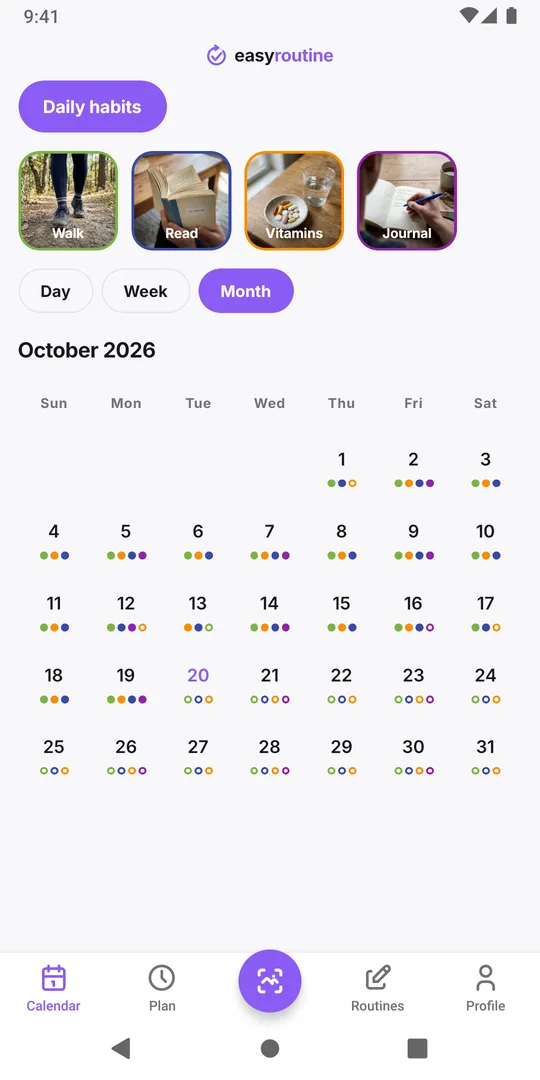
For a fairer picture, open the Calendar tab and switch to Month. One empty day in a month full of dots is a very different story from the number 0 on the Profile tab. If an activity has a schedule, planned days you did not log show as faded entries: no red cross and no missed-days counter, just a plan that did not turn into a log. More in Calendar and streaks.
Did it, but forgot to log it?
Sometimes the day was not really missed: you went for the walk, you just did not open the app. In that case, add the log for that day. Open the past day on the calendar, tap + Log and pick the activity. Then tap the new entry and set the time you really did it. The gap is filled, and because the streak is worked out from your logs, it counts that day again.
Only do this for things you actually did. Logging a walk you did not take gets the number back, but the record stops telling you the truth, and that record is the whole point. How to backdate a forgotten log.
Restart the streak today
The streak restarts with one log, and it does not matter which activity. That makes a small daily habit the best anchor:
- Pick one easy activity for every day, such as vitamins or a ten minute walk, and log it even on busy days. The harder habits can come and go without breaking the run.
- Log right after you do it, not in the evening from memory. Tap + Log on today and pick the activity.
- Note why a day slipped. A short note on the next log, like "late shift, short walk only", turns a pattern of misses into something you can see and fix.
If the streak broke after a longer break, getting back into your routine after the holidays covers the restart step by step.
Start a lighter plan from next Monday (Premium)
If you use schedules, a plan that was too big is often why the streak broke. With Premium you can give a smaller plan a start date: schedule the journal on three evenings instead of seven from next Monday, so the calendar does not fill with faded, missed entries before you begin. Logging and the streak itself stay free. More about scheduling.
Common questions
Does EasyRoutine have a separate streak for each habit?
No. There is one Day streak for the account, and any logged activity keeps it going. To see how one habit is going, look at its dots in the month view of its routine.
Can I freeze or repair a streak?
There is no streak freeze. If you did the activity but forgot to log it, add the log on that past day and set the real time; the streak counts that day again. Only add what really happened.
Why does my streak still show a number when I have not logged today?
Today is not finished yet, so the streak counts back from yesterday until you log something. It only resets after a full day without any log.
Should I start the habit over from scratch after a miss?
No. Keep the same habit at the same time and simply continue, in a smaller form if needed. Starting over with a new, bigger plan usually makes the next miss more likely.
Is the streak a Premium feature?
No. The Day streak is free. Premium adds scheduling and reminders and removes ads.
Keep reading
Free on iPhone and Android. Sign in with Apple, Google or your email to start.