I signed in on my new phone and my routines are empty
Your routines are almost certainly still there. An EasyRoutine account is its email address, so an empty app after sign-in nearly always means you signed in with a different address and opened a new, empty account. Sign out and sign in with the original address, and everything comes back.
Check which account you are in
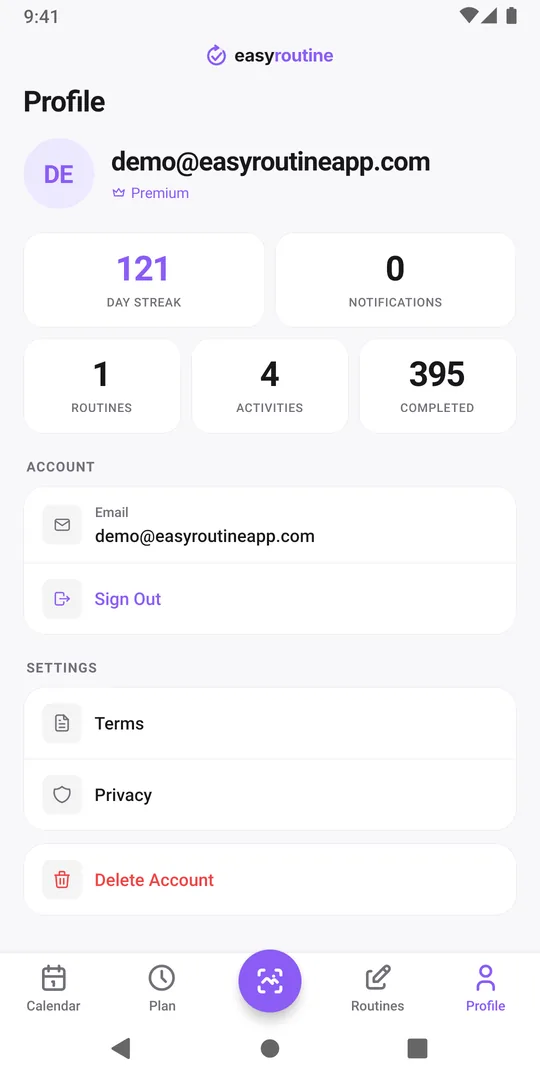
Open the Profile tab on the new phone. Two things tell you what happened:
- The email address at the top. This is the account you are in now.
- The Routines, Activities and Completed counts. All zero means a brand-new account, not a sync problem.
Now compare the address with the one the old phone's Profile tab shows, if you still have it. Different addresses settle it: your data is in the other account. The Calendar of a new account shows Build your first routine; do not start rebuilding yet.
Two other things look similar but are not this problem. With no connection the app shows a No Internet Connection notice, not an empty calendar. And if the counts are not zero but a routine looks bare, its activities may be archived: open the routine on the Routines tab and check Archived.
How a second account gets created
EasyRoutine never asks "create an account or sign in?". Any new address simply opens a new account. The sign-in method does not matter, only the address it brings: an email code, Google and Apple with the same address all open the same account. The usual ways a different address slips in:
- The wrong Google account. The Google picker offered your work or an old account first, and you tapped it.
- A different email for the code. You typed your current address, but the account was made years ago with another one.
- Sign in with Apple with Hide My Email. Apple gave EasyRoutine a private relay address instead of your real one. On an Android phone, where Apple sign-in is not offered, Google or an email code with your real address opens a new account.
- A different Apple ID on the new iPhone, which comes with a different address.
Get back into the original account
- Find the original address. The old phone's Profile tab shows it. No old phone? Think about which Google account you picked back then, or search your inboxes for an EasyRoutine sign-in code, which went to the account's address. On an iPhone, Settings, your name, Sign in with Apple lists the apps you used it with (Apple's steps).
- Sign out on the new phone. Profile tab, Sign Out, then confirm.
- Sign in with that address. The email code works on iPhone and Android: type the address and enter the code it sends. With Google, pick the matching Google account. With Apple, use the same Apple ID.
- Check the Profile counts. Your routines, activities and completed logs are back, with the streak, notes, flags and schedules.
If Google sign-in says This email is already linked to a different Google account., your address is in use by an account you opened with another Google login. Sign in with an email code to that address instead.
Used Hide My Email and now on Android? Write to support at info@easyroutineapp.com before you set things up again.
Clean up after the mix-up
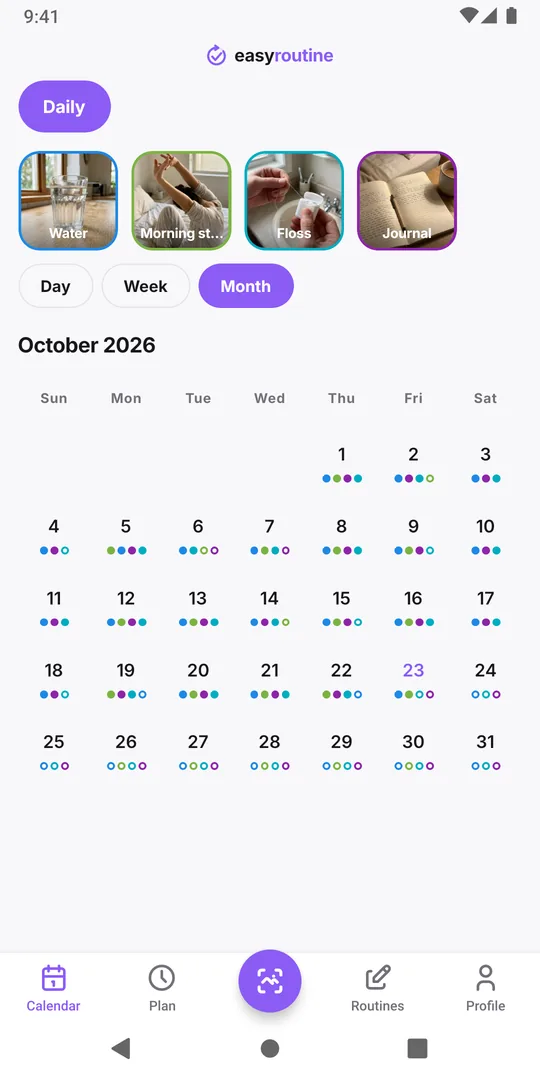
- Things you logged in the empty account do not move over. Logs cannot be transferred between accounts. In the original account, open each day on the calendar and use Log with the right time to add them again.
- The empty account stays unless you delete it. It does no harm. To remove it, sign in to it, check the address at the top of Profile is the wrong one and the counts are zero, then tap Delete Account. Do this only in the empty account: deletion is immediate and covers every phone.
- Premium belongs to the original account. If it seemed to be missing, it should be back once you are in the right account. Restore Premium on a new phone.
When the original account really is empty
Signing in with the right address and still seeing zeros has one usual cause: the account was deleted. Delete Account, on any phone or by email, removes routines, activities, logs and photos for every device at once, and the next sign-in with that address starts a fresh account. Deleted data is not brought back from backups. If you are sure nobody deleted it, write to support with the address and roughly when you last saw your data.
Switching phones soon? The new phone checklist has you note the address and counts before you start, so this never happens.
Common questions
Did signing in on the new phone delete my data?
No. Signing in never deletes anything. Your data stays in the account it was saved in, and you see it again once you sign in with that account's email address.
Can I merge the new account into the old one?
No. Accounts cannot be merged and logs cannot be moved between them. Sign in to the original account and add anything you logged in the new one again on the right day.
Does it matter whether I use Google, Apple or an email code?
Only the email address matters. Any method that brings the same address opens the same account. Apple sign-in is available on iPhone only.
I do not remember which email I used. What now?
Look at the old phone's Profile tab if you can, try each Google account you have, and search your inboxes for an old EasyRoutine sign-in code. If you are still stuck, write to support at info@easyroutineapp.com.
Keep reading
Free on iPhone and Android. Sign in with Apple, Google or your email to start.