Your schedule doesn't match your actual routine anymore? Plan for the usual week
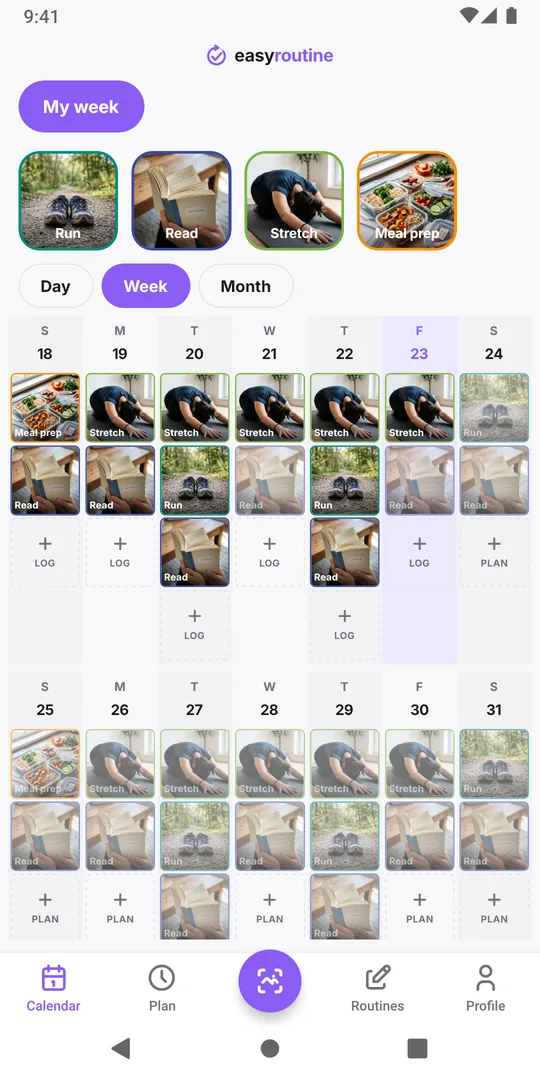
If your calendar is full of faded entries you never logged, the plan was probably made for an ideal week, or for a week you no longer have. Look at when you actually do things, then move each activity's days and times to match. A plan you meet most weeks beats a perfect plan you miss.
Signs the plan and your life have drifted apart
A schedule stops fitting quietly. Look for these patterns over the last two or three weeks:
- The same gap every week. The Thursday run is faded every Thursday, but you never miss Saturday.
- You do it, just at another time. The plan says 7:00; your logs say 7:45 most days.
- Logs on unplanned days. You keep reading on Sunday, which the plan leaves out.
- A changed week. New job, new commute, school term, a baby, winter evenings. The plan was right once; the week moved.
None of these mean you lack discipline. They mean the plan describes a different person's week.
Re-plan in four steps
- Collect two weeks of real data. Keep logging every activity when you actually do it, planned or not, at the real time. If you log late, set the time back to when it happened (how to fix a late log).
- Compare plan and record. For each activity, note which planned days stay empty and what time the logs really cluster around.
- Change one thing per activity. Move the time to where the logs are, drop the day that never works, or add the day you keep doing anyway. Keep the changes small so you can tell what helped.
- Check again in two weeks. If the same entry is still faded, shrink it further or ask whether you still want it at all.
Useful patterns when you re-plan:
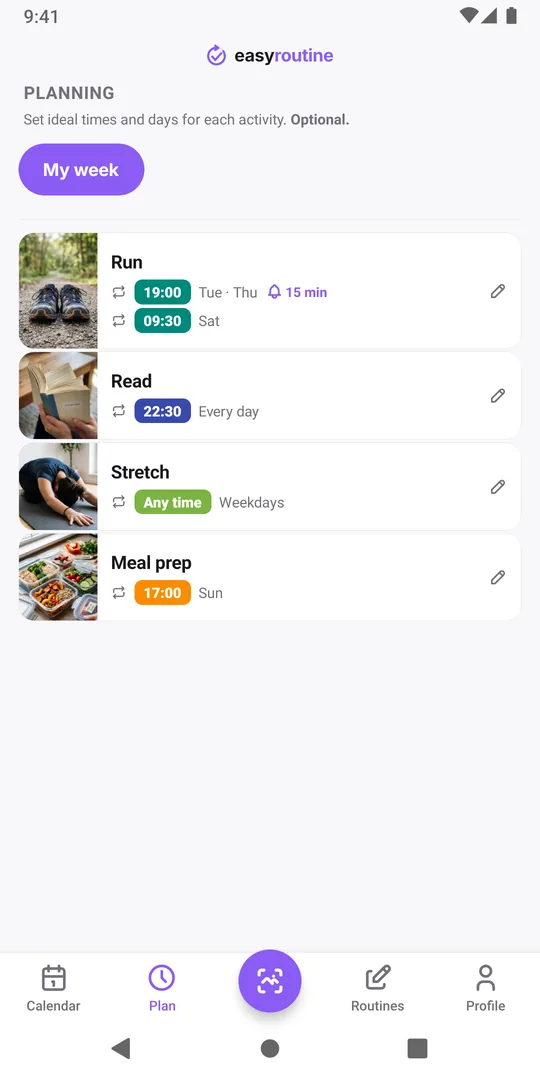
- Split weekdays and weekends. Run Tuesday and Thursday at 19:00, Saturday at 9:30, instead of one time for every day.
- Drop the clock when it does not matter. A stretch that happens "sometime in the evening" does not need 21:00.
- Plan seasons as seasons. Evening runs from April to September can have an end date instead of failing all winter.
Changing the plan in EasyRoutine (Premium)
Scheduling is part of Premium; logging and the calendar are free. Open the Plan tab and tap the activity. Under Recurring you can change the days and time, tap Add another time for a separate weekend slot (up to four per activity), or remove the time so it shows as Any time. A reminder can only sit on a timed slot, so move it along with the time, or switch it off if you never needed it. The full options are on the scheduling page.
One detail matters here: faded entries are drawn from the current plan, back to the day the activity was created. If you simply change Monday to Tuesday, the past weeks will show faded Tuesdays you never planned, and the Mondays you missed disappear. Your logs never change either way. To keep the old weeks readable, end the old time with Until set to yesterday and add the new time with From today. The ended time still uses one of the four slots, so remove it once those weeks no longer interest you.
What the calendar shows after the change
A week later, open the Week view: if few faded entries are left, the plan fits, and if one activity still leaves the same gap, go back to step 3 for it alone (Calendar and streaks).
Common questions
Why do my planned habits keep showing as missed?
A planned activity stays faded on a past day until you log it on that day. If the same entries stay faded week after week, the planned day or time does not fit your real week. Move them to when you actually do the activity.
Will changing a schedule delete my past logs?
No. Logs stay exactly as they are. Only the faded planned entries are redrawn from the new plan. To keep the old plan visible for past weeks, end the old time with Until and add the new one with From.
Can I change my schedule on the free plan?
No. Creating and editing schedules is part of Premium. On the free plan you can still log everything you do, on any day and at the real time.
How often should I review my routine schedule?
Look at the week view once a week and change the plan after two weeks of the same pattern, or whenever your week changes, such as a new job or school term.
Keep reading
Free on iPhone and Android. Sign in with Apple, Google or your email to start.