Traveling across time zones and not sure when to take your medication?
Ask your doctor or pharmacist before you travel: the CDC advises taking medicines by the time since your last dose, not by the local time of day. EasyRoutine cannot work out the timing for you, but it can log each dose at the moment you take it, so the time since your last dose is always on record.
Get the timing from your doctor or pharmacist
The CDC's advice on traveling with medicine says to ask your health care provider about any changes to taking your medicine if you travel to a different time zone, and that medicines should be taken according to the time since your last dose, not the local time of day. Ask before the trip, not at the gate, and write the answer down as clock times for the travel days.
The same page has packing advice worth following: medicines in your carry-on in case luggage is lost or delayed, in their original labeled containers, and enough for the whole trip plus extra in case of delays.
Why the clock on the wall misleads you
Say you take a tablet at 08:00 at home in New York and fly to Paris, six hours ahead. Your usual 08:00 dose falls at 14:00 Paris time. If you simply wait for 08:00 in Paris the next morning, the gap since your last dose is not 24 hours. Flying west stretches the day the other way, and a dose can feel due when it is not.
That is why counting by "one tablet a day" goes wrong on a travel day: the days themselves change length. The question to ask is "how long ago did I take the last one?", and you can only answer it if you wrote down when.
Log every dose on the road
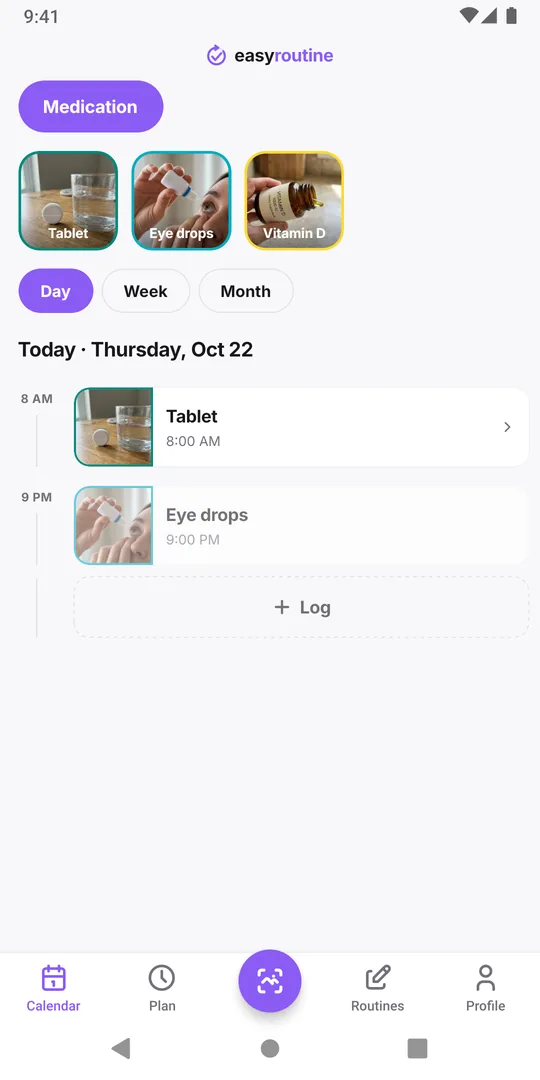
In EasyRoutine, keep a Medication routine with one activity per medicine and log each dose right after you take it: tap + Log on today, pick the medicine and save. It is logged with the current time, so the record shows when the dose really happened.
Before the next dose, open the Day view and find the last entry for that medicine, then compare it with the plan your doctor or pharmacist gave you. On a long flight or a short night, also check yesterday: the last dose may be on a different date than you think.
A few habits keep the record honest while traveling:
- Fix late logs. Took it on the plane and logged it after landing? Open the log and set the date and time to when you took it. Future times cannot be logged.
- Write the home time in the note. A note like "08:00 New York time" removes any doubt when you read the log later.
- Log after the phone has switched time zone. When your phone changes time zone, the app reloads and a log sheet you left open is lost, so log once you are settled.
How reminders behave after you land (Premium)
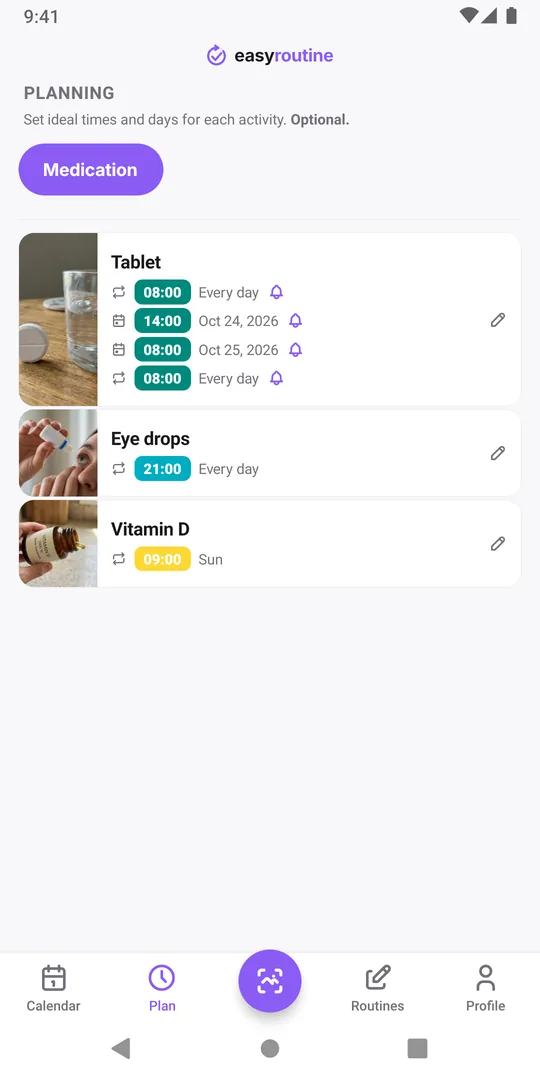
With Premium, a planned dose can send a reminder. They follow your phone's clock, which matters on a trip:
- Repeating reminders (a time on chosen weekdays, with no end date) ring at that local time wherever you are. An 08:00 reminder rings at 08:00 in Paris, not 24 hours after your last dose.
- Dated reminders (single-day plans, or times with a From or Until date) are moved to the new time zone once you open the app there.
If your doctor gave you different clock times for the travel days, set them up before you leave: give the usual time an Until date the day before departure, add Single day plans for the travel days at the times you were given, and add the usual time again From the day you are back. Otherwise, open the Plan tab after landing and check that each reminder still makes sense. More in missing notifications.
Mistakes to avoid
- Taking a dose because the clock says so. Check the time since the last logged dose first.
- Taking another dose "to be safe". If you cannot tell whether you took it, do not take a second one; ask a pharmacist, who can be found in most places you travel. See avoiding a double dose.
- Relying on the reminder alone. A reminder tells you a planned time arrived; the log tells you what actually happened.
For the rest of your routine on the trip, such as supplements, skincare and workouts, see keeping your routine while traveling.
Common questions
Does EasyRoutine tell me when to take my next dose in a new time zone?
No. It shows when you logged each dose and can remind you at times you set. When to take a medicine across time zones is a question for your doctor or pharmacist.
Will my reminders move to the new time zone automatically?
Repeating reminders ring at the same local clock time on your phone wherever you are. Reminders for single days or with a start or end date are moved once you open the app in the new time zone.
Can I change the time of a dose I logged late?
Yes. Open the log and set the date and time to when you took the dose. Times in the future cannot be logged.
Do I need Premium to track doses while traveling?
No. Logging doses and reading the calendar are free. Premium adds planned dose times and reminders.
Keep reading
- Antibiotic reminder: every dose as prescribed, until the last dayAn antibiotic reminder plan: write down dose times and the last day your prescriber gave you, log each dose, and get a reminder per dose until the end date.
- Pill organizer vs an app to track your medicationA weekly pillbox sorts your pills; an app remembers when you took them. An honest comparison, what each does better, and how to use both together.
- Dedicated medication reminder app or a simple log? An honest comparisonDedicated medication reminder app or a simple log? What specialist apps do better (doses, refills, interactions), what a simple log does, and who should pick each.
- Daily medication checklist template: did I take it today?A free daily medication checklist template to copy onto paper: one row per medicine and dose time, how to fill it in, and the mistakes to avoid.
- Tracking medication after surgery: did I take it, and when?Track medication after surgery: log every dose and as-needed painkiller with the time taken, free. With Premium, each medicine gets an end date and reminders.
- Did I already take it? How to avoid taking medication twiceHow to avoid taking medication twice: weekday blister packs, pill organizers and a dose log you check before the next dose instead of trusting memory.
- Ran out of your prescription without noticing? What to do now, and next timeRan out of a prescription without noticing? Who to contact today, why it happens, and how a refill date with a reminder gets the next box ordered in time.
- How do I know if I missed a dose of my medication?How to know if you missed a dose of medication: check the pack, count the tablets, read your dose log for gaps, then ask the leaflet or a pharmacist what to do.
- I forget to take my medication: how to stop missing dosesKeep forgetting to take your medicine? Give each dose a cue you cannot miss, log it the moment you take it and, with Premium, get a reminder at the dose time.
- Taking medication at different times each day and losing track?Take medication at different times each day and keep losing track? Log each dose when it happens, for free, and fix the time afterwards if you logged it late.
- My partner and I both give medication: who gave the last dose?You and your partner both give medication and lose track of who gave the last dose? Keep one log you both check first, with a note saying who gave it.
Free on iPhone and Android. Sign in with Apple, Google or your email to start.