Medication reminder app and daily checklist: did I take it today?
Did I take my morning tablet, or am I remembering yesterday? A daily checklist answers that, as long as you tick it every time, and a medication reminder app helps you remember to. Here is a simple template with a slot for each medication time, and how to turn it into a log with dose reminders in EasyRoutine.
What this checklist is, and what it is not
The checklist copies the schedule you were already given into slots you tick off. It does not replace that schedule, and it is not a substitute for a pharmacist's dosing instructions. If anything about a dose is unclear, ask them, not the app. And because any app can fail (a flat battery, a muted phone), do not rely on it as your only safeguard where a missed or double dose could harm you.
The daily medication checklist template
Fill in your own medicines with the name on the box and the times on your prescription or label. The examples show the shape.
Routine: Medication
Morning slot (8:00)
- Morning tablet: every day, 8:00
Evening slot (20:00)
- Evening tablet: every day, 20:00
- Eye drops: every day, 21:00
Twice a day
- Example: a medicine taken morning and evening, every day, 8:00 and 20:00 (one activity with two times)
Not every day
- Weekly tablet: Sunday, 9:00
Active period: none for ongoing medication. For a short course with an end date, see finishing a medication course.
Keep one activity per medicine, not one for "all my pills". That way the log tells you exactly which one you took, and a missing one stands out.
Set up EasyRoutine as your medication reminder app
- On the Routines tab, tap Add routine and name it Medication.
- Tap Add activity for each medicine. A photo of the box is optional, but it lets you log by scanning later, and EasyRoutine suggests a name from it. Give each one a different color.
- Log each medicine when you take it: tap the "+ Log" button on the day and pick it. This is free, and the day shows what is done.
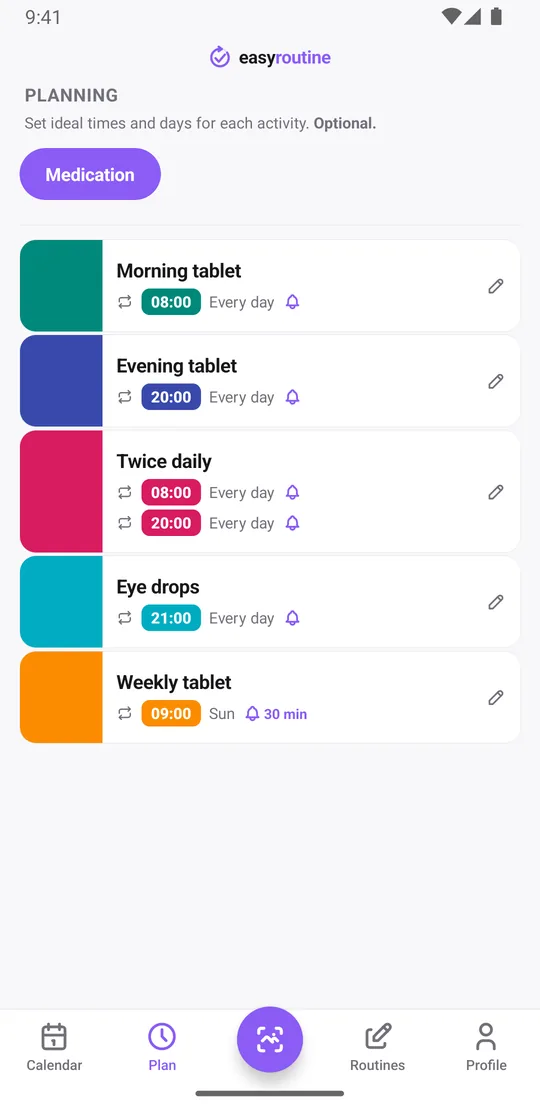
- With Premium, open the Plan tab, pick a medicine and under Recurring set the time and tap the weekdays it applies to. For every day, tap all seven.
- Set a Notification for that time: on time, or 5, 10, 15 or 30 minutes before.
- Repeat for each medicine. The Plan tab then shows each one with its days and times.
Steps 1 to 3 are free and already make a working checklist, with notes, flags and the photo scan included. Scheduling and reminders (steps 4 to 6) are part of Premium: they add a faded planned entry for each dose and a nudge at its time.
Tick it off: several at once, scan or planned entry
Log a medicine when you take it. The time is the whole point: later you can see not only that you took it but when.
- Several at once: the "+ Log" button on a day lets you pick one or all of the morning medicines and log them together, with the current time for today. Tap a logged entry to change its time.
- By photo: if the box has a photo in the app, open the Scan tab and point the camera at it. The scan matches it against your own activities with a photo and logs it straight away. Boxes that look alike are safer to log by hand.
- Late: took it later than usual or forgot to log? Add the log and set the time to when you actually took it.
- From a planned entry (Premium): with a schedule, tap the medicine's faded entry on the calendar. The Log Entry sheet opens with the planned time filled in, and you save it (change the time first if you took it earlier or later).
Each log records that you took it and when, plus an optional note and a red, amber or green flag. It does not record amounts. If something is worth remembering, like "took with food" or "felt dizzy", put it in the note. The log sheet shows your last few notes for that medicine. Use the flag your own way, for example amber for a dose you took late.
Check before you take it, and see missed doses
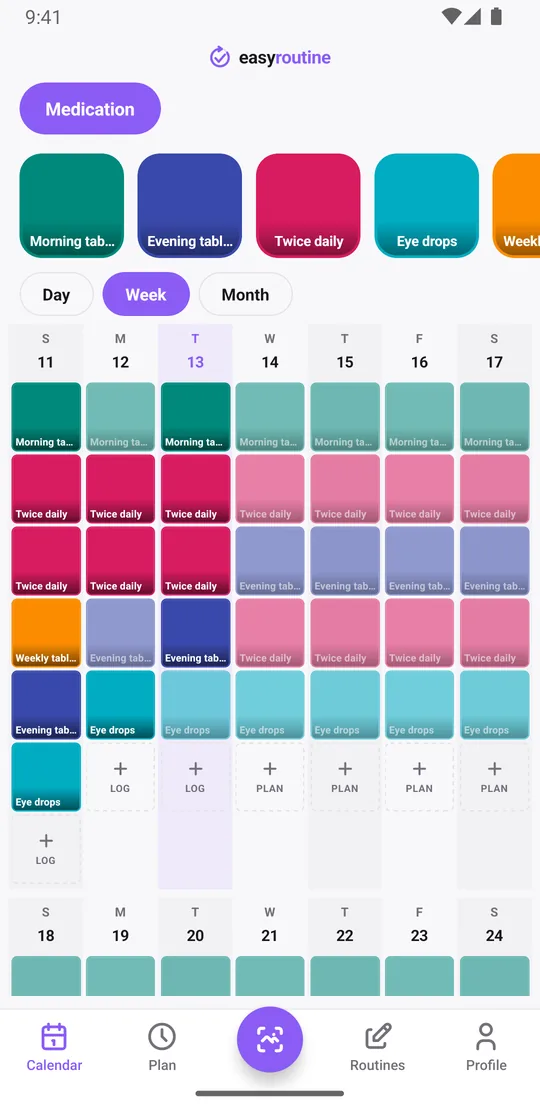
Before you take a dose, open the calendar and look at today. A colored tile means it is already logged. A faded entry means it is planned and not logged yet.
To answer "when did I last take it?" for a medicine you do not take daily, like the weekly tablet, tap its tile at the top of the calendar. The calendar then shows only that medicine, so the last tile is the last time you logged it, and the month view shows several Sundays at once.
If a scheduled dose is never logged, its faded entry simply stays on that day. There is no separate "missed" label or color: a faded entry on a past day is the missed one. The week and month views make gaps easy to spot over time. If you did miss a dose, follow the advice that came with the medicine or ask your pharmacist; the app does not tell you what to do.
Tracking medication twice a day
A medicine you take morning and evening stays one activity with two times. Open it in the Plan tab, set the first time, then tap Add another time and set the second. Each time has its own weekdays and its own reminder, so you get a nudge at 8:00 and again at 20:00. One activity can hold up to four recurring times.
On the calendar that medicine then shows two entries per day. One logged and one faded in the evening means the evening dose is still open.
Common questions
How do I make a checklist to track if I took my medication today?
Create a Medication routine and add each medicine as its own activity. Log it each time you take it: tap its faded planned entry and save, or use the + Log button on the day. The day view then shows what is logged, with the time. With Premium you can schedule each medicine so planned doses appear faded until you log them.
How do I track medication twice a day?
Keep it as one activity and give it two times in the Plan tab, using Add another time. Each time can have its own reminder. Scheduling and reminders are part of Premium.
Is this a substitute for a pharmacist's dosage schedule?
No. EasyRoutine is not a medical device and does not know about medicines or doses. Follow your prescriber, your pharmacist and the label; the app only records that and when you took something.
What does the app show if I skip a scheduled dose?
The planned dose stays as a faded entry on that day. There is no separate missed label, so a faded entry on a past day is a dose that was not logged.
Is EasyRoutine a free pill reminder app?
Logging doses, notes, flags, the photo scan and the calendar are free. The reminders themselves are part of Premium, because they are set inside a schedule and scheduling is Premium ($1.49 a month in the US).
Keep reading
Free on iPhone and Android. Sign in with Apple, Google or your email to start.