How do I know if I missed a dose of my medication?
You know you missed a dose when something you can check says so: a full compartment in the pill organizer, a tablet still in today's blister, or no log for that dose in your record. A log helps you spot the gap; what to do about it comes from the leaflet, your pharmacist or your doctor.
Spotting a missed dose is not the same as deciding what to do
What to do after a missed dose depends on the medicine. The patient information leaflet in the box usually says, and the NHS Specialist Pharmacy Service tells professionals to advise patients to never take a double dose to make up for a forgotten dose, unless advised by a prescriber. For some medicines the advice is different, which is why the leaflet and a pharmacist come first. If you are unsure, ask your pharmacist or call your local health advice line before you take anything.
Checks that work without an app
Start with what is in front of you:
- Weekday blister packs. If the pack prints days above the tablets, a tablet still under yesterday's day is a missed dose.
- Count the tablets. Tablets gone since you opened the box should match the doses due since then. If more are left than there should be, a dose was probably missed; if fewer, one may have been taken twice. Either way, tell your pharmacist rather than evening it out yourself.
Both are better than memory, because a daily dose feels the same every day and "I think I took it" might be about yesterday. Unsure whether you already took today's dose? See avoiding a double dose before you take another.
Reading a dose log for gaps
A log is a record you write to the moment you take each dose. In EasyRoutine that is a routine called Medication with one activity per medicine and a log with the time for every dose. To look for a missed dose:
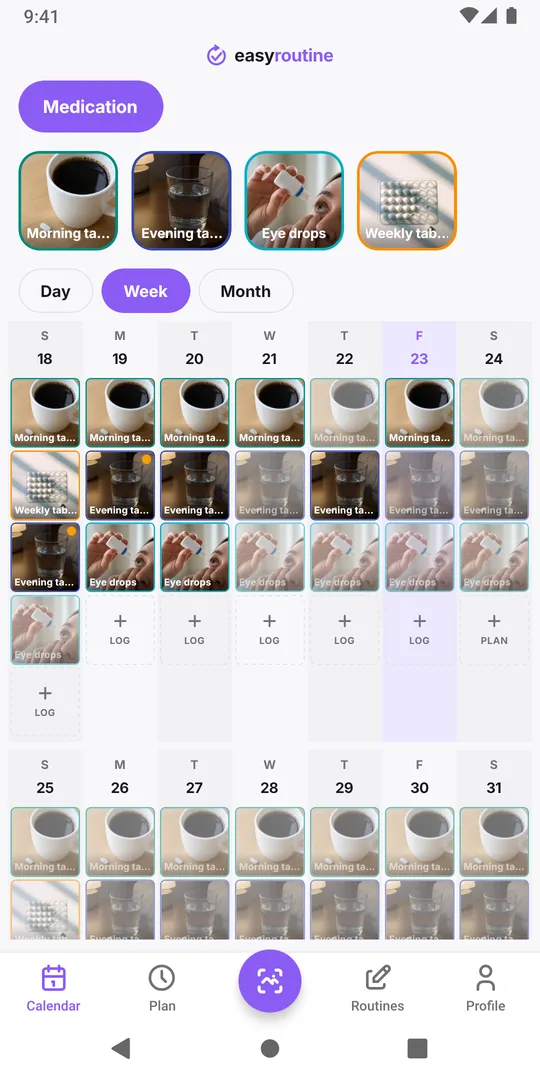
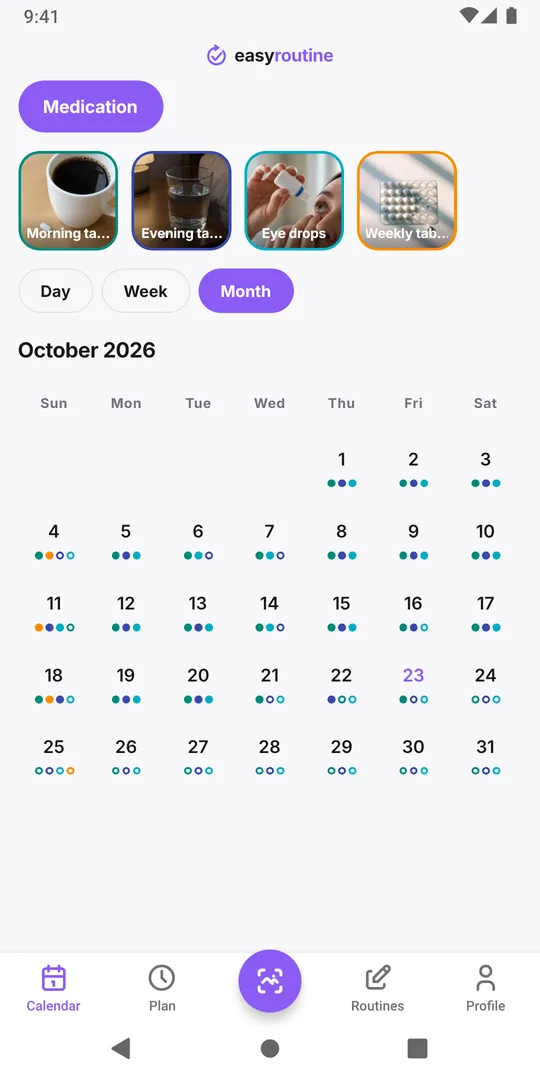
- Open the Calendar tab on the Medication routine and switch to Week or Month view.
- Tap the medicine's tile above the calendar to highlight its entries. Tap it again to clear the highlight.
- Look for the days that should have an entry and do not.
Read the gaps against how the medicine is taken. A daily tablet should show one entry per day; a twice-a-day medicine two, so a day with one entry still has a gap. A weekly tablet is supposed to leave six empty days between entries.
With Premium, a planned dose that you did not log stays on the calendar as a faded entry, so a faded entry on a past day marks a dose with no log, which is where to look first. Without a schedule, a missing dose is simply a day without an entry. The app has no separate "missed" label.
No log does not always mean no dose
A log only knows what you told it: an empty day can mean you missed the dose, or took it and did not log it. Check the pack before you act on a gap, and if you still cannot tell, ask your pharmacist rather than taking another dose.
If you did take it, forgot to log shows how to add the log afterwards at the real time.
After a missed dose: write down what happened
Once you have checked the leaflet or spoken to your pharmacist, note it. If you took the dose late, log it at the time you actually took it and add a note such as "late, remembered at 11:40" with an amber flag. If you skipped it on advice, there is nothing to log for that dose, but you can write "skipped evening dose as the leaflet says" in the note of the next one.
Those notes are useful at your next appointment: a pattern like "evening doses on Fridays" is easier to fix than a vague feeling of forgetting. If the same dose keeps slipping, a reminder at the dose time (Premium) or moving the medicine next to something you do every evening can help.
Common questions
How do I know if I missed a dose of my medication?
Check something you can see: a full compartment in your pill organizer, a tablet left under a past day on the blister, a tablet count that is too high, or a day with no log in your dose record. If none of them settle it, ask your pharmacist.
What should I do if I missed a dose?
Follow the leaflet that came with the medicine, or ask your pharmacist or doctor, because the advice differs between medicines. Do not take a double dose to make up for it unless your prescriber tells you to. EasyRoutine does not give this advice.
Does EasyRoutine mark a dose as missed?
Not with a label. With Premium, a planned dose you did not log stays as a faded entry on that day. Without a schedule, a missed dose is a day with no entry for that medicine.
Can I look at the gaps for one medicine only?
Yes. Tap that medicine's tile above the calendar to highlight its entries, then switch to the week or month view. The other medicines stay visible, so you still see the whole day.
Keep reading
Free on iPhone and Android. Sign in with Apple, Google or your email to start.