Tracking medication after surgery: did I take it, and when?
You come home from an operation with a bag of new medicines, a discharge sheet and a head that is not at its sharpest. Did I take the 14:00 dose, or am I thinking of yesterday? EasyRoutine gives you a log you can check in a second, reminders at each dose time and a schedule that ends when your instructions say it ends.
Your care team decides, the app remembers
Use the app to follow the plan you were given and to record each dose. Because any app can fail (a flat battery, a muted phone), do not make it your only safeguard where a missed or double dose could harm you. A printed copy of the discharge sheet on the fridge still helps.
Set it up from your discharge sheet
Sit down with the sheet once, ideally with whoever is helping you at home, and copy it into a routine. Use the names on the boxes and the times on your instructions. The names below are examples only.
Routine: Recovery meds
- Pain relief: every day, 8:00 (add further times of day exactly as your sheet says)
- Eye drops: every day, 12:00
- Antibiotic: every day, 20:00
Active period (Premium): each medicine from the day you start it, Until the last day on your instructions. Different medicines often end on different days, so give each its own dates.
Reminders (Premium): on time for every dose.
Notes: anything worth telling your care team, such as "took late" or "felt sick".
Keep one activity per medicine. Then the log tells you exactly which one you took, and the one you have not taken yet stands out.
In the app, tap Add routine on the Routines tab and name it Recovery meds, then tap Add activity for each medicine. A photo of the box is optional; it lets you log by scanning, and EasyRoutine suggests a name from it.
Log each dose for free, from the calendar or with a photo
Logging every dose is free and needs no schedule: tap + Log on today and pick the medicine. Several at once, like the morning round? Tick them together, and today they are logged with the current time. With a Premium schedule (below), you can also tap a dose's faded planned entry on the calendar: the log sheet opens with the planned time filled in, and you save it. If the box has a photo in the app, you can also open the Scan tab and point the camera at it; for boxes that look alike, picking by hand is safer.
Took it late, or logged it afterwards? Tap the logged entry and set the time to when you actually took it. The app records that and when you took something, plus an optional note and flag. It does not record amounts.
Check before you take it
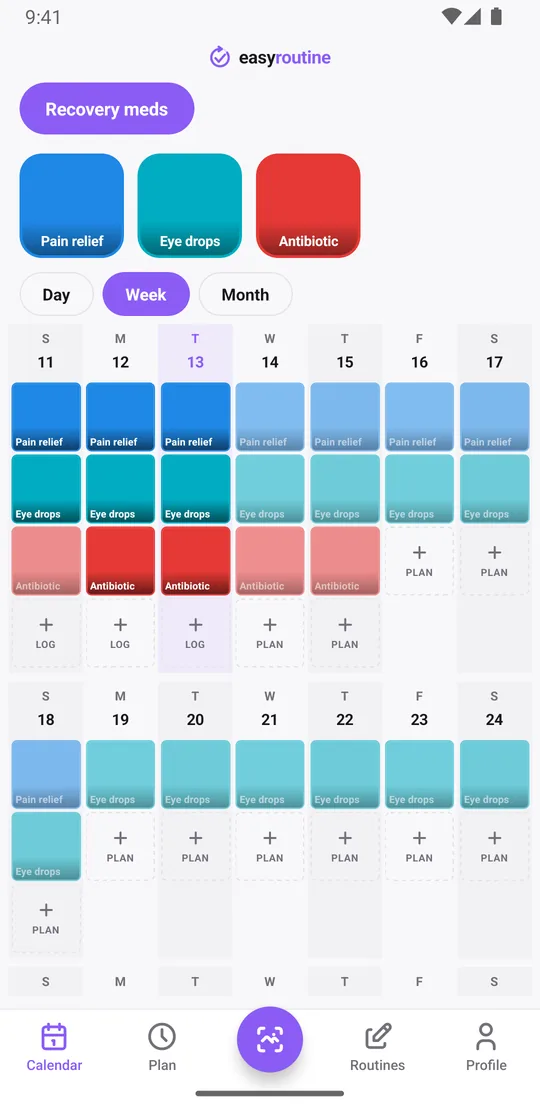
Before each dose, look at today on the calendar. A colored tile means that dose is already logged. A faded entry means it is planned and not logged yet. A faded entry left on an earlier day is a dose that was not logged. If you think you missed one, follow the instructions that came with the medicine or ask your pharmacist; the app does not tell you what to do.
When did I last take it? Tap a medicine's tile at the top of the calendar and the calendar shows only that medicine; its most recent entry is the last dose you logged. The month view shows your whole recovery at once.
Notes and flags worth keeping
Every log can carry a note and a green, amber or red flag, both free. Notes do not show on the calendar itself; you see them when you open a log, and each time you log a medicine the log sheet lists your last few notes for it. Things worth writing down:
- a dose taken later than planned, and why
- how you felt afterwards, in your own words, such as "felt sick" or "drowsy"
- the day you started a new pack
- questions for your follow-up appointment
Decide once what each flag means to you, for example green for taken as planned, amber for taken late and red for something to mention to your care team. The app does not interpret notes or flags; they are simply your record to bring along.
Add the schedule and reminders with Premium
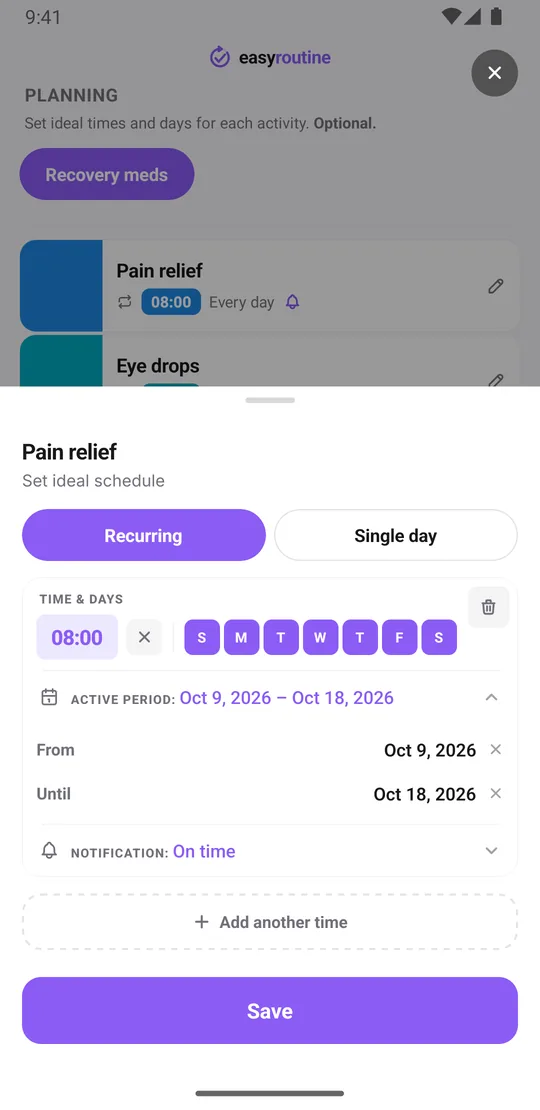
- With Premium, open the Plan tab, pick a medicine and under Recurring set the time and tap all seven days.
- Tap Active period and set From and Until to the first and last day on your instructions. Both dates are included.
- Set a Notification, on time or up to 30 minutes before.
- If a medicine is taken several times a day, tap Add another time for each one, up to four per medicine, and give each time the same active period.
If your instructions change partway, for example fewer doses in the second week, each time can have its own active period, so the schedule can follow the sheet exactly. Scheduling, active periods and reminders are part of Premium; logging each dose is free. More about scheduling.
Reminders at each dose time
Each scheduled time can remind you on time or 5, 10, 15 or 30 minutes before. The notification names the medicine, and tapping it opens the routine. Reminders are set on the phone itself, so once scheduled they arrive even without a connection. They only run inside each medicine's active period, so nothing keeps buzzing after a course has ended. How reminders work.
When the short-term schedule ends
On the day after a medicine's Until date, it stops appearing on the calendar and its reminders stop. You do not need to delete anything, and the app does not send a separate message. Your logs stay, so the full record of your recovery weeks remains if your care team asks. Once everything has ended, archive the activities to tidy up; their logs stay on the calendar.
If someone else is helping
EasyRoutine is a personal app with one account per person; there is no sharing between accounts. A partner or carer who gives the doses can set up the same routine in their own account and log each dose they give, with their own reminders. For more on that setup, see the medication tracker for caregivers. Exercises and other recovery tasks your care team gave you can go in a routine of their own, as in the recovery routine tracker.
Common questions
How do I keep track of post-surgery medication doses?
Create a routine for your recovery medicines and add each one as an activity, using the names and times on your discharge sheet. When you take a dose, tap its planned entry on the calendar and save it, or use + Log on the day, so every dose is logged with the time.
Is there an app to remind me to take medication after an operation?
EasyRoutine can remind you at each scheduled dose time, on time or up to 30 minutes before. Scheduling and reminders are part of Premium. It is not a medical device, so follow your care team's instructions.
Can I track a short-term medication schedule and stop after it ends?
Yes. Give each medicine an active period with the start and end dates on your instructions. After the end date it disappears from the calendar and its reminders stop, while your logs stay.
Is tracking post-surgery medication free?
Logging each dose, notes, flags, the photo scan and your history on the calendar are free. Scheduling each medicine with an end date and reminders at dose times are part of Premium.
Can a caregiver log doses for me?
Accounts are not shared, but a caregiver can set up the routine in their own account and log each dose they give you.
Keep reading
Free on iPhone and Android. Sign in with Apple, Google or your email to start.