Medication tracker app or a simpler log? An honest comparison
Dedicated medication tracker apps are built around the medicine: names, doses, amounts. EasyRoutine is built around one question, "did I already take it today?", and answers it with a quick log and an optional reminder. That makes it simpler, and also less capable, so here is an honest look at both.
Does EasyRoutine track dosage and interactions like a medication tracker?
No, and it is better to know that before you install it. EasyRoutine is a general routine tracker, not a medical device. It:
- does not know what a medicine is or what it contains,
- has no field for a dose or an amount,
- does not check interactions, warn about doses or give any medical advice.
If you need any of those things, choose an app that is built for medication. EasyRoutine will not replace it, and pretending otherwise would not be fair to you.
What it does instead: a quick check log
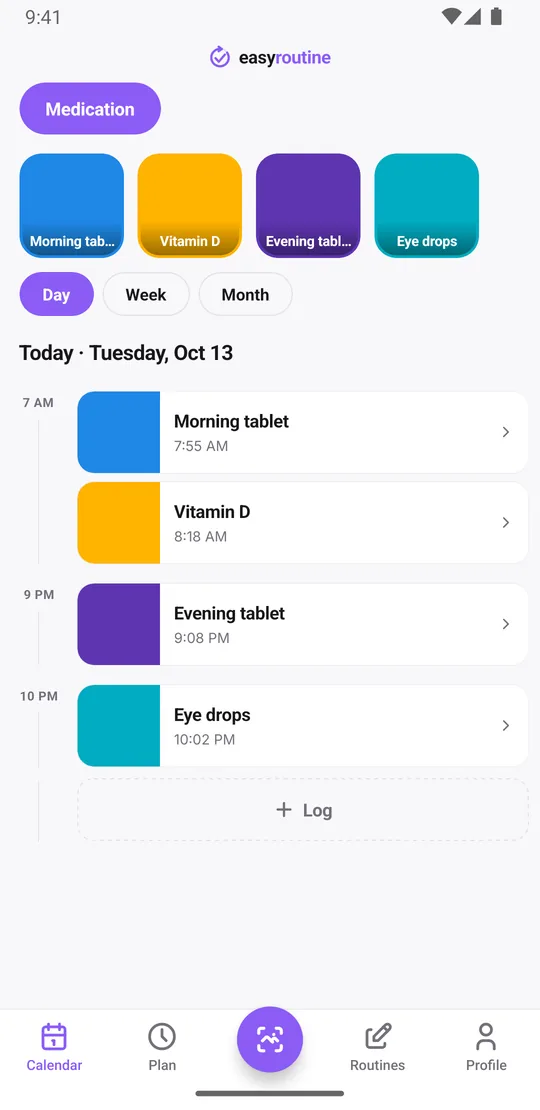
In EasyRoutine you create a routine, for example Medication, and add each thing you take as an activity: Morning tablet, Vitamin D, Evening tablet. When you have taken one, you log it: tap its faded planned entry if it has a Premium schedule and save, or tap + Log on the day and pick it. The log stores that you took it and when.
That is the whole idea, and it covers the question most people actually ask during the day:
- Did I take it? If it is logged today, yes. The day view shows each log with its time.
- Did I take it twice? If it is already logged, you do not need another one.
- Did I miss days? Gaps in the week or month view are days without a log.
- When did I last take it? Tap the activity's tile at the top of the calendar to show only that activity. The most recent entry is the last time you logged it, which helps with things you take now and then, like eye drops.
Took it late? Edit the time of the log. Forgot to log it? Add it afterwards for the right day and time. Each log can carry a note, like "half tablet, as agreed with the doctor" or "with food", and a green, amber or red flag. The note is just text you write for yourself; the app does not interpret it. Each time you log, the log sheet shows your last few notes for that activity, so you can see what you wrote the previous days.
Reminders, on the days and times you choose
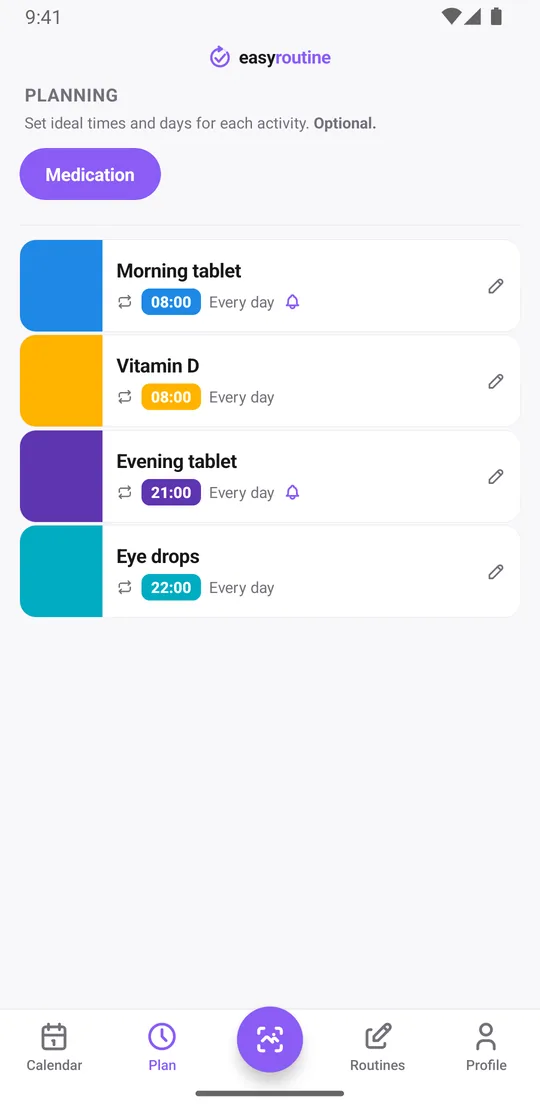
With Premium you can schedule each activity on chosen weekdays at a set time, for example Morning tablet every day at 8:00 and Evening tablet every day at 21:00. Each timed slot can have a reminder on time or 5, 10, 15 or 30 minutes before. An activity can have up to four recurring times, so a tablet you take twice a day gets two slots.
For a course with a clear end, like a week of antibiotics, a recurring slot can have a start and an end date and stops showing after the last day. Planned doses you have not logged yet appear faded on the calendar. Scheduling and reminders are Premium; logging, notes, flags, the photo scan and the calendar are free. How reminders work.
Why pick the simpler option?
A simpler log suits you if:
- You take one or a few regular things, like a daily tablet and some supplements, and mainly need to know whether today's dose is done.
- You want medication next to everything else. The same app can track supplements, skincare, the gym or watering plants, each in its own routine.
- You prefer typing nothing. Log from the calendar in a few taps, or give an activity a photo of the box and log it by pointing the camera at it in the Scan tab. The scan only knows your own activities that have a photo, and it does not read doses from the label. About the photo scan.
- You track for someone else. A carer can keep a routine for the person they look after and log each dose they give. There is no sharing between accounts. See medication tracking for caregivers.
Logging is free, and Premium (scheduling, reminders, no ads) costs $1.49 a month in the US. Pricing.
Who should choose a dedicated medication tracker app
Pick an app built for medication if you need it to know about the medicine itself: recording dose amounts, handling a schedule that changes the dose, or warning about combinations. The same goes if you manage many medicines with complex timing, or if a missed or doubled dose could be dangerous and you want a tool designed with that risk in mind. In those cases, also ask your doctor or pharmacist what they recommend.
Is it safe to rely on for medication timing?
Use it as a helper, not as your only safeguard. Reminders are local notifications on your phone. Once set, they fire even without a connection, but they cannot fire if the phone is off, the battery is empty or notifications are muted. Logging needs an internet connection, because your data is stored on the server and synced between devices.
So: let EasyRoutine remind you and keep the record, and keep the instructions from your doctor or pharmacist, and the leaflet that came with the medicine, as the source of truth. If you are unsure what to do after a missed dose, ask them, not an app. More on using EasyRoutine for medication.
Common questions
Does EasyRoutine track my dosage and interactions like a medical reminder app?
No. It records that and when you took something, with an optional note. It does not know medicines, has no dose field and does not check interactions. If you need that, use an app built for medication.
What does it do instead?
It gives you a quick check log: log each dose when you take it, see it on the calendar with its time, and spot missed days. With Premium you can schedule doses and get reminders.
Why would I pick the simpler option?
If you mainly need to know whether today's dose is done, want medication next to your other routines in one app, or prefer tapping to typing, a simple log is less work.
Is it safe to rely on for medication timing?
Not as your only safeguard. EasyRoutine is not a medical device and a phone reminder can be missed. Follow your doctor or pharmacist, and use the app as a reminder and record.
Can I use EasyRoutine as a free medication tracker?
Logging is free: each dose you log is stored with its time, an optional note and a flag, and the calendar shows your history. Scheduled doses and reminders are part of Premium. It does not record doses or amounts, only that and when you took something.
Keep reading
Free on iPhone and Android. Sign in with Apple, Google or your email to start.