Antibiotic reminder: take every dose until the course is finished
Day five of a ten-day course of antibiotics, you feel better, and the pack is easy to forget. Was that this morning's dose or yesterday's? EasyRoutine answers that for free: log each dose and the calendar shows it. If you want an antibiotic reminder at each dose time until the course is finished, the way your prescriber told you, Premium adds a start and end date and a reminder for every dose.
First: the course comes from your prescriber
If you are unsure whether to keep going, when exactly the last dose is, or what to do after a missed or late dose, ask your pharmacist. Do not use the app, or this page, to decide.
Why short courses like antibiotics are easy to lose track of
A daily tablet you have taken for years runs on habit. A short course is new, it often has two or three doses a day, and it ends on a date you have to remember. Midway through, two questions come up again and again: "did I take the midday one?" and "how many days are left?". A start date, an end date and a log answer both.
The template
Fill in the name from the box and the times and dates from your prescription or label. This example is a twice-a-day course of ten days.
Routine: Medication
- Antibiotic AM: every day, 8:00, reminder on time
- Antibiotic PM: every day, 20:00, reminder on time
Active period for both: From the day of your first dose, Until the day of your last dose (both days included)
Three times a day? Add Antibiotic midday at the time on your label, with the same active period.
Already take a daily tablet? Keep it in the same routine, without an end date.
One activity per dose time makes each dose its own tile, so a missed midday dose is obvious. You can also keep one activity and give it two or three times with Add another time. Either works; with one activity, set the active period on each time, because every time carries its own.
Log each dose (free)
When you take a dose, log it: tap "+ Log" on the day, pick the activity and it lands on the calendar. Took it late, or logging it afterwards? Tap the logged entry and change the time to when you really took it; you can also add a dose to an earlier day. Once the course is scheduled (below), it is even quicker: tap the dose's faded entry and the Log Entry sheet opens with the planned time filled in. If you photographed the box, the Scan tab logs it with the current time when you point the camera at the pack; with two similar activities like AM and PM, logging by hand is clearer.
Was that this morning's dose? Tap the Antibiotic AM tile at the top of the calendar. The calendar then shows only that activity, so the last entry is the last morning dose you logged. Tap it again to see everything.
The log records that you took it and when, not how much. The comment is for anything worth telling your pharmacist later:
- a dose taken late, and how late
- a missed dose, and what the pharmacist or the label told you to do
- "took with food" or "upset stomach"
- "started the second pack" after a refill
Flag a log amber or red if something was off. The log sheet shows your last few comments for that activity, so the notes from earlier in the course are right there when you log the next dose. Comments are not shown on the calendar itself; open a log to read it.
Set the start and end date
- On the Routines tab, open your Medication routine or tap Add routine to create one. Tap Add activity and name it after the box, plus AM or PM.
- With Premium, open the Plan tab and pick the activity. Under Recurring, set the dose time and tap all seven days.
- Tap Active period. Set From to the day of the first dose and Until to the day of the last dose. Both dates are included.
- Set the Notification to on time, or up to 30 minutes before if you need a head start.
- Repeat for the other dose times.
Scheduling, the active period and reminders are part of Premium. On the free plan you can still log every dose and see it on the calendar; you just have to keep the end date in mind yourself. More about scheduling.
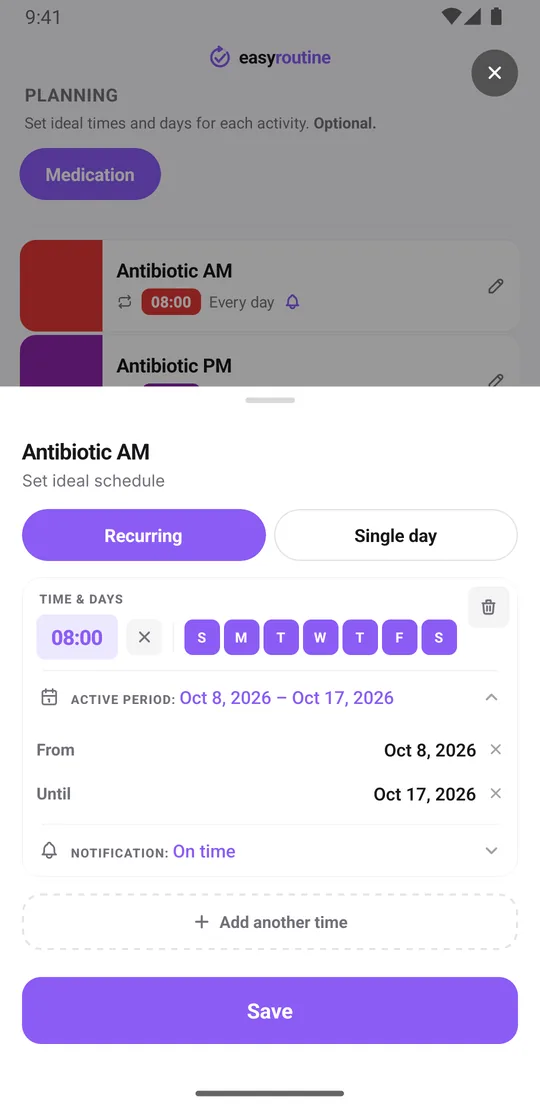
An antibiotic reminder each day it is due
Within the active period, each dose time reminds you with a notification on your phone. Reminders are scheduled on the device, so they still arrive without a connection once they are set. Outside the period there is nothing: no reminder before the first day and none after the last. How reminders work.
As with any app, a muted phone or a flat battery can mean a missed nudge. Keep the pack somewhere you will see it, too.
See how much of the course is done
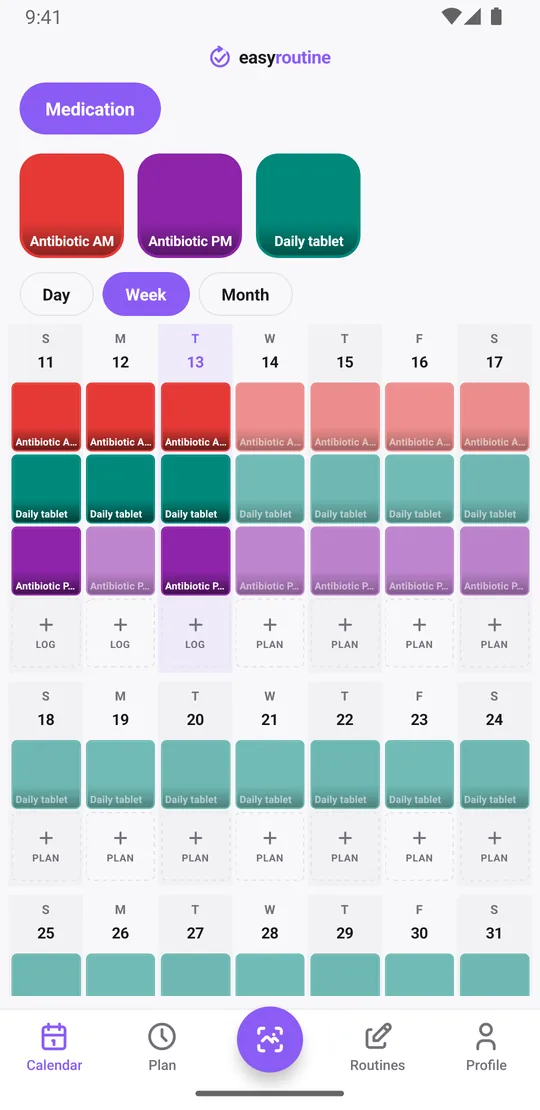
The week view shows the course at a glance: colored tiles for the doses you logged, faded entries for doses planned but not logged. Faded entries on past days are doses that were not logged. Faded entries on today and the coming days are the ones still ahead.
The app does not show a countdown or a "days left" number. To see what remains, open the week or month view and count the planned entries up to the end date; for a course of a week or two, that is quick.
On the day after Until, the course disappears from the calendar and the reminders stop. The app does not send a message that the course is over. Your logs stay, so the full record of the course remains on the calendar. Months later, tap the activity's tile and switch to the month view to see when you last had a course and how it went, notes included.
Common questions
How do I remember to keep taking antibiotics for the full course?
Add the medicine as an activity, schedule each dose time every day and give it an active period from the first to the last day of the course, with a reminder at each dose time. Log every dose by tapping its faded planned entry and saving. Scheduling and reminders are part of Premium. Follow your prescriber and the label for how long the course runs.
Can I set an end date so I know when to stop?
Yes. Set Until in the active period to the day of your last dose, as your prescription or pharmacist describes it. On the next day the course disappears from the calendar and its reminders stop. The app does not send a separate end-of-course message.
How can I check whether I already took this morning's dose?
Tap the activity for that dose at the top of the calendar. The calendar then shows only that activity, so the last entry is the last dose you logged. This works on the free plan.
Will it tell me how many days are left in the course?
Not as a number. Planned doses show as faded entries on the calendar up to the end date, so you can count what is left in the week or month view.
What should I do if I miss a dose?
Follow the instructions that came with the medicine or ask your pharmacist. EasyRoutine does not give medical advice. You can log the dose at the time you actually took it and add a note.
Does this work for other short courses, not just antibiotics?
Yes. The setup works for any medicine you were given for a set number of days: add an activity per dose time and give it an active period. The app does not know what the medicine is.
Keep reading
Free on iPhone and Android. Sign in with Apple, Google or your email to start.