Pill organizer vs an app to track your medication
Did I take this morning's pills? A weekly pill organizer answers that with an empty compartment, and an app like EasyRoutine answers it with a logged time. They solve slightly different problems, and many people are best served by using both.
What a pill organizer does well
A plastic box with a compartment for every day (often split into morning and evening) is hard to beat for some things, and it is fair to say so:
- It sorts the pills for you. You fill the week once, and each compartment holds exactly what belongs to that slot. An app cannot do this. EasyRoutine does not know what is in your tablets or how many you take.
- It needs no phone, battery or signal. It works when your phone is flat, lost or in another room.
- You can see it from across the room. An open Tuesday lid tells you at a glance that Tuesday is done.
- Someone else can fill it. A family member or pharmacy can prepare the week for you.
If your main problem is getting the right pills into the right slot, a pill organizer is the better tool, and no app replaces it.
Where a pillbox falls short
A pillbox shows the present, not the past. Once you refill it on Sunday, last week is gone. It cannot tell you:
- When you took the morning pills, only that the compartment is empty now.
- Whether you emptied a compartment by taking the pills or by dropping them, or moved them to a bag for the day.
- How many evening doses you missed this month, if you wanted to mention it at your next appointment.
It also cannot nudge you. A full compartment at 21:00 only helps if you happen to look at it. And medication that does not fit in a box, like eye drops, a cream or something you keep in the fridge, has no compartment at all.
What EasyRoutine adds: a quick check log
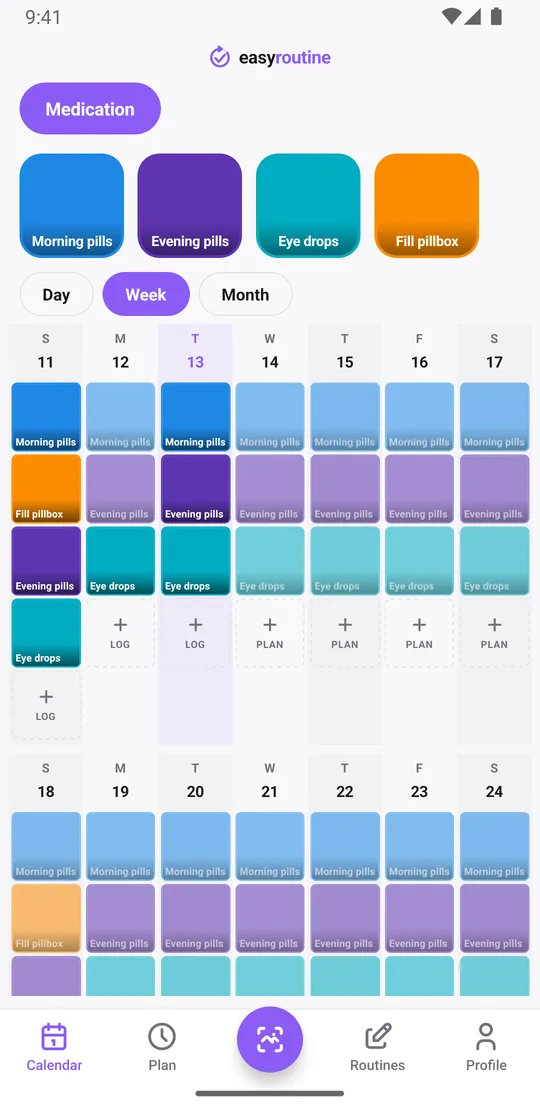
EasyRoutine is a general routine tracker, not a medication app. You add each thing you take as an activity, for example Morning pills and Evening pills, and log it when you have taken it: tap + Log on the day and pick it, or, with a Premium schedule, tap its faded planned entry and save. The log records that you did it and at what time.
That gives you the answer to "did I already take it today?" in a second: if Morning pills is logged today at 8:05, you took them. If you took them later than usual, adjust the time in the log. If you only remember in the evening that you forgot to log the morning dose, you can add the log with the right time afterwards.
Each log can carry a short note, such as "took with lunch" or "felt dizzy", and a green, amber or red flag. The log sheet shows your last few notes for that activity, so you can see recent comments without searching.
Unlike a refilled box, the history stays. Tap the Evening pills tile at the top of the calendar and the calendar shows only that activity: the last tile is the last time you logged it, and the month view shows every evening you did, gaps included. Logging, notes and this history are free.
Can the app remind you at the right time?
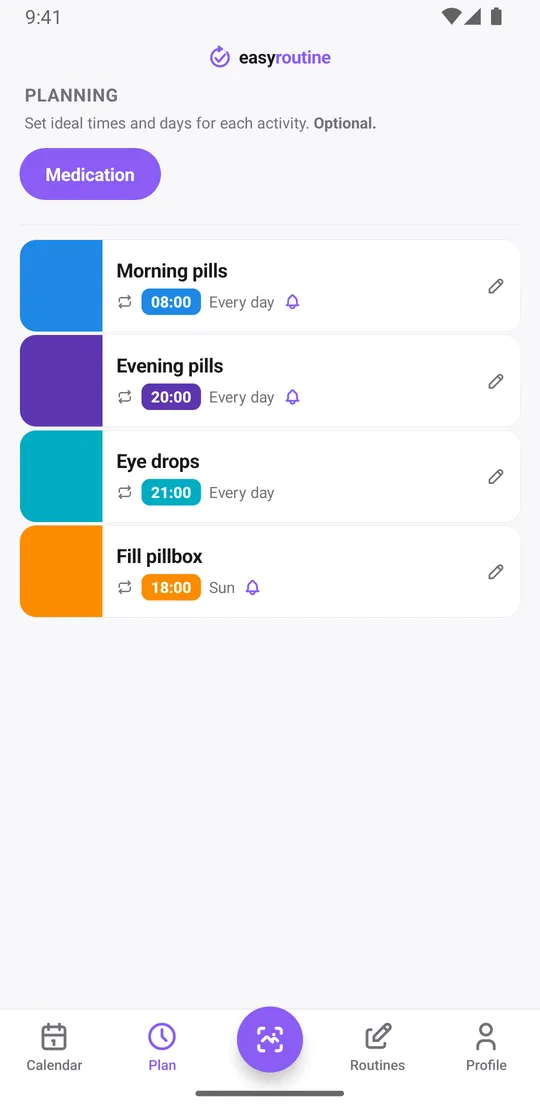
A pillbox separates pills by day, but it stays silent. With EasyRoutine Premium you can schedule each activity on the weekdays and times you take it, say Morning pills every day at 8:00 and Evening pills every day at 20:00, and add a reminder on time or 5, 10, 15 or 30 minutes before. Reminders are local notifications on your phone, so they still fire without a connection once they are set. How reminders work.
Scheduling and reminders are part of Premium. Logging, notes, flags, the photo scan and the calendar are free. Planned doses you have not logged yet show as faded entries on the calendar, so a missed one stands out.
Does the app track dosages like a pillbox sorts by dose?
No. EasyRoutine records that and when you took something. It has no field for an amount, does not know your medicines and does not check doses or interactions. If you want to remember "half a tablet this week", write it in the note. Questions about how much to take, or what to do after a missed dose, belong with your doctor or pharmacist and the leaflet that came with the medicine.
Photo logging, if you like it
If you give an activity a photo (your pill organizer, or the box of a medicine you keep separately), you can log it from the Scan tab by pointing the camera at it. The scan compares what it sees with your own activities that have a photo and logs the match straight away. It does not identify pills or read labels for dosing, and two similar boxes are easier to keep apart by logging them on the calendar instead. About the photo scan.
Use both: the box sorts, the app remembers
The two tools fit together well. A simple setup:
- Fill the pill organizer once a week as you do now.
- In EasyRoutine, create a Medication routine with Morning pills, Evening pills and Fill pillbox.
- With Premium, schedule Fill pillbox on Sunday at 18:00 and the daily doses at their times, with reminders.
- Each time you empty a compartment, tap the matching faded planned entry and save it. Now the box shows what is left this week, and the calendar shows what you actually did, week after week.
The month view then answers questions the box cannot, like how often the evening dose slipped this month.
Not a medical device
EasyRoutine is a log and a reminder, not a medical device. It gives no medical advice and can fail like any app: a muted phone, a dead battery, a reminder you swipe away. Where a missed or double dose could harm you, do not rely on it as your only safeguard. A pill organizer, a routine you follow, and the advice of your doctor or pharmacist remain the foundation. Read more on using EasyRoutine for medication.
Common questions
Isn't a pillbox simpler than an app?
For sorting pills, yes. A pillbox needs no phone and shows today's compartment at a glance. An app adds what a box cannot: the time you took each dose, a history after you refill, notes and optional reminders.
Can the app remind me at the right time?
Yes, with Premium. Schedule each activity on its weekdays and time and add a reminder on time or up to 30 minutes before. Logging and the calendar are free.
Does EasyRoutine track my dosage?
No. It records that and when you took something, with an optional note. It does not know medicines, amounts or interactions. Ask your doctor or pharmacist about dosing.
Can I use a pill organizer and EasyRoutine together?
Yes. Keep sorting pills in the box and log the matching activity when you empty a compartment. You can also add a weekly Fill pillbox activity with its own reminder.
Keep reading
Free on iPhone and Android. Sign in with Apple, Google or your email to start.