How to schedule an activity twice a day at different times
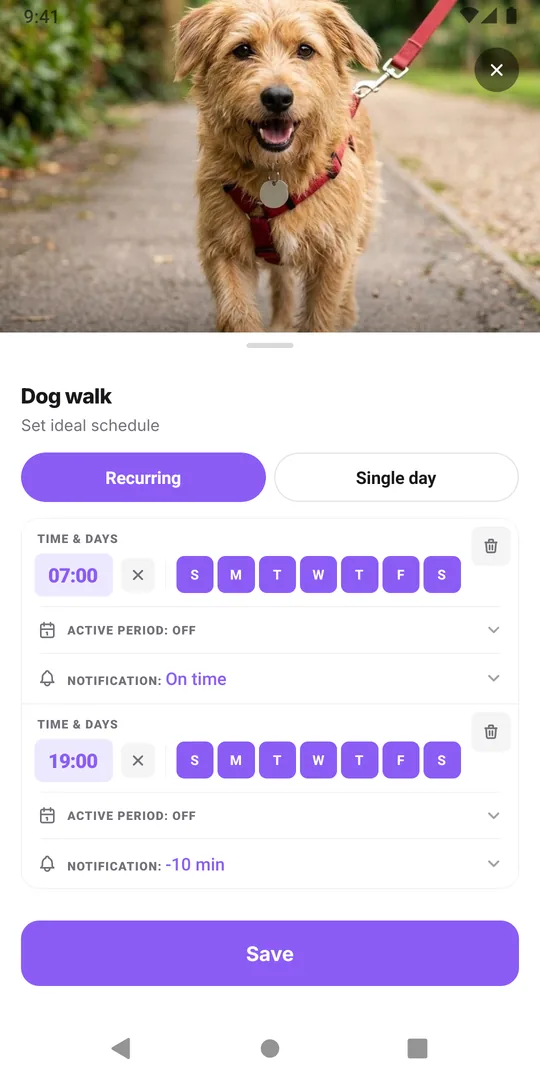
Add two scheduled times to the same activity, for example 7:00 and 19:00 for the dog walk, or 8:00 and 20:00 for something you take twice a day. Each time has its own days and its own reminder, and both show on the calendar as separate entries you log one by one.
Things people do twice a day
Plenty of routines come in pairs:
- walking the dog morning and evening
- brushing teeth, or wearing and cleaning a retainer
- feeding a pet two meals
- a skincare step in the morning and at night
- tablets or drops your doctor or pharmacist told you to take twice a day
The hard part with a pair is not remembering the first one. It is knowing, at 21:00, whether the second one already happened. A tick on a list tells you "done today" but not "done twice".
Choose the two times well
A few rules of thumb help any twice-daily routine stick:
- Tie each time to an anchor. Breakfast and dinner, leaving the house and coming home, or brushing your teeth morning and night are moments you already have.
- Space them sensibly for the task. For a dog walk that is about energy and daylight. For anything medical, the spacing comes from the label or your doctor or pharmacist, not from an app.
- Let the days differ if your week does. The morning walk might be 7:00 on workdays and 9:00 at the weekend while the evening one stays at 19:00.
- Name it once. Keep one activity called "Dog walk", not "Dog walk AM" and "Dog walk PM", so all walks share one history.
Set two times in EasyRoutine (Premium)
Scheduling and reminders are part of Premium; logging and the calendar are free.
- Open the Plan tab and tap the activity.
- Under Recurring, set the first time, for example 7:00, and tick the days.
- Tap Add another time, set 19:00 and tick its days.
- Give either time a reminder if you want one, on time or a few minutes before.
- Save.
An activity holds up to four weekly times, so a third midday slot or a separate weekend morning still fits. Each time needs a clock time for its reminder; a time left on Any time shows at the top of the day without a notification.
What the day looks like
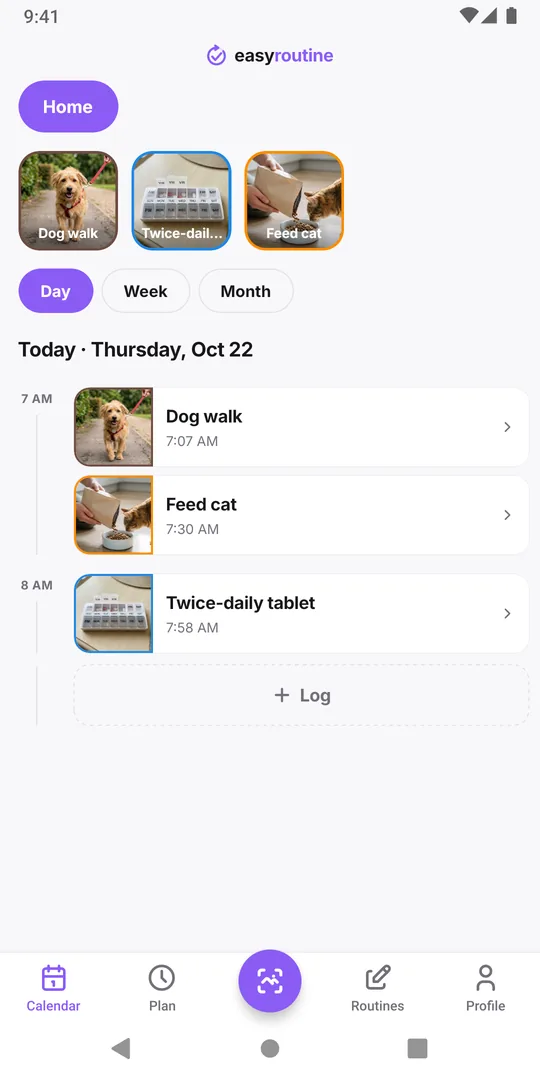
In the Day view, the activity appears twice: once at 7:00 and once at 19:00, both faded until you log them. Tap the morning entry after the walk, and it turns full color while the evening one stays faded. That answers "did I already do the second one?" at a glance.
Each log keeps its own time, so if the evening walk happened at 18:20, that is what the calendar shows. Forgot to log the morning one? Tap its faded entry later and set the time it really happened.
When two activities make more sense
Use two separate activities when the two things really differ: a morning cleanser and a night cream are different products, and the photo scan can match each one if each has its own photo. For the same thing done twice, one activity with two times keeps things tidy. For weekday and weekend times on the same habit, see different times on weekdays and weekends.
Common questions
Can one activity have two reminders a day?
Yes, with Premium. Give the activity two scheduled times, each with its own reminder. Up to four weekly times fit on one activity.
Do I log each time separately?
Yes. Each scheduled time shows as its own entry on the calendar, and you tap each one when you have done it. Each log keeps the time it really happened.
Can the morning and evening times run on different days?
Yes. Every scheduled time has its own set of weekdays, so the evening slot can run every day while the morning one runs on weekdays only.
Does the app tell me how far apart to space a twice-daily medicine?
No. EasyRoutine records that and when you took something and reminds you at the times you set. The timing itself should come from your doctor, pharmacist or the label.
I set a reminder twice a day. Why do I only get one?
A time you add with Add another time starts with its notification set to Off, and a time left on Any time cannot remind you at all. Open the activity in the Plan tab, give both times a clock time and a notification, and check that each one shows a bell before you save.
Keep reading
- Two-week habit trial: a schedule template with a built-in end dateTry a new habit for exactly two weeks: a copyable template, a keep-or-drop rule set in advance, free daily logging and a day 14 review that decides.
- Weekday-only routine schedule template: Monday to Friday, nothing on weekendsA copyable Monday to Friday routine template and how to schedule it in EasyRoutine so workday habits show only on weekdays and your weekend stays clear.
- Can EasyRoutine track a one-time task, or only recurring ones?Yes, within limits. Plan a one-time task on a single date with a reminder (Premium), or log it any time for free. EasyRoutine is built for repeating tasks.
- Your schedule doesn't match your actual routine anymore? Plan for the usual weekPlanned habits keep showing as missed? How to compare your plan with what you really do, move times and days to fit the usual week, and keep the old weeks honest.
- My activity runs on the wrong weekdays: how to fix days scheduled by mistakePicked the wrong days when you set up a schedule? Change the weekdays on that time and the new pattern replaces the old one. Your past logs stay as they are.
- Changing my schedule made old weeks show the wrong missed daysEdited a schedule and old weeks now show different missed days? Why faded entries follow the current plan, and how to change a plan without rewriting history.
- Different times on weekdays versus weekends for the same activityRun at 7:00 on workdays and 9:00 at the weekend? Give one activity two scheduled times, each with its own weekdays, instead of two copies of the activity.
- How to pause a schedule temporarily without deleting itGoing away for a week? EasyRoutine has no pause switch, but you can end a schedule before the break and restart it after, mute reminders, or archive for a while.
- How to plan next week in advance (and see it on one calendar)Plan next week in advance in 15 minutes: look back, place fixed dates, fit habits around them. In EasyRoutine, scheduled activities already sit on future days.
- My scheduled activity didn't show up today: what to checkA scheduled activity is missing from today's calendar? Check the weekdays, the active period, the selected routine, a highlighted tile and whether it was archived.
- How to stop a treatment schedule automatically after two weeksSet a short treatment to end by itself: give the scheduled time a From and an Until date, and it shows and reminds you only between them. No deleting afterwards.
- What's the difference between scheduling and logging?Scheduling says when you plan to do something; logging records what you actually did. Why a new schedule changes little at first, and what is free.
Free on iPhone and Android. Sign in with Apple, Google or your email to start.