Weekday-only routine schedule template: Monday to Friday, nothing on weekends
Some routines only exist because of work: packing lunch, desk stretches, planning tomorrow before you log off. You want them on Monday to Friday and nowhere near your Saturday. Here is a template you can copy, and how to set it up in EasyRoutine so the weekend stays clear.
Which routines belong on weekdays only
A good test: would you feel silly being reminded about it on a Sunday? Then it is a weekday routine. Common examples:
- Before work: pack lunch, gym before work, take the work badge
- At the desk: stretch break, refill the water bottle, a short walk at lunch
- End of the day: plan tomorrow, clear the desk, log off on time
- School days: pack the school bag, sign the reading log
If your work days are not Monday to Friday, the same method works with whichever weekdays you work. For rotating shifts, see the note at the end.
The template
Copy this and swap in your own steps and times.
Routine: Workday
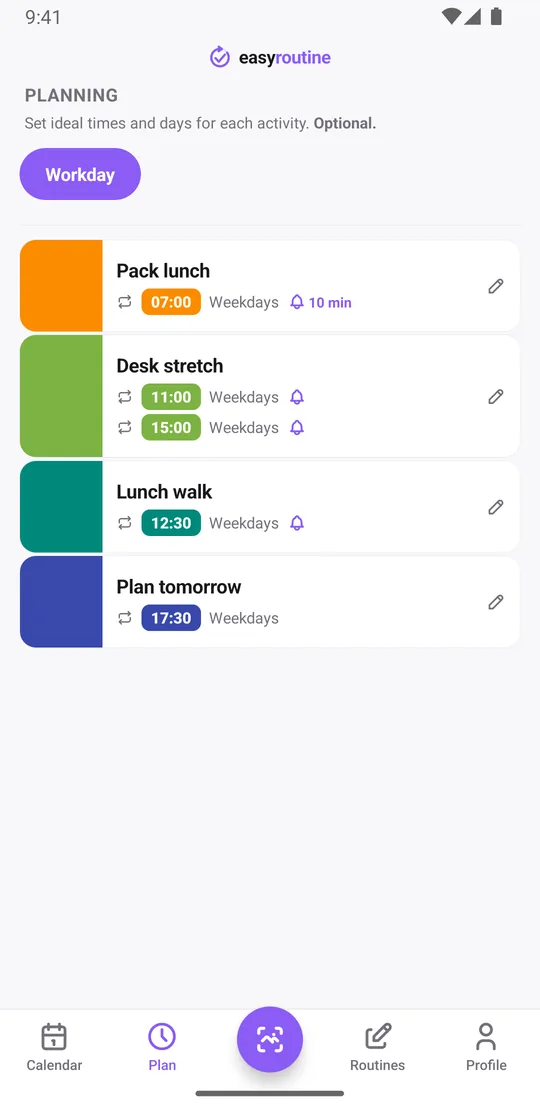
- Pack lunch: Monday to Friday, 7:00
- Desk stretch: Monday to Friday, 11:00 and 15:00 (one activity with two times)
- Lunch walk: Monday to Friday, 12:30
- Plan tomorrow: Monday to Friday, 17:30
Active period: none, it runs until you change it. If you only need it for a set stretch, like a work placement, add From and Until dates.
Reminders: on time for the stretch and the walk, 10 minutes before for packing lunch, off for the rest if you prefer.
One thing to know before you start: in EasyRoutine, a routine is only a name and a group. The schedule belongs to each activity. So "weekday-only routine" means every activity in the routine is scheduled for Monday to Friday. It takes a few taps per activity, and it also means one activity can later get weekend days without affecting the others.
Restrict the schedule to Monday to Friday
- On the Routines tab, tap Add routine and name it Workday. Tap Add activity for each step.
- With Premium, open the Plan tab and pick the first activity.
- Under Recurring, set the time, then tap Monday, Tuesday, Wednesday, Thursday and Friday. Leave Saturday and Sunday off.
- Set a Notification if you want one, on time or 5, 10, 15 or 30 minutes before.
- For the desk stretch, tap Add another time, set 15:00 and pick the same five days.
- Repeat for each activity. In the Plan tab, each one now reads Weekdays next to its time.
Scheduling and reminders are part of Premium. On the free plan there is no schedule, so nothing is planned on any day; you simply log each step when you do it. More about scheduling.
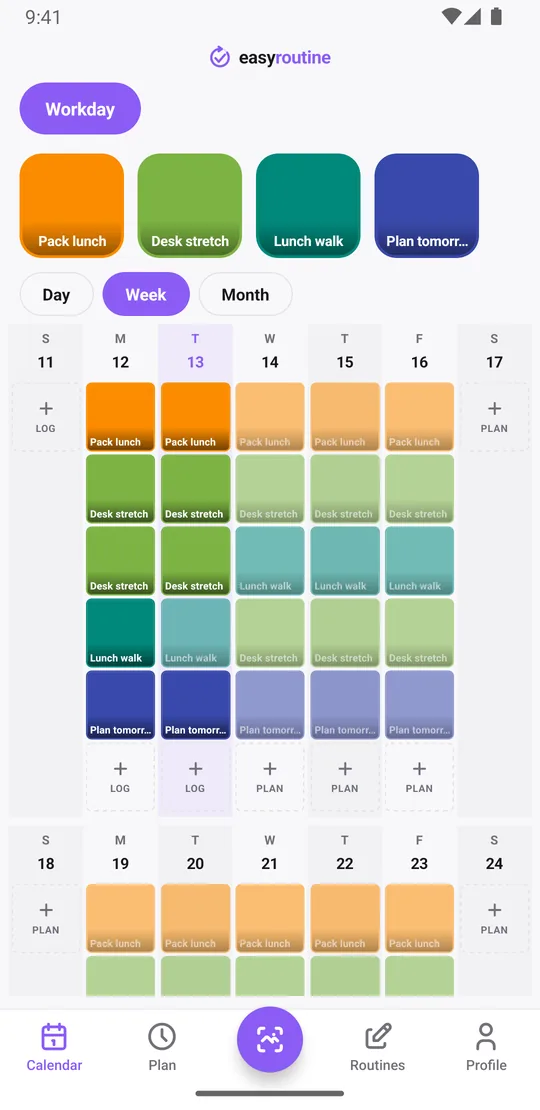
What the calendar looks like on weekends
On Monday to Friday each step shows as a faded entry until you log it, then as a colored tile. On Saturday and Sunday there are no planned entries for these activities and no reminders. The days are still there in the week view; they just have nothing from this routine on them, unless you log something.
And you can: if you do happen to pack lunch on a Saturday, log it with the log button on that day. Logging does not depend on the schedule. It simply appears as a tile on Saturday, and nothing is planned for the next one.
See how your workdays actually went
The schedule says what should happen; the log says what did. Logging is free: tap + Log on a day and pick the steps you did, or log a planned entry by tapping it. Missed it at the time? Add the log to that day afterwards.
To answer "when did I last take a lunch walk?", tap the Lunch walk tile at the top of the calendar. The calendar then shows only that activity, so the latest entry is the last walk. Switch to the month view and you see the longer pattern: walks every day in a quiet month, gaps in the weeks with back-to-back meetings.
Each log can also carry a short note and a green, amber or red flag, which helps a workday routine more than you might expect:
- Lunch walk: "rain, 10 min only", flagged amber
- Desk stretch: "neck stiff again", flagged red
- Plan tomorrow: the one task that has to happen first
The log sheet shows the last few notes for that activity, so on Monday you can still see what Friday's Plan tomorrow said. Notes do not appear on the calendar itself; open a log to read it.
Will it show on weekends if I do not schedule it?
An activity without any schedule is never planned on any day, weekdays included. It only appears on days when you log it. So if you leave one activity in the Workday routine unscheduled, it will not show on weekends, but it will not show as planned on Monday either. To get the weekday pattern, the activity needs the five weekdays in its schedule.
Adding weekends later
Plans change. To add weekends to one activity, open it in the Plan tab and tap Saturday and Sunday on the same time; the label then reads Every day. If the weekend time is different, say a stretch at 9:00 instead of 11:00, tap Add another time and give that time only Saturday and Sunday. Each activity can hold up to four recurring times, so a weekday time and a weekend time fit easily. The rest of the routine stays weekdays-only.
Shift work rarely fits Monday to Friday. If your days off move, pick the weekdays that match a regular pattern, or add single-day plans for the dates you work (up to 20 per activity). The routine tracker for shift workers covers that in more detail.
Common questions
How do I make a routine only show up on weekdays?
Schedule each activity in the routine for Monday to Friday in the Plan tab. Routines do not have their own schedule, so the weekday pattern is set per activity. The Plan tab then shows Weekdays next to each one. Scheduling is part of Premium.
Can I use this template on the free plan?
Yes, as a checklist. Create the routine and activities and log each step when you do it, with notes and flags if you like. The free plan has no schedule, so nothing is planned on weekdays and there are no reminders; that part is Premium.
Will it still show on weekends if I don't schedule it?
An activity with no schedule is not planned on any day, so it will not show on weekends, but it will not be planned on weekdays either. It appears only on days you log it.
What does the calendar show on weekends for a weekday-only activity?
Nothing from that activity: no faded planned entry and no reminder. Saturday and Sunday stay in the week view, empty for that routine unless you log something.
Can I add weekends later?
Yes. Tap Saturday and Sunday on the existing time, or add a second time just for weekends if the time is different. Past logs are not affected.
Keep reading
Free on iPhone and Android. Sign in with Apple, Google or your email to start.