My scheduled activity didn't show up today: what to check
An activity only appears on days its schedule covers. If it is missing today, the most likely reasons are that today's weekday is not ticked, or that today falls outside the active period set on its time. Work through the checks below in order; most cases are solved in the first two.
1. Is today's weekday ticked?
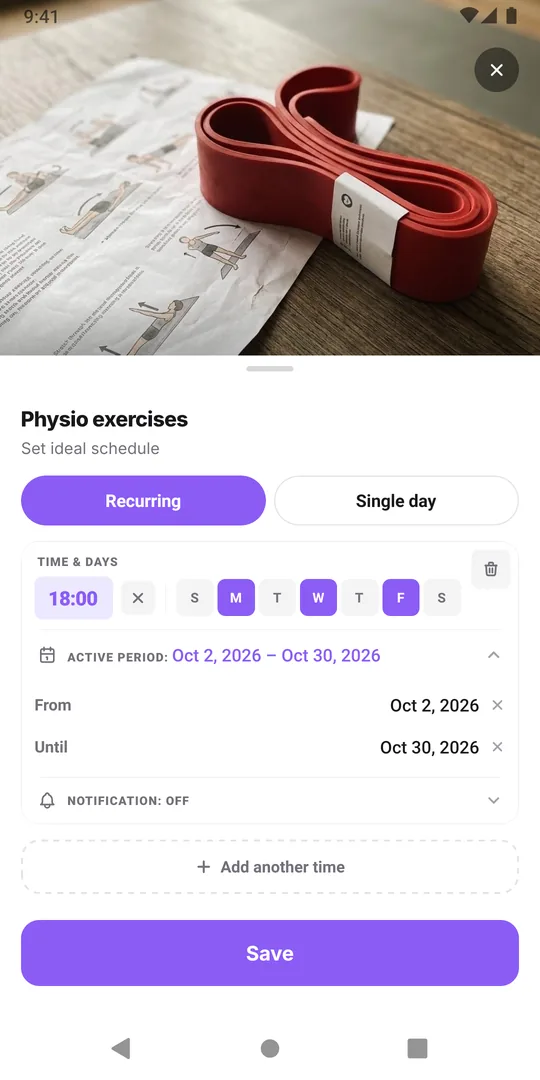
Each scheduled time runs on the weekdays you ticked, nothing else. Open the Plan tab, tap the activity and look at its times under Recurring. If today is Thursday and the time runs Monday, Wednesday and Friday, the activity is simply not planned today.
With several times on one activity, check each one: a weekend time and a weekday time each have their own days. If the days were set wrong by mistake, see activity on the wrong weekdays.
2. Is today inside the active period?
A scheduled time can have an active period with a From and an Until date. Outside those dates it does not appear at all:
- From is in the future. You set it up to start next Monday, so it will appear then.
- Until has passed. A two-week plan ended yesterday, so today is empty. That is the active period working as intended; see stop a treatment automatically after two weeks.
Both dates are included, so a time with Until set to today still shows today.
3. Was it planned for a single date instead?
Single dates are listed separately from weekly times, under Single day. If you meant to plan the dentist today but the date says tomorrow, today stays empty. Check the date and fix it if needed. Single dates more than 30 days in the past are removed when you save the schedule.
4. Are you looking at the right routine?
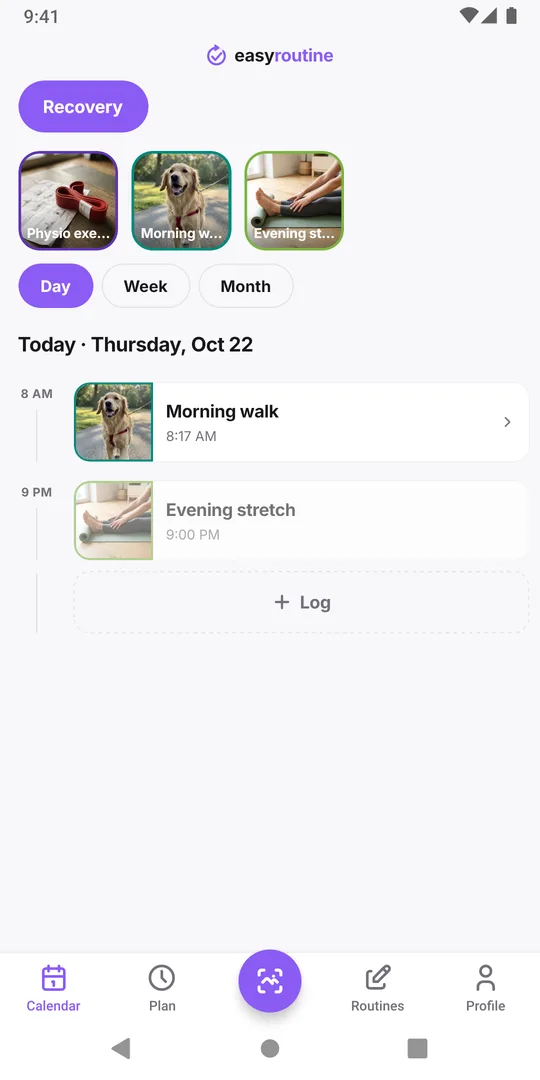
The calendar shows one routine at a time: the one selected in the pills above it. If the activity lives in your "Evening" routine and "Morning" is selected, it will not appear. Tap the other routine. More in several routines at once.
5. Is another activity highlighted?
Tapping an activity tile above the calendar highlights that activity: its dots get bigger and move to the front in the Month view, and its entries get a bolder colored frame in the Week and Day views. Other activities stay on the calendar, but next to a highlighted one they are easier to overlook. Tap the selected tile again to clear the highlight.
6. Was the activity archived, or already logged?
An archived activity leaves the tiles and its planned entries are no longer drawn, even though its schedule is kept. Unarchive it from the routine's archived list to bring it back.
And if the activity was logged today already, it is there, just not faded: a logged entry shows in full color instead of the faded planned one. If you logged it on another phone, it shows here too once synced.
If none of these fit
Schedules need Premium to create and edit, and the app needs an internet connection to load your data. If you have checked everything above, close and reopen the app with a connection, then look again. If it still does not show, write to support with the activity name and what its schedule says. The full set of schedule options is on the scheduling page.
Common questions
Why is my activity on the calendar some days but not today?
Each scheduled time runs only on the weekdays you ticked and only inside its active period. If today is not one of those days, the activity is not planned today.
Can I still log an activity that is not scheduled today?
Yes. Logging does not depend on the schedule. Tap Log on today and pick the activity. Logging is free.
My activity disappeared after two weeks. Is it deleted?
Probably not. If its time had an Until date, it stops appearing after that date. The activity and its logs are still there; extend or remove the Until date to bring it back.
Why don't I get a reminder even though the activity shows today?
A reminder needs a clock time on the scheduled time and the reminder switched on. A time left on Any time shows on the calendar but sends no notification.
Keep reading
- Two-week habit trial: a schedule template with a built-in end dateTry a new habit for exactly two weeks: a copyable template, a keep-or-drop rule set in advance, free daily logging and a day 14 review that decides.
- Weekday-only routine schedule template: Monday to Friday, nothing on weekendsA copyable Monday to Friday routine template and how to schedule it in EasyRoutine so workday habits show only on weekdays and your weekend stays clear.
- Can EasyRoutine track a one-time task, or only recurring ones?Yes, within limits. Plan a one-time task on a single date with a reminder (Premium), or log it any time for free. EasyRoutine is built for repeating tasks.
- Your schedule doesn't match your actual routine anymore? Plan for the usual weekPlanned habits keep showing as missed? How to compare your plan with what you really do, move times and days to fit the usual week, and keep the old weeks honest.
- My activity runs on the wrong weekdays: how to fix days scheduled by mistakePicked the wrong days when you set up a schedule? Change the weekdays on that time and the new pattern replaces the old one. Your past logs stay as they are.
- Changing my schedule made old weeks show the wrong missed daysEdited a schedule and old weeks now show different missed days? Why faded entries follow the current plan, and how to change a plan without rewriting history.
- Different times on weekdays versus weekends for the same activityRun at 7:00 on workdays and 9:00 at the weekend? Give one activity two scheduled times, each with its own weekdays, instead of two copies of the activity.
- How to pause a schedule temporarily without deleting itGoing away for a week? EasyRoutine has no pause switch, but you can end a schedule before the break and restart it after, mute reminders, or archive for a while.
- How to plan next week in advance (and see it on one calendar)Plan next week in advance in 15 minutes: look back, place fixed dates, fit habits around them. In EasyRoutine, scheduled activities already sit on future days.
- How to schedule an activity twice a day at different timesNeed a morning and an evening slot for the same activity? Add two scheduled times to one activity, such as 8:00 and 20:00, each with its own days and reminder.
- How to stop a treatment schedule automatically after two weeksSet a short treatment to end by itself: give the scheduled time a From and an Until date, and it shows and reminds you only between them. No deleting afterwards.
- What's the difference between scheduling and logging?Scheduling says when you plan to do something; logging records what you actually did. Why a new schedule changes little at first, and what is free.
Free on iPhone and Android. Sign in with Apple, Google or your email to start.