Two-week habit trial: a schedule template with a built-in end date
Is this new habit worth keeping, or did it just sound good on Sunday night? A two-week trial answers that with evidence instead of a feeling. Here is a template you can copy, how to give it a real end date in EasyRoutine, and what to look at on day 14.
Why a fixed two weeks works
Open-ended habits are easy to drop quietly. A trial with a clear last day is different: you only have to show up for fourteen days, and at the end you decide on purpose. Two weeks covers every weekday twice, so you see how the habit fits both busy and quiet days.
Good candidates are small and concrete: ten minutes of stretching after waking, reading ten pages before bed, a walk after lunch. Decide before you start what "worth keeping" means for you, for example "logged on at least 10 of 14 days", and write it down.
The template
Copy this and swap in your habit. The dates are an example of a 14-day window.
Routine: 2-week trial
Activity name: Stretch (short, so it fits on a tile; add "trial" if you keep it in an existing routine)
Days: every day (or Monday to Friday, if the habit only fits workdays)
Time: 7:15
Active period (Premium): From Monday 2 November, Until Sunday 15 November (both days included: 14 days)
Reminder (Premium): on time
Keep it if: logged on at least 10 of 14 days
Note to add when logging: one word on how it went, plus a green, amber or red flag
Putting the trial in its own routine keeps it visible and separate from habits you already rely on. You can run two or three trials side by side in the same routine, each as its own activity, as long as each one stays small.
Run the trial on the free plan
Logging and the calendar are free, so the trial itself costs nothing. On the Routines tab, tap Add routine and name it 2-week trial, then tap Add activity and name the habit. Each day you do it, tap + Log on that day and pick the habit. Did it in the morning and forgot to log it? Log it later and set the real time, or add it to yesterday.
To see the trial on its own, tap the habit's tile at the top of the calendar: the calendar then shows only that habit, so the logged days, the gaps and your last log stand out. The month view shows the whole two weeks at once. If the habit has an obvious object, like the book you are reading or your yoga mat, give the activity a photo and you can log it with the photo scan by pointing the camera at it.
Notes and flags: the why behind the count
Every log can carry a short note and a green, amber or red flag, also free. Add one to some logs ("stiff back", "easy", "only 5 minutes", "skipped, late meeting") and decide once what the flags mean, for example green for done as planned, amber for a shortened version and red for a day it felt forced. Each time you log, the log sheet shows your last few notes for that habit, so you notice a pattern while the trial is still running. Notes do not appear on the calendar; tap a log to read its note. On day 14, they tell you more than the count alone.
With Premium: a date range that ends after two weeks
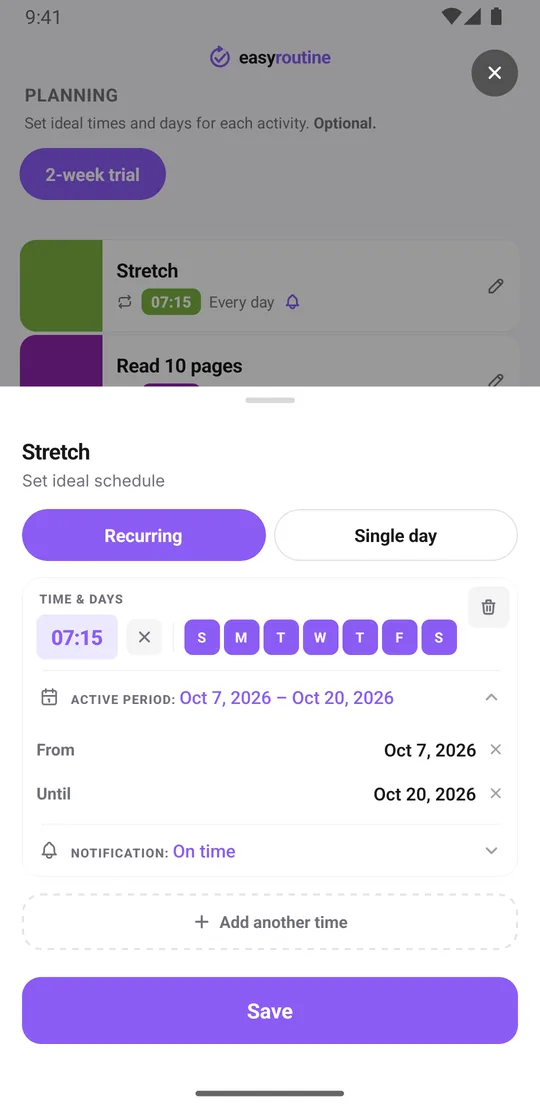
- Open the Plan tab and pick the activity. Under Recurring, set the time and tap the weekdays.
- Tap Active period, set From to your first day and Until to your last day. Both dates count, so a Monday start ends on the Sunday of the following week.
- Set a Notification, on time or up to 30 minutes before, if you want a nudge each day.
- If the habit has two times a day, add the second with Add another time and give it the same active period, since each time carries its own.
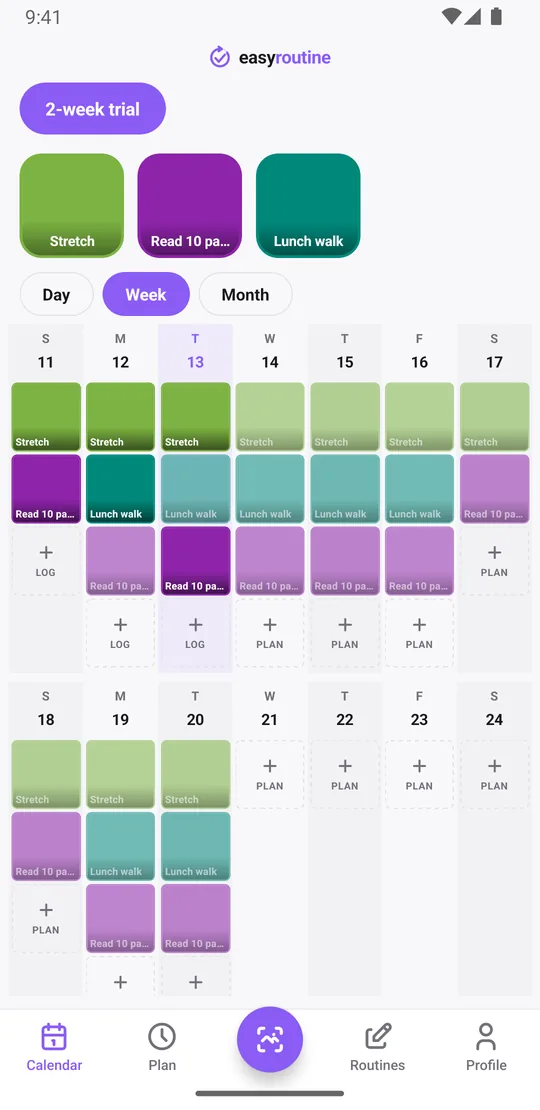
Each planned day then shows as a faded entry until you log it; tap it and save it in the Log Entry sheet. Missed a day? Do not delete anything. A faded entry left on a past day is honest data, and the trial is about finding out what really happens. Scheduling, active periods and reminders are part of Premium. More about scheduling.
What happens after the two weeks end
On the day after Until, the habit stops appearing on your calendar and its reminders stop. You do not have to delete anything. The app does not send a message or ask you to renew; the planned entries simply end. Everything you logged stays on the calendar, and the activity stays in its routine, so you can still log it any day with the log button.
Day 14 review checklist
Sit down with the calendar for two minutes and go through this:
- Count the logged days. Tap the habit's tile to show only that habit, then open the week or month view and count its days. The app does not show percentages, so you count, which takes seconds for 14 days.
- Look at the faded entries. Each one left on a past day is a planned day you skipped. Are they clustered on certain weekdays? That tells you where the habit does not fit.
- Read your notes and flags. Flags show as dots in the Day and Week views; tap a log to read its note. Mostly green and "easy", or amber and "forced it"?
- Check your streak. The day streak on your Profile counts days in a row with any log, across all routines, so treat it as a general signal rather than a score for this habit.
- Compare with the rule you wrote down before you started.
Then decide:
- Keep it: open the time in the Plan tab, clear the Until date, and move the activity to a regular routine with Move to routine.
- Extend it: set a new Until date for another week or two.
- Drop it: do nothing and let it end, or archive the activity to hide it. Its logs stay on the calendar.
Common questions
How do I schedule a habit for just two weeks?
With Premium, open the habit in the Plan tab, set its days and time under Recurring, then tap Active period and set From to your first day and Until to day 14. Both dates are included.
What happens after the two weeks end?
The habit stops showing on the calendar and its reminders stop. The app does not prompt you to renew. Your logs stay, and the activity stays in its routine, so you can extend it or keep logging it.
How do I decide whether to keep the habit after the trial?
Count the days you logged it in the week or month view, look at which planned days were skipped, read your notes and flags, and compare the result with the rule you set before you started, such as 10 of 14 days.
Can I run a two-week trial on the free plan?
Yes. Logging each day, notes, flags and the calendar are free; tap the habit's tile to see only its days and count them. The automatic start and end dates and the reminders need Premium.
Keep reading
Free on iPhone and Android. Sign in with Apple, Google or your email to start.