How to stop a treatment schedule automatically after two weeks
Give the treatment's scheduled time an active period: **From** the first day and **Until** the last day of the course. The activity then shows on the calendar and reminds you only between those dates, and from the day after it simply stops appearing. Nothing needs deleting, and every log stays.
Why short treatments need an end date
Eye drops for ten days, a cream for two weeks, an antibiotic course, a fortnight of physio exercises: short treatments come with a clear last day, and two things tend to go wrong around it.
- The reminder outlives the treatment. You finish, forget to switch the reminder off, and dismiss it every morning for weeks.
- You lose count. Was today day 13 or day 14? Without a record, the last few days are guesswork.
An end date set on day one solves the first. A log of each dose or application solves the second. How long a treatment should last is for your doctor or pharmacist, and the label, to decide; the plan just follows what they told you. If you are unsure whether to finish or stop early, ask them. See also finishing a medication course.
Count the days correctly
Two weeks starting on a Monday ends on the Sunday of the following week, not on the Monday. Count it like this:
- day 1 is the day you start
- day 14 is the last day you take or apply it
- day 15 is the first day without it
In EasyRoutine both dates of an active period are included, so a course from Monday 2 November to Sunday 15 November is exactly 14 days. If the course is counted in doses rather than days, for example 28 doses twice a day, check that the dates and the number of times per day give the same total.
Set the active period in EasyRoutine (Premium)
Scheduling and reminders are part of Premium; logging is free.
- Create an activity for the treatment, for example Eye drops, in the routine where you will see it.
- Open the Plan tab and tap the activity.
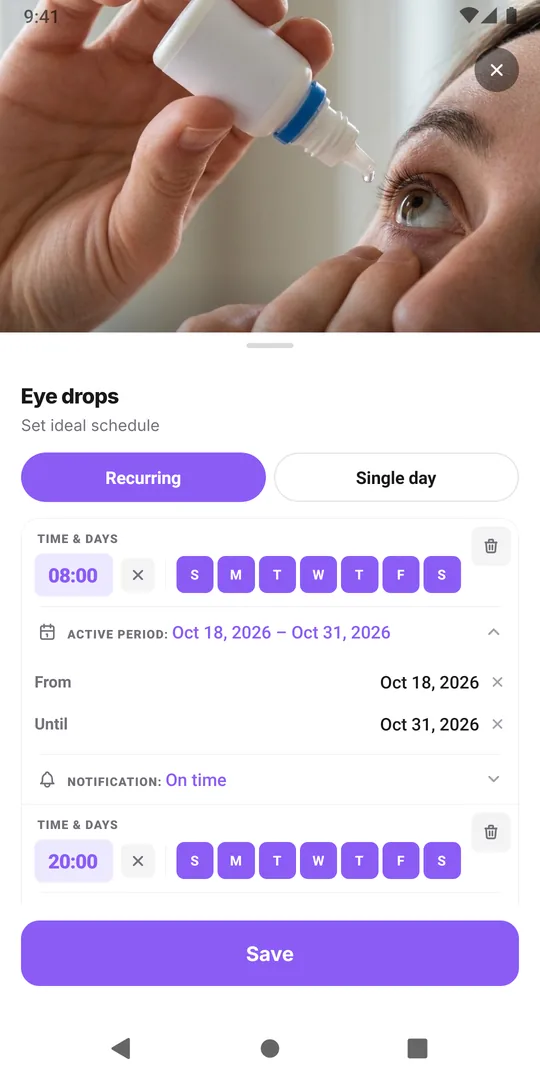
- Under Recurring, tick every day and set the time. Add a reminder if you want one.
- Set From to day 1 and Until to day 14.
- For a twice-daily treatment, tap Add another time for the evening and give it the same From and Until dates.
- Save.
What happens during and after
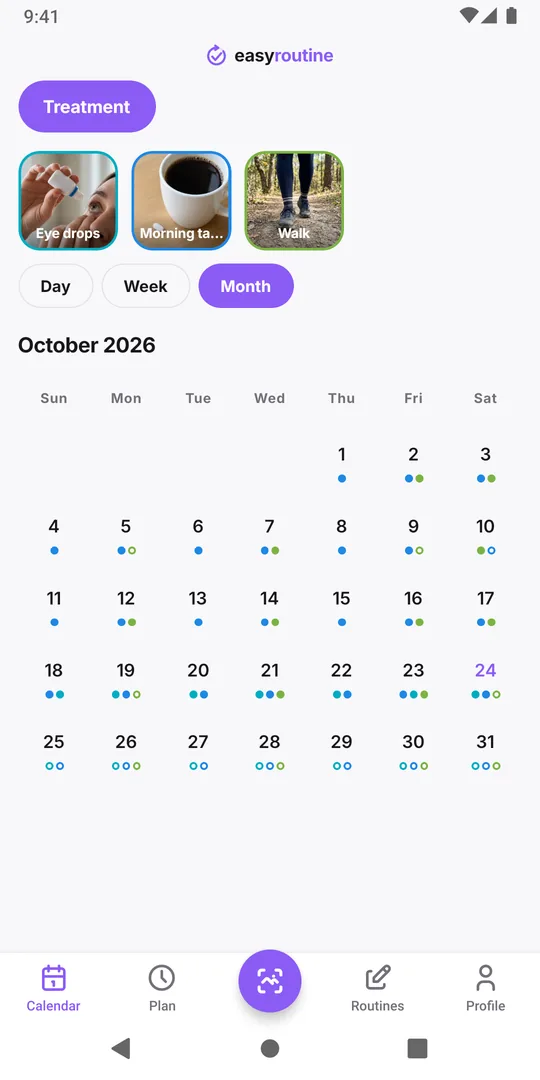
During the course, each planned time shows as a faded entry until you log it, so a gap on day 9 is easy to spot. Tap the entry when you have taken or applied it; add a note if something is worth telling the doctor later.
On day 15 the activity no longer appears on the calendar and no reminder fires. The schedule stays saved, and the logs remain on their days, so the month view still shows exactly which days of the course you completed.
When you no longer need the activity on screen, archive it. If the same treatment comes back later, unarchive it and give its time new dates.
A note on reminders
Reminders are set on your phone, and the app keeps up to 60 upcoming reminders at a time across all activities. A two-week course twice a day uses 28 of them, so if you already have many reminders, the app warns you when you save. Check that notifications are allowed for EasyRoutine before day 1; see missing notifications.
Common questions
Will the schedule really stop by itself?
Yes. A scheduled time with an Until date stops appearing on the calendar and stops reminding you after that date. You do not need to delete anything.
Is the Until date included?
Yes. Both From and Until are included, so From Monday 2 November until Sunday 15 November covers 14 days.
What if the doctor extends the treatment?
Open the activity in the Plan tab and move the Until date later. The extra days appear on the calendar and get reminders.
Can I see afterwards which days I missed?
Yes. Logs stay on the calendar after the course ends, and planned days you did not log show as faded entries inside the course dates.
Can I stop the reminders early if the treatment ends sooner?
Yes. If your doctor ends the treatment early, move the Until date to today, or set that time's notification to Off. Logs you already made stay on the calendar.
Keep reading
- Two-week habit trial: a schedule template with a built-in end dateTry a new habit for exactly two weeks: a copyable template, a keep-or-drop rule set in advance, free daily logging and a day 14 review that decides.
- Weekday-only routine schedule template: Monday to Friday, nothing on weekendsA copyable Monday to Friday routine template and how to schedule it in EasyRoutine so workday habits show only on weekdays and your weekend stays clear.
- Can EasyRoutine track a one-time task, or only recurring ones?Yes, within limits. Plan a one-time task on a single date with a reminder (Premium), or log it any time for free. EasyRoutine is built for repeating tasks.
- Your schedule doesn't match your actual routine anymore? Plan for the usual weekPlanned habits keep showing as missed? How to compare your plan with what you really do, move times and days to fit the usual week, and keep the old weeks honest.
- My activity runs on the wrong weekdays: how to fix days scheduled by mistakePicked the wrong days when you set up a schedule? Change the weekdays on that time and the new pattern replaces the old one. Your past logs stay as they are.
- Changing my schedule made old weeks show the wrong missed daysEdited a schedule and old weeks now show different missed days? Why faded entries follow the current plan, and how to change a plan without rewriting history.
- Different times on weekdays versus weekends for the same activityRun at 7:00 on workdays and 9:00 at the weekend? Give one activity two scheduled times, each with its own weekdays, instead of two copies of the activity.
- How to pause a schedule temporarily without deleting itGoing away for a week? EasyRoutine has no pause switch, but you can end a schedule before the break and restart it after, mute reminders, or archive for a while.
- How to plan next week in advance (and see it on one calendar)Plan next week in advance in 15 minutes: look back, place fixed dates, fit habits around them. In EasyRoutine, scheduled activities already sit on future days.
- How to schedule an activity twice a day at different timesNeed a morning and an evening slot for the same activity? Add two scheduled times to one activity, such as 8:00 and 20:00, each with its own days and reminder.
- My scheduled activity didn't show up today: what to checkA scheduled activity is missing from today's calendar? Check the weekdays, the active period, the selected routine, a highlighted tile and whether it was archived.
- What's the difference between scheduling and logging?Scheduling says when you plan to do something; logging records what you actually did. Why a new schedule changes little at first, and what is free.
Free on iPhone and Android. Sign in with Apple, Google or your email to start.