How early should your reminder go off?
Set the reminder for the moment you can act on it. Something you do on the spot, like taking a tablet that sits next to the kettle, works best on time. Anything that needs getting ready or leaving the house, like a gym session, needs a reminder early enough to cover that preparation.
The idea: remind yourself when you can start
A reminder only helps if you can act on it right away. If it rings too early, you dismiss it, carry on with what you were doing and forget again. If it rings at the planned time for something that takes 20 minutes to get ready for, you are already late.
So the right lead time is roughly how long it takes you to get from what you are usually doing to the start of the task. Ask yourself two questions:
- Can I do this in the place where the phone buzzes, within a minute?
- If not, how long do I need to stop, get ready or get there?
Example lead times for common tasks
These are starting points, not rules. Adjust them to how long you actually need.
- On time: a tablet or supplement kept where you are at that moment, eye drops, a glass of water, a quick log of something you just did. You can act within a minute, so an early reminder only adds a gap where you can forget.
- 5 minutes before: short tasks that need you to stand up and switch rooms, like flossing before bed or a stretching break at the desk.
- 10 to 15 minutes before: tasks you need to finish something else for, like packing a lunch before leaving, feeding a pet before a call, or starting dinner prep.
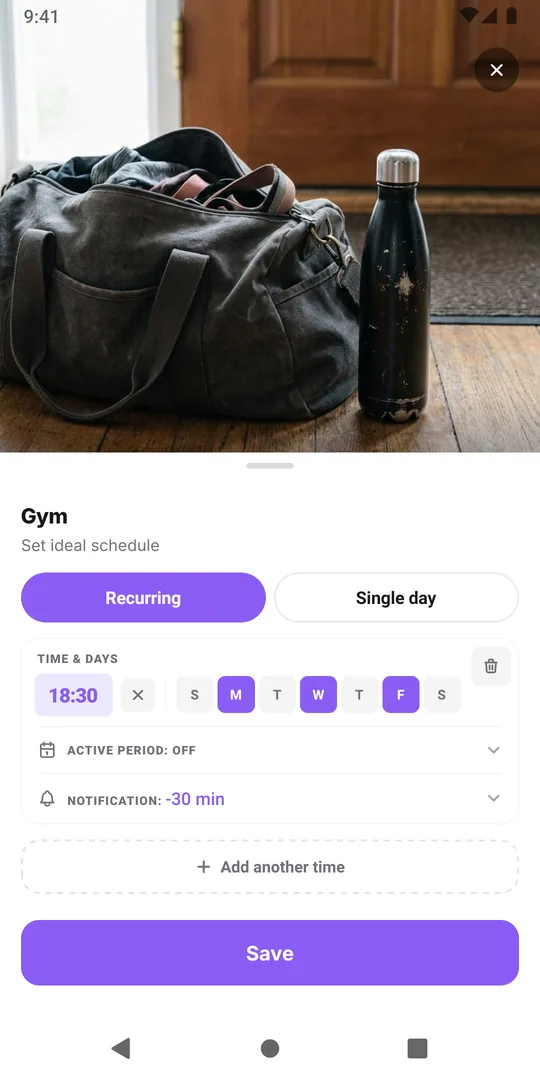
- 30 minutes before: anything that involves leaving the house or changing: the gym, a run, a class, putting the bins out before the collection truck comes.
If you notice you keep snoozing a reminder in your head and then missing the task, the lead time is usually too long. If you keep rushing, it is too short.
Setting the lead time in EasyRoutine
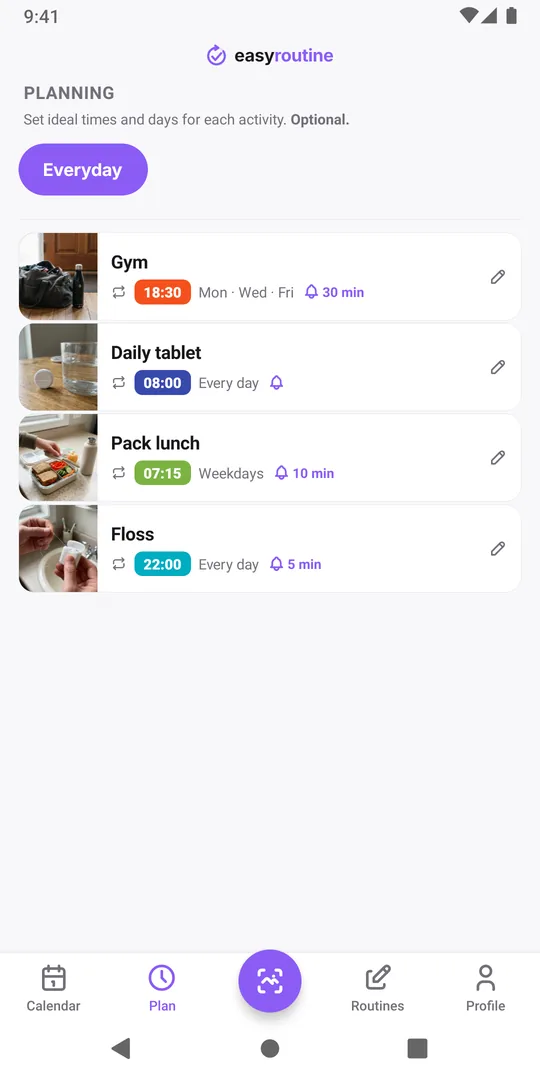
In EasyRoutine every scheduled time of an activity has its own Notification setting in the Plan tab: Off, On time, or 5, 10, 15 or 30 minutes before. A gym session at 18:30 with a 30-minute lead time rings at 18:00, which gives you time to change and leave. The notification names the activity and the routine, and tapping it opens that routine so you can log it when you are done.
Because each time has its own setting, a tablet at 8:00 can ring on time while the evening walk at 19:00 rings 15 minutes early. Reminders are part of Premium together with scheduling; see Reminders for what they need.
When early is not enough
Two situations need more than a lead time:
- The task needs a decision the evening before, like packing the gym bag. Make that its own activity with its own time the evening before, instead of a reminder hours ahead.
- The timing differs by day. If you leave earlier on weekdays, give the activity a second time for the weekend with its own reminder. Each activity can have up to four repeating times. Twice a day at different times shows how.
Whatever you pick, try it for a week and look at the week view: planned entries you did not log stay faded, so a row of faded entries at the same time tells you to move the reminder.
Common questions
Can I set a lead time longer than 30 minutes?
The app offers on time and 5, 10, 15 or 30 minutes before. For a longer run-up, like an hour before an appointment, create a separate preparation activity at the earlier time with its own reminder.
Can I get two reminders for the same time, one early and one on time?
Each scheduled time has one reminder. To get a second nudge, add a second time to the activity a few minutes later with its own notification.
Does the reminder ring again if I ignore it?
No. Each reminder rings once. The planned entry stays faded in the Week and Day views (a hollow ring in the Month view) until you log it, so you can still see it was missed.
Keep reading
- Missing your reminder notifications? Work through this checklistReminder notifications not arriving? Work through this checklist: a reminder that is really set, phone notification settings, Focus modes, and opening the app.
- Hit the "Too many reminders" limit? Here is how to make roomSaw "Too many reminders" after saving a schedule? A phone holds 60 upcoming EasyRoutine reminders. Here is how they add up and how to free room.
- Is your iPhone notification summary delaying your reminder?Reminder arriving late, bundled with other notifications? Your iPhone's Scheduled Summary is holding it back. Switch EasyRoutine to Immediate Delivery.
- Not getting a reminder? The activity needs a scheduled time firstNot getting a reminder for an activity? In EasyRoutine a reminder belongs to a scheduled time. Without a weekday or date and a clock time, nothing can ring.
- One reminder for several activities at once?Want one reminder for several activities, like a whole morning routine? EasyRoutine reminders belong to one activity each. Here is the closest setup.
- Phone was offline and you missed a reminder?Missed a reminder while your phone was offline? EasyRoutine reminders are stored on the phone and fire offline, but dated ones are topped up only online.
- Reminders don't show up because of Do Not Disturb or Focus?Reminders don't show up because of Do Not Disturb or a Focus? EasyRoutine reminders follow your phone's quiet modes. Here is how to let them through.
- Turned off notifications by accident? Here is how to turn them back onTurned off notifications by accident or tapped Don't Allow? Reminders stay silent until you allow EasyRoutine notifications again in your phone's settings.
- Why are reminders a paid feature?Why are reminders a paid feature? In EasyRoutine a reminder lives on a scheduled time, and scheduling is Premium. Logging, the scan and the calendar stay free.
- Why did you get a reminder for something you already logged?Got a reminder for something you already logged? EasyRoutine reminders ring at their set time either way. The calendar, not the notification, shows what is done.
Free on iPhone and Android. Sign in with Apple, Google or your email to start.