Why are reminders a paid feature?
In EasyRoutine a reminder is not a separate feature: it is a setting on an activity's scheduled time. Planning schedules ahead is what Premium pays for, so reminders come with it. Everything about recording what you did, including logging, notes, the AI photo scan and the calendar, stays free.
Reminders sit on top of a schedule
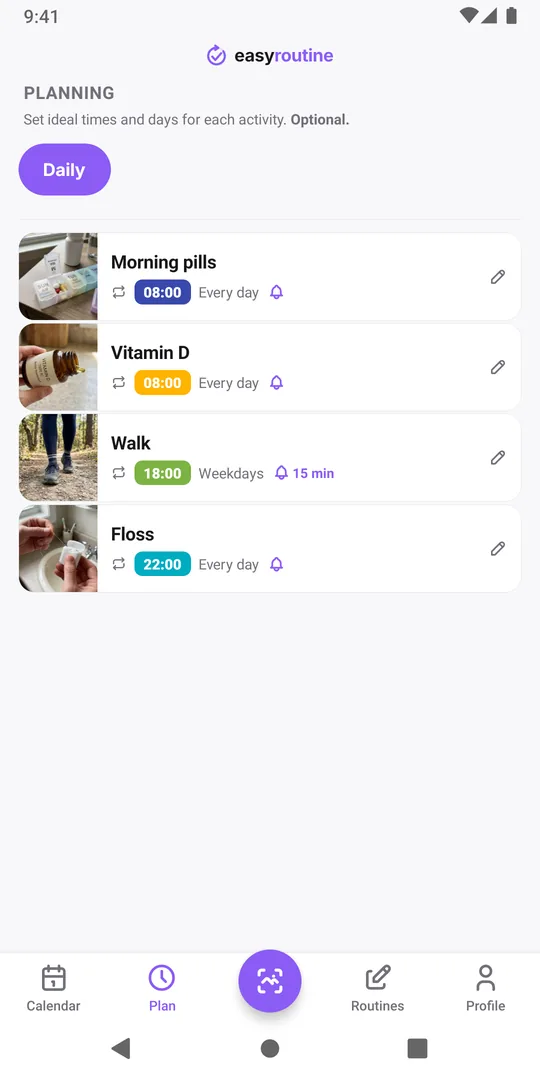
To remind you, an app has to know when something is supposed to happen. In EasyRoutine that is the schedule: weekdays or a date, and a clock time, set per activity in the Plan tab. The reminder is one more setting on that time, Notification, with a choice of on time or a few minutes before.
Without a schedule there is no time to ring at, so there can be no reminder. That is why the two are sold together: the Premium paywall lists exactly three things, No ads, Schedule planning and Activity notifications.
What stays free
The free plan is a complete log, not a trial:
- Unlimited routines, activities and logs.
- Logging by tap, several at once with Log, or back-dated to when you actually did it.
- Notes and a red, amber or green flag on each log.
- The AI photo scan that logs an activity from a photo.
- The day, week and month calendar, the Day streak and totals.
- Sync across your phones.
If your main question is "Did I already do this today?" or "When did I last do that?", the free plan answers it. The free plan shows a banner ad at the bottom of the calendar and profile screens.
Reminders without paying: the workaround
If you only need a nudge for one or two things, you do not need Premium. Use a free tool you already have for the nudge and EasyRoutine for the record:
- Set a repeating alarm in your phone's clock app, or a repeating event in your calendar app, for the time you want.
- When it rings, open EasyRoutine and log the activity.
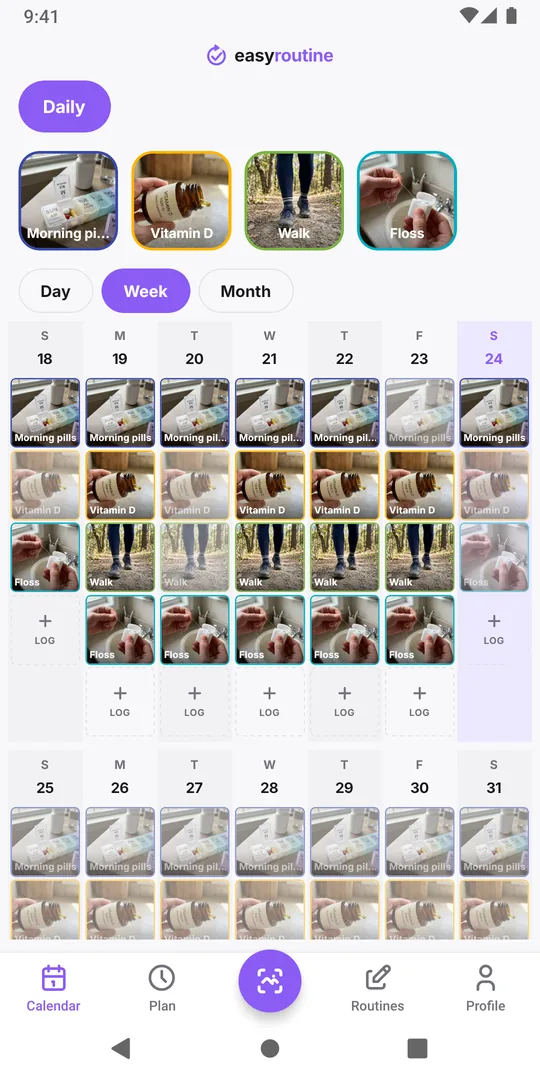
You lose the link between the two (the alarm does not know whether you logged it), and you will not see planned entries on the calendar. For a handful of reminders that is often fine. Premium becomes worth it when you have several activities on different days and times and want each to show up as planned on the calendar and remind you on its own. The current price for your country is on the pricing page.
If you already had Premium
When Premium ends, your schedules are not deleted and their reminders keep going off. You can still remove them, but adding or changing plans needs Premium again, and logging carries on as before. If you subscribe again later, the Plan tab opens with your schedules as you left them. Reminders explains in more detail what a reminder needs.
Common questions
Is there a free trial of reminders?
No. There is no free trial; Premium is a monthly subscription you can cancel in your App Store or Google Play settings.
Can I buy reminders without the rest of Premium?
No. Premium is one subscription that covers schedule planning, activity notifications and removing ads.
Is the AI photo scan free?
Yes. The scan, AI photo naming, logging, notes, flags and the calendar are all on the free plan.
Are there limits on the free plan?
No limits on routines, activities, logs or photos. The free plan shows banner ads and has no schedules or reminders.
Keep reading
- Missing your reminder notifications? Work through this checklistReminder notifications not arriving? Work through this checklist: a reminder that is really set, phone notification settings, Focus modes, and opening the app.
- Hit the "Too many reminders" limit? Here is how to make roomSaw "Too many reminders" after saving a schedule? A phone holds 60 upcoming EasyRoutine reminders. Here is how they add up and how to free room.
- How early should your reminder go off?How early should a reminder go off? Match the lead time to the task: on time for a tablet, 10 to 30 minutes early for anything you need to get ready or leave for.
- Is your iPhone notification summary delaying your reminder?Reminder arriving late, bundled with other notifications? Your iPhone's Scheduled Summary is holding it back. Switch EasyRoutine to Immediate Delivery.
- Not getting a reminder? The activity needs a scheduled time firstNot getting a reminder for an activity? In EasyRoutine a reminder belongs to a scheduled time. Without a weekday or date and a clock time, nothing can ring.
- One reminder for several activities at once?Want one reminder for several activities, like a whole morning routine? EasyRoutine reminders belong to one activity each. Here is the closest setup.
- Phone was offline and you missed a reminder?Missed a reminder while your phone was offline? EasyRoutine reminders are stored on the phone and fire offline, but dated ones are topped up only online.
- Reminders don't show up because of Do Not Disturb or Focus?Reminders don't show up because of Do Not Disturb or a Focus? EasyRoutine reminders follow your phone's quiet modes. Here is how to let them through.
- Turned off notifications by accident? Here is how to turn them back onTurned off notifications by accident or tapped Don't Allow? Reminders stay silent until you allow EasyRoutine notifications again in your phone's settings.
- Why did you get a reminder for something you already logged?Got a reminder for something you already logged? EasyRoutine reminders ring at their set time either way. The calendar, not the notification, shows what is done.
Free on iPhone and Android. Sign in with Apple, Google or your email to start.