Hit the "Too many reminders" limit? Here is how to make room
A phone holds at most 60 upcoming EasyRoutine reminders, and every weekday of every reminder time counts separately. When you go over, the app warns you and leaves out the furthest ones. Turning off reminders you do not need, or keeping one reminder for a group of activities you do together, brings you back under the limit.
Why the warning appears
EasyRoutine does not send reminders from a server. It hands them to your phone in advance, and phones only accept a limited number of waiting notifications per app (an iPhone stops at 64). EasyRoutine keeps itself to 60, the soonest first.
After you save a schedule that pushes the total over 60, the app shows Too many reminders: your device holds up to 60 upcoming reminders, so some of the later ones may not fire. The reminders that do fit still work normally. Only the ones furthest in the future are left out.
How the 60 add up faster than you think
The limit counts reminders the phone is waiting to show, not activities. A repeating reminder counts once for each weekday it is on:
- A reminder every day at 8:00 counts as 7.
- A reminder Monday to Friday at 18:00 counts as 5.
- An activity with two times a day, both with a reminder, every day, counts as 14.
So eight activities with a daily reminder already need 56 of the 60 places. Add a twice-daily supplement and you are over.
Reminders with an Until date, a From date that has not started yet, or a single-day plan work differently: they are scheduled date by date, and each date takes a place. A daily reminder for the next three weeks can take 21 places on its own until the dates come closer.
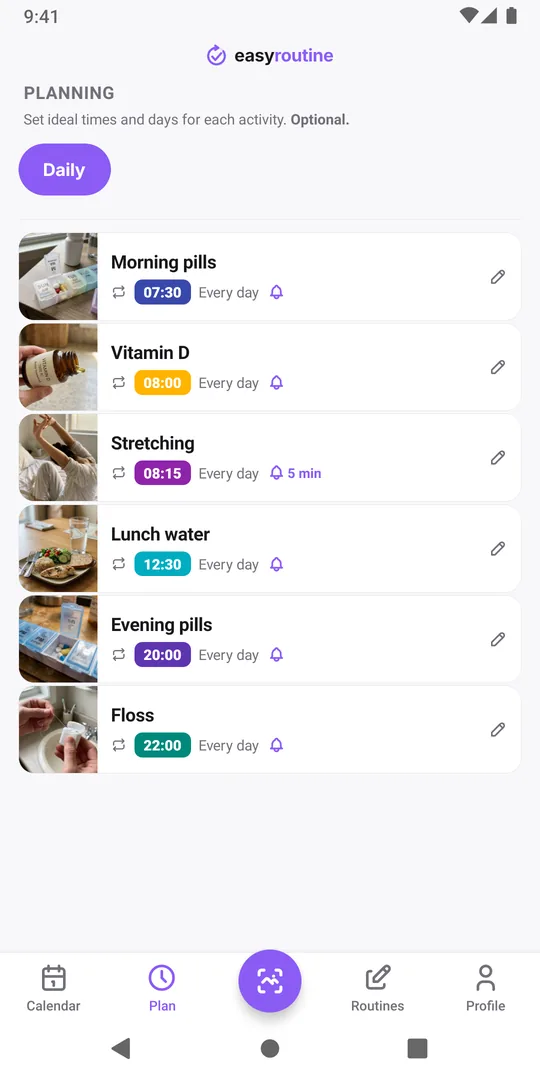
How to make room
Open the Plan tab and go through your activities. For each time, ask whether you actually need the nudge or whether the habit already runs by itself.
- Turn off reminders you no longer need. Set Notification to Off for times you never miss anyway, like brushing your teeth. The schedule stays, so the planned entries still show on the calendar.
- Keep one reminder for a group. If you take vitamin D, magnesium and omega-3 together at 8:00, one reminder on the first activity is enough. Turn the other two off; when the first notification arrives, you log all three. The one reminder for several activities page explains this setup.
- Drop weekdays you do not need. A reminder on weekdays only takes 5 places instead of 7.
- Archive activities you have stopped. Archived activities never send reminders and free their places at once.
The Notifications tile in the Profile tab counts your reminder times, which is a quick way to see whether the clean-up worked. Save a schedule again afterwards: if the warning no longer appears, everything fits.
What happens to the reminders left out
Nothing is deleted. Your schedules stay exactly as you set them; only the reminders beyond the 60th are not handed to the phone yet. Dated reminders expire as their days pass, which frees places, and the app fills them with later ones the next time you open it with a connection. Repeating reminders that were cut can stay missing for as long as the total is over the limit, so bringing the count under 60 is the reliable fix. Missing notifications lists the other reasons a reminder might not arrive.
Common questions
Can I raise the 60 reminder limit?
No. The limit comes from how phones store waiting notifications, so EasyRoutine stays under it on every device. The only way to fit more activities is to use fewer reminder places, for example one reminder for activities you do together.
Does every activity count toward the limit?
Only times with a notification turned on count. Activities without reminders, times set to Any time and archived activities take no places.
Which reminders are left out when I go over?
The ones furthest in the future. The app keeps the 60 that fire soonest, so the reminders for today and tomorrow are always the ones that stay.
Do reminders on my second phone count too?
Each phone has its own 60 places. Every phone where you are signed in schedules the same reminders, so the count is the same on each.
Keep reading
- Missing your reminder notifications? Work through this checklistReminder notifications not arriving? Work through this checklist: a reminder that is really set, phone notification settings, Focus modes, and opening the app.
- How early should your reminder go off?How early should a reminder go off? Match the lead time to the task: on time for a tablet, 10 to 30 minutes early for anything you need to get ready or leave for.
- Is your iPhone notification summary delaying your reminder?Reminder arriving late, bundled with other notifications? Your iPhone's Scheduled Summary is holding it back. Switch EasyRoutine to Immediate Delivery.
- Not getting a reminder? The activity needs a scheduled time firstNot getting a reminder for an activity? In EasyRoutine a reminder belongs to a scheduled time. Without a weekday or date and a clock time, nothing can ring.
- One reminder for several activities at once?Want one reminder for several activities, like a whole morning routine? EasyRoutine reminders belong to one activity each. Here is the closest setup.
- Phone was offline and you missed a reminder?Missed a reminder while your phone was offline? EasyRoutine reminders are stored on the phone and fire offline, but dated ones are topped up only online.
- Reminders don't show up because of Do Not Disturb or Focus?Reminders don't show up because of Do Not Disturb or a Focus? EasyRoutine reminders follow your phone's quiet modes. Here is how to let them through.
- Turned off notifications by accident? Here is how to turn them back onTurned off notifications by accident or tapped Don't Allow? Reminders stay silent until you allow EasyRoutine notifications again in your phone's settings.
- Why are reminders a paid feature?Why are reminders a paid feature? In EasyRoutine a reminder lives on a scheduled time, and scheduling is Premium. Logging, the scan and the calendar stay free.
- Why did you get a reminder for something you already logged?Got a reminder for something you already logged? EasyRoutine reminders ring at their set time either way. The calendar, not the notification, shows what is done.
Free on iPhone and Android. Sign in with Apple, Google or your email to start.