Why did you get a reminder for something you already logged?
EasyRoutine reminders ring at their set time whether or not you logged the activity earlier. The reminder and the log are separate: the reminder is handed to your phone in advance, and logging does not take it back. When a reminder arrives, the calendar is what tells you whether it is already done.
Why the reminder still rings
EasyRoutine schedules reminders on the phone itself, ahead of time, so they arrive even without a connection. A repeating reminder is handed over as "every Monday at 8:00" and the phone fires it on its own clock. Logging the activity at 7:40 records that you did it, but it does not cancel the 8:00 reminder the phone is already holding.
That is the price of reminders that work offline and keep running even if you do not open the app for weeks. The upside is reliability: a reminder never goes missing because the app guessed you had already done something.
Use the reminder as a check, not an order
The useful way to read an EasyRoutine reminder is "time to check this", not "you have not done this yet". When it arrives:
- Tap it. It opens the routine the activity belongs to.
- Look at today on the calendar. A logged activity shows as a solid entry with its time; a planned one not yet logged is faded.
- If it is solid, you are done and can dismiss the notification. If it is faded, do it and tap the entry to log it.
This is especially handy for the question reminders are often meant to answer: "Did I already take it?" A notification cannot tell you that, but the calendar can, with the exact time you logged it.
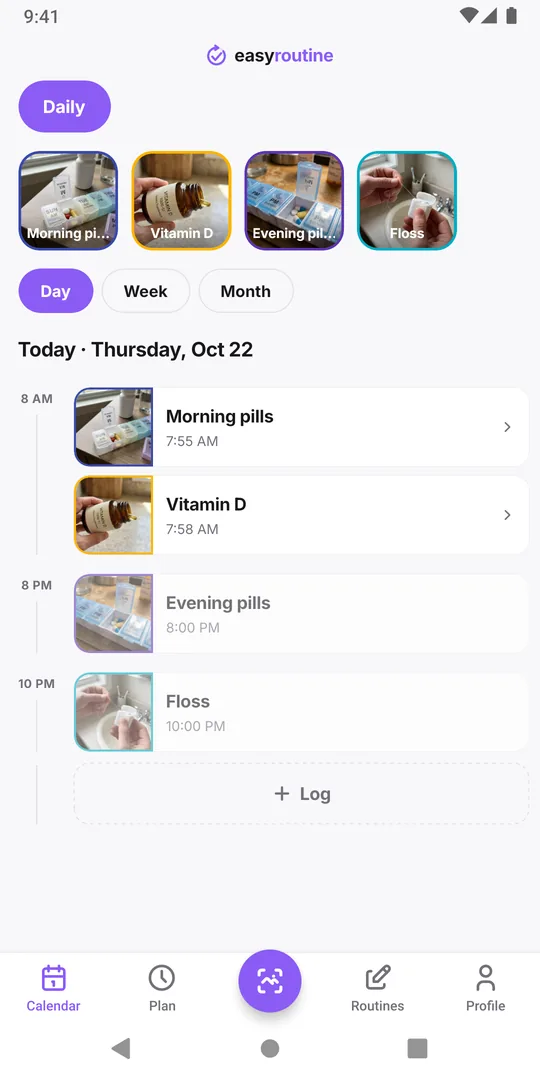
If early logging is your normal pattern
If you regularly do the activity before its reminder, the time in the schedule no longer matches your day. Two easy fixes in the Plan tab:
- Move the time earlier, to when you actually do it, so the reminder comes when it is useful.
- Turn the reminder off for that time if the habit runs without it. The planned entry still appears on the calendar, so you can still see when it was missed.
If the reminder rings with a lead time, say 15 minutes before, remember it rings that much before the planned time; logging during those minutes is normal and the reminder will already have rung. Reminders are part of Premium, together with the schedules they belong to. Schedule doesn't match reality has more on adjusting times that drift.
Common questions
Can EasyRoutine skip the reminder when I already logged the activity?
No. Reminders ring at their set time regardless of logs. Check today's calendar when one arrives; a solid entry means it is done.
Did the reminder log the activity twice?
No. A reminder never creates a log. Only you log an activity, by tapping, with the Log button or with the photo scan.
I logged it on another phone. Why did this phone still remind me?
Every phone where you are signed in holds its own copy of your reminders, and logging on one does not cancel them on the others. The calendar on both phones shows the log once it has synced.
Keep reading
- Missing your reminder notifications? Work through this checklistReminder notifications not arriving? Work through this checklist: a reminder that is really set, phone notification settings, Focus modes, and opening the app.
- Hit the "Too many reminders" limit? Here is how to make roomSaw "Too many reminders" after saving a schedule? A phone holds 60 upcoming EasyRoutine reminders. Here is how they add up and how to free room.
- How early should your reminder go off?How early should a reminder go off? Match the lead time to the task: on time for a tablet, 10 to 30 minutes early for anything you need to get ready or leave for.
- Is your iPhone notification summary delaying your reminder?Reminder arriving late, bundled with other notifications? Your iPhone's Scheduled Summary is holding it back. Switch EasyRoutine to Immediate Delivery.
- Not getting a reminder? The activity needs a scheduled time firstNot getting a reminder for an activity? In EasyRoutine a reminder belongs to a scheduled time. Without a weekday or date and a clock time, nothing can ring.
- One reminder for several activities at once?Want one reminder for several activities, like a whole morning routine? EasyRoutine reminders belong to one activity each. Here is the closest setup.
- Phone was offline and you missed a reminder?Missed a reminder while your phone was offline? EasyRoutine reminders are stored on the phone and fire offline, but dated ones are topped up only online.
- Reminders don't show up because of Do Not Disturb or Focus?Reminders don't show up because of Do Not Disturb or a Focus? EasyRoutine reminders follow your phone's quiet modes. Here is how to let them through.
- Turned off notifications by accident? Here is how to turn them back onTurned off notifications by accident or tapped Don't Allow? Reminders stay silent until you allow EasyRoutine notifications again in your phone's settings.
- Why are reminders a paid feature?Why are reminders a paid feature? In EasyRoutine a reminder lives on a scheduled time, and scheduling is Premium. Logging, the scan and the calendar stay free.
Free on iPhone and Android. Sign in with Apple, Google or your email to start.