One reminder for several activities at once?
EasyRoutine has no combined reminder: each reminder belongs to one activity's scheduled time. If you give several activities the same time with a reminder each, you get separate notifications that arrive together. If you want a single nudge, keep the reminder on the first activity of the group only and log the rest when it rings.
Why one nudge is often better than five
A morning routine of five small steps does not need five alerts. When the phone buzzes five times at 7:00, most people swipe them all away at once, and the alerts stop meaning anything. One notification that says "start the morning routine now" is usually enough, because the steps follow each other anyway.
What matters more is that the group is done in a fixed order at a fixed moment, so the first step pulls the others along. The reminder only has to start the chain.
How reminders work in EasyRoutine
Each activity has its own schedule in the Plan tab, and each scheduled time has its own Notification setting. The notification names that one activity and its routine: "Activity "Brush teeth" is coming up in "Morning"." Tapping it opens the routine.
There is no setting that bundles several activities into one notification, and a routine has no schedule or reminder of its own. That leaves two setups.
Setup 1: one reminder on the first step
This is the closest thing to a group reminder.
- Give every activity of the group the same time, for example 7:00, in the Plan tab. They all appear as planned entries at 7:00 on the calendar.
- Turn on Notification only for the first step, the one that starts the routine, like brushing your teeth.
- Leave Notification on Off for the other activities.
When the reminder rings, tap it to open the routine and work through the steps. Afterwards, tap Log on the day and pick all the activities you did to log them in one go.
This setup also saves places: a phone holds at most 60 upcoming EasyRoutine reminders, and every daily reminder takes 7. See too many reminders.
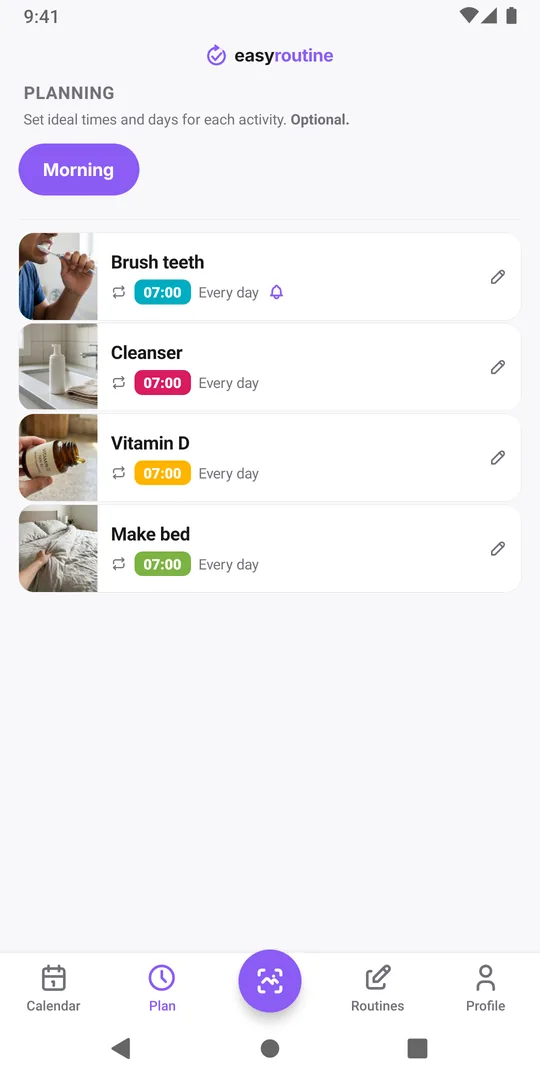
Setup 2: a reminder on each, same time
If every step really needs its own nudge, for example because you tend to skip one in the middle, turn on the notification for each activity. They are separate notifications and arrive together, one per activity. Stagger the times by a few minutes (7:00, 7:05, 7:10) if you want them to work as a running checklist instead of a pile.
Scheduling and reminders are part of Premium. On the free plan you can still keep the whole group in one routine and log it with Log, just without the nudge.
Common questions
Can a routine have its own reminder?
No. Routines have no schedule of their own; reminders belong to an activity's scheduled time. Put the reminder on the first activity of the routine to get a similar effect.
If several reminders are at the same time, do they arrive as one?
No. Each activity sends its own notification, so they arrive at the same moment as separate notifications. Your phone may stack them together in the notification list.
Can I log several activities at once?
Yes. The Log button on a day lets you pick several activities and log them all in one step, which suits a group with one reminder.
Keep reading
- Missing your reminder notifications? Work through this checklistReminder notifications not arriving? Work through this checklist: a reminder that is really set, phone notification settings, Focus modes, and opening the app.
- Hit the "Too many reminders" limit? Here is how to make roomSaw "Too many reminders" after saving a schedule? A phone holds 60 upcoming EasyRoutine reminders. Here is how they add up and how to free room.
- How early should your reminder go off?How early should a reminder go off? Match the lead time to the task: on time for a tablet, 10 to 30 minutes early for anything you need to get ready or leave for.
- Is your iPhone notification summary delaying your reminder?Reminder arriving late, bundled with other notifications? Your iPhone's Scheduled Summary is holding it back. Switch EasyRoutine to Immediate Delivery.
- Not getting a reminder? The activity needs a scheduled time firstNot getting a reminder for an activity? In EasyRoutine a reminder belongs to a scheduled time. Without a weekday or date and a clock time, nothing can ring.
- Phone was offline and you missed a reminder?Missed a reminder while your phone was offline? EasyRoutine reminders are stored on the phone and fire offline, but dated ones are topped up only online.
- Reminders don't show up because of Do Not Disturb or Focus?Reminders don't show up because of Do Not Disturb or a Focus? EasyRoutine reminders follow your phone's quiet modes. Here is how to let them through.
- Turned off notifications by accident? Here is how to turn them back onTurned off notifications by accident or tapped Don't Allow? Reminders stay silent until you allow EasyRoutine notifications again in your phone's settings.
- Why are reminders a paid feature?Why are reminders a paid feature? In EasyRoutine a reminder lives on a scheduled time, and scheduling is Premium. Logging, the scan and the calendar stay free.
- Why did you get a reminder for something you already logged?Got a reminder for something you already logged? EasyRoutine reminders ring at their set time either way. The calendar, not the notification, shows what is done.
Free on iPhone and Android. Sign in with Apple, Google or your email to start.