Can you compare habits from different routines on one calendar?
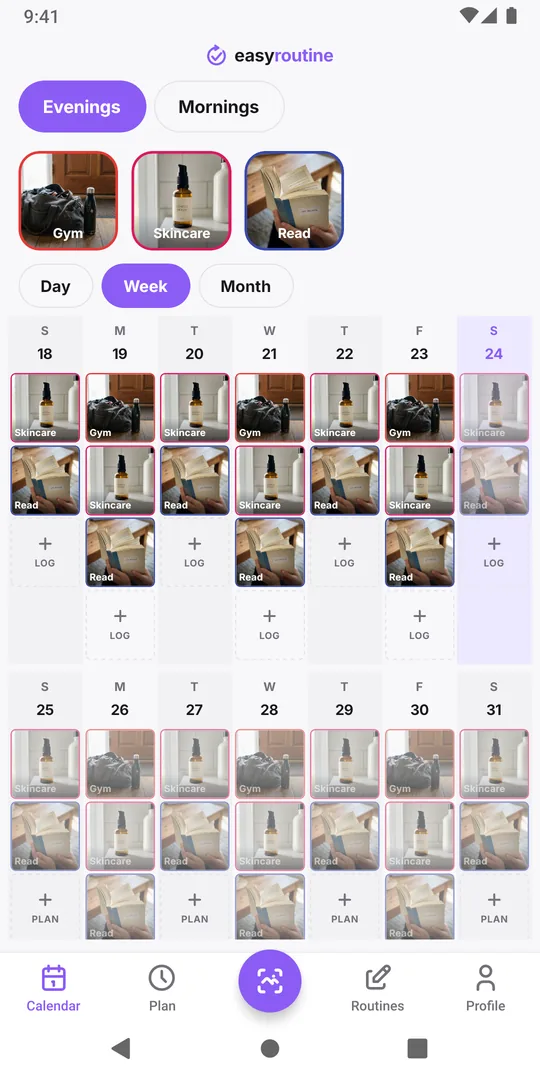
Not in one view: the EasyRoutine calendar shows one routine at a time. Habits you want to see side by side, like a gym habit and an evening skincare step, need to be in the same routine. Everything else you check by switching between routines with the buttons above the calendar.
Why you might want two habits on one view
Comparing two habits is about how they affect each other, not about each one alone. Typical questions:
- Do they compete for the same time? On gym evenings, does the skincare routine get skipped?
- Does one pull the other along? On days you walk in the morning, do you also read in the evening?
- Did something change both? A new job, a trip or an illness often shows up as a gap in several habits in the same week.
You can only answer these by looking at the same days for both habits at once. Two separate lists, read one after the other, make it hard to spot that the gaps fall on the same evenings.
How EasyRoutine's calendar handles routines
A routine is a group of activities, like Morning, Training or Skincare. The Calendar tab shows the routine selected in the buttons above it, never several routines at once. Its day, week and month views show only that routine's logs and plans.
What does cover all routines is on the Profile tab: the Day streak counts days with a log in any routine, and Completed counts all your logs. Neither breaks things down per habit. Tracking more than one routine explains the setup in general.
Put the habits you compare in the same routine
The fix is to group by the question you want to answer, not by category. If what you want to know is whether training crowds out your evening skincare, both belong in one routine, for example Evenings:
- On the Calendar tab, select the routine that holds one of the habits.
- Long-press that activity's tile above the calendar to edit it.
- Tap Move to routine and pick the routine where the other habit lives, then save.
The activity keeps its color, photo and schedule, and its logs belong to the activity, so its history moves with it. Now one week view shows both habits on the same days.
A few rules keep this from turning into a mess:
- Group by time of day or by the question. Morning, Evening and Weekend often work better than Fitness, Health and Home.
- Keep routines small enough to read. In the month view a day shows up to four dots, so four or five activities per routine read best.
- Leave unrelated habits apart. Watering plants and flossing do not need to be compared, so they can stay in their own routines.
Comparing across routines without moving anything
Sometimes the habits belong in separate routines for good reasons, such as a shared routine you added from a link, or a routine only used during a treatment. You can still compare them by hand:
- Pick a fixed period, such as the last two weeks.
- Open the first routine in Month view, tap the habit's tile to highlight its dots, and note the days that are empty.
- Switch to the second routine with the buttons above the calendar and do the same.
- Lay the two lists of dates next to each other. Days that are empty in both point to something that affected both habits.
This takes a few minutes and works well for an occasional check. If you find yourself doing it every week, the two habits probably belong in the same routine.
What to do with what you find
If the gaps line up, the habits compete for the same slot. Move the weaker one to another moment (skincare straight after the gym shower, not at bedtime), or make it smaller on the busy days. If the gaps do not line up, the two habits are independent, and each needs its own fix; which habit is slipping shows how to read one habit over a month.
Common questions
Can the calendar show all my routines at once?
No. It shows the routine selected in the buttons above it. Switch routines there to see the others.
If I move an activity to another routine, do I lose its logs?
No. Logs belong to the activity, so they show in the new routine's calendar after the move, together with its color, photo and schedule.
Does the Day streak count all routines?
Yes. The Day streak counts every day with at least one log in any routine, and Completed counts all logs in your account.
How many activities should one routine have?
There is no limit, but four or five read best, because a day in the month view shows up to four dots.
Keep reading
- I missed a day and lost my habit streak: what now?Missed a day and lost your habit streak? Why one miss does not undo a habit, how to restart without missing twice, and what EasyRoutine keeps when it resets.
- Can't tell which habit you're slipping on? Read the month, one habit at a timeFeel behind on your habits but can't say which one? Read a month of logs habit by habit, find the one that thins out, and fix that habit, not the whole routine.
- Can't see future scheduled days on your calendar?Only past logs on your calendar and nothing for the week ahead? Why future days stay empty, what makes them fill in, and what to check when a plan is missing.
- Want a completion percentage or streak per habit?Want a completion rate or a streak for each habit? How to work one out by hand in a few minutes, and what EasyRoutine shows instead of per-habit statistics.
- Compare this week to last week: are you doing better?Want to know if this week went better than last week? What to compare, what to ignore, and how to read two weeks side by side in EasyRoutine's calendar.
- How to find an old note you left on a logTrying to find what you wrote weeks ago, like "tingling" or "dry patch on chin"? How to track down an old note in EasyRoutine and keep notes easy to find.
- How do I check if I already did something today?Did I already take it, feed the cat, water the plants? How to get a quick yes or no before doing something twice or skipping it, and where EasyRoutine shows it.
- What do the flag colours mean on my log?Red, amber and green flags on your logs mean whatever you decide. Common ways to use them, how to pick one meaning and stick to it, and where the dots show up.
- Which days did I actually miss this week?Hectic week and not sure what slipped? How to find the days you missed for each habit, tell a real miss from a forgotten log, and decide what to do about it.
Free on iPhone and Android. Sign in with Apple, Google or your email to start.