Compare this week to last week: are you doing better?
To see if this week went better than last week, compare the same few things for each habit: how many days it happened, which days were missed, and roughly when. EasyRoutine has no comparison screen, but the week view stacks the weeks one under the other, so last week is one scroll up and the gaps can be compared by eye.
What is worth comparing
"Better" is vague, so turn it into three questions you can answer for each habit:
- How many days? Walk on 5 days this week against 3 last week is a clear answer.
- Which days were missed? The same weekday missing twice in a row is a pattern. Different days missing each week is usually just life.
- At what time? A habit that keeps happening later in the day is often about to slip, even if the count is still fine.
Answer them habit by habit. A week where three habits went up and one went down is not the same as a week where everything was average, even if the totals match.
What not to read too much into
One week is a small sample. Before you call it progress or a setback, check:
- Was it a normal week? A holiday, a cold or a deadline explains a lot. Compare a normal week with the last normal week.
- Is the week finished? On a Wednesday, this week has only three days to show. Compare Monday to Wednesday with Monday to Wednesday.
- Did the plan change? If you planned four runs last week and three this week, a lower count is not a drop.
If you want a trend rather than a snapshot, look at four weeks instead of two. A habit that loses one day each week for a month tells you more than any single pair of weeks.
Two weeks on one screen in EasyRoutine
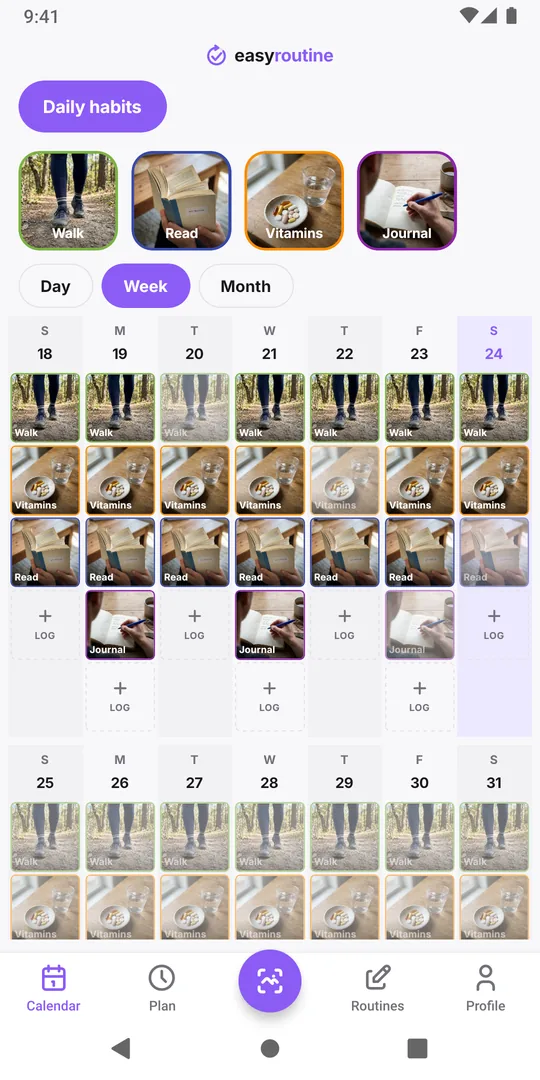
The Week view is the calendar's default. Each week is one row of seven days, with a tile for every logged activity on its day, and the weeks are stacked from past to future. So last week sits right above this one:
- Open the Calendar tab and pick the routine with the buttons above it.
- In Week, scroll up a little until last week and this week are both on screen.
- Tap one habit's tile above the calendar. Its tiles get a bolder frame, so you can count its days in each row.
- Tap the next habit's tile to switch, or tap again to clear.
For more than two weeks, switch to Month: each day shows colored dots for what was logged, and a highlighted habit's dots get bigger, so four or five weeks fit on one screen. If the habit has a schedule (Premium), planned days you did not log show as faded tiles in the week view and hollow rings in the month view, which makes the missed days easier to count than empty space.
A weekly count across all routines
The calendar shows one routine at a time. For a single number across everything, use the Completed tile on the Profile tab: it counts all your logs ever. Note it down every Monday morning; the difference from one Monday to the next is how many logs you made that week. It is a rough number (deleting a log lowers it, and it does not tell you which habits moved), but it is quick, and it covers every routine at once.
Turn the comparison into one change
End the comparison with one decision, not a list. If a habit went down, look at the days it was missed and change one thing about it: a different time, a smaller version, or one day fewer in the plan. If everything held, keep the plan and check again next week. A short note on your next log, like "week 3: walk 5 of 7", keeps a record you can scroll back to later.
For finding gaps in a single week, see which days did I actually miss this week. For one habit over a whole month, see which habit is slipping.
Common questions
Does EasyRoutine have a week-over-week comparison or chart?
No. There is no comparison screen and no charts. The week view stacks weeks under each other and the month view shows several weeks at once, so you compare by eye.
How do I go back to last week?
In the Week view, scroll up. Each row is one week, with the past above and the future below.
Can I see the number of logs per week?
Not directly. The Completed tile on the Profile tab counts all logs ever, so noting it once a week and taking the difference gives a weekly total across all routines.
What if I forgot to log some days last week?
Add the logs on the days they happened, with the real time, before you compare. Only add what you actually did.
Keep reading
- I missed a day and lost my habit streak: what now?Missed a day and lost your habit streak? Why one miss does not undo a habit, how to restart without missing twice, and what EasyRoutine keeps when it resets.
- Can't tell which habit you're slipping on? Read the month, one habit at a timeFeel behind on your habits but can't say which one? Read a month of logs habit by habit, find the one that thins out, and fix that habit, not the whole routine.
- Can't see future scheduled days on your calendar?Only past logs on your calendar and nothing for the week ahead? Why future days stay empty, what makes them fill in, and what to check when a plan is missing.
- Want a completion percentage or streak per habit?Want a completion rate or a streak for each habit? How to work one out by hand in a few minutes, and what EasyRoutine shows instead of per-habit statistics.
- Can you compare habits from different routines on one calendar?Want your gym days next to your skincare nights on one calendar? Why EasyRoutine shows one routine at a time, and how to group habits you want to compare.
- How to find an old note you left on a logTrying to find what you wrote weeks ago, like "tingling" or "dry patch on chin"? How to track down an old note in EasyRoutine and keep notes easy to find.
- How do I check if I already did something today?Did I already take it, feed the cat, water the plants? How to get a quick yes or no before doing something twice or skipping it, and where EasyRoutine shows it.
- What do the flag colours mean on my log?Red, amber and green flags on your logs mean whatever you decide. Common ways to use them, how to pick one meaning and stick to it, and where the dots show up.
- Which days did I actually miss this week?Hectic week and not sure what slipped? How to find the days you missed for each habit, tell a real miss from a forgotten log, and decide what to do about it.
Free on iPhone and Android. Sign in with Apple, Google or your email to start.