Can't tell which habit you're slipping on? Read the month, one habit at a time
When you feel behind but cannot say on what, stop judging by your overall streak and look at each habit separately over the last month. In EasyRoutine, open the month view of one routine, highlight one activity, and compare its dots with the others: the habit whose dots thin out is the one slipping.
Why the feeling is vague
A vague "I'm falling behind" usually hides one or two slipping habits behind others that still go well. One streak for everything, like EasyRoutine's Day streak, stays alive as long as any easy habit happens, so it says you showed up, not which habit you skipped (how the streak counts).
Read a month, habit by habit
This works on paper or in any tracker that keeps dates:
- Take one area of life at a time. Morning habits, evening habits, training. Mixing them makes every month look average.
- Look at four weeks, not one. A single bad week is noise. A habit that thins out week after week is a trend.
- Go through the habits one by one. For each, count the days it happened in the last two weeks and in the two weeks before.
- Compare the two halves. Steady habits look about the same. The slipping one has clearly fewer days in the recent half.
- Look at which days are missing. Gaps on the same weekday point to that day's plans. Gaps spread across the week point to the habit itself: too big, no clear moment, or no longer wanted.
Doing it in EasyRoutine's month view
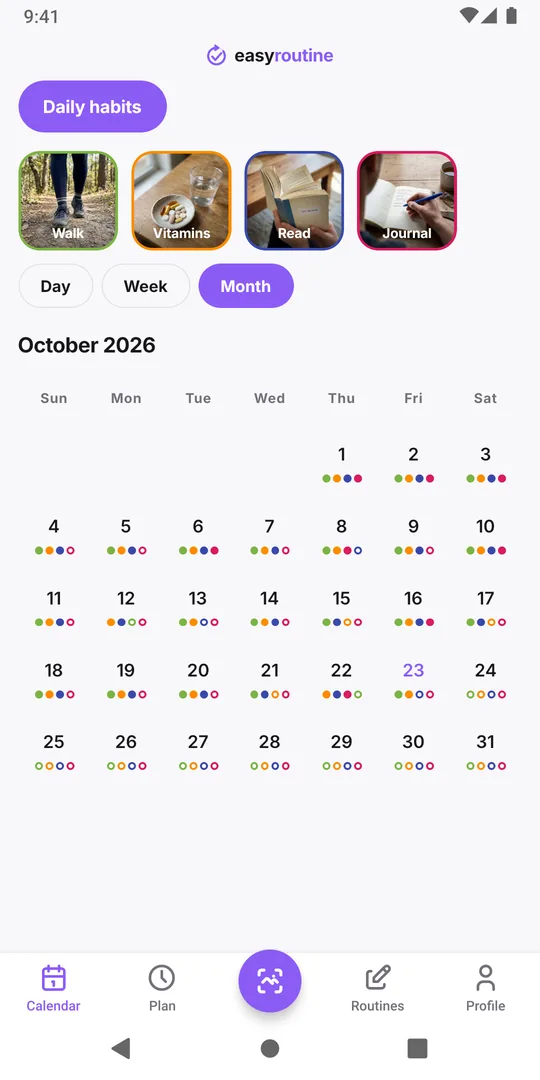
The calendar shows one routine at a time, which already gives you step 1. Open the Calendar tab, pick the routine with the buttons above it and switch to Month. Each logged activity shows as a small dot in its own color on that day.
Then tap one activity's tile above the calendar. Its dots grow bigger and move to the front of each day, while the others stay visible, so you can follow that single color through the month. Tap the tile again to clear it and try the next one.
Two details help you read it right:
- Rings are missed plans. If the activity has a schedule (Premium), planned days you did not log show as hollow rings in its color. Without a schedule, a missed day simply has no dot.
- A day shows up to four dots. In a routine with more than four activities, a busy day can hide one. Highlighting the activity puts its dot first, so check suspects that way.
Find out why it slips
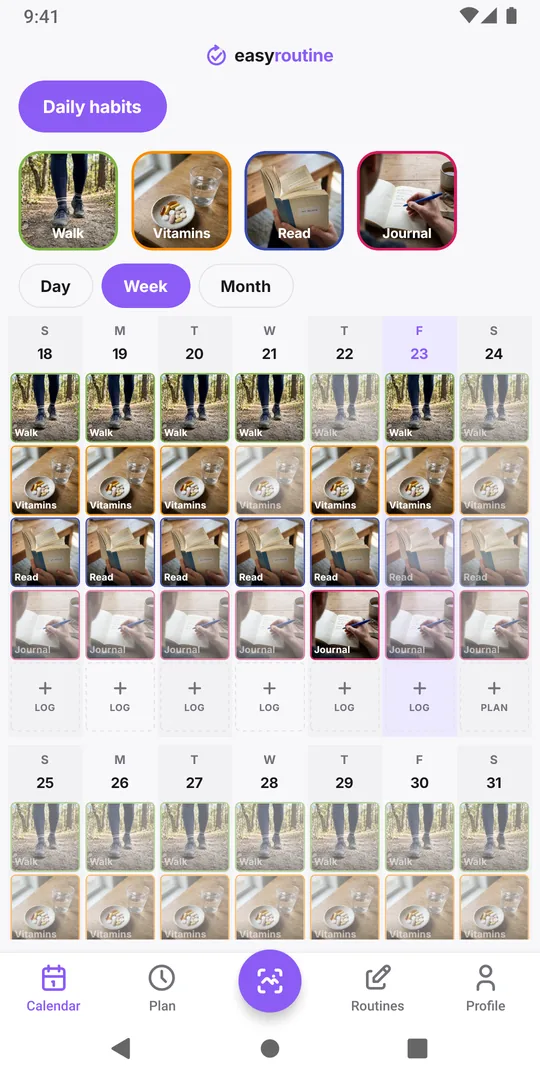
Once you know which habit it is, look closer. Switch to Week to see the times: a journal that used to happen at 22:00 and now shows up at 23:30 is being squeezed by something.
Then read your own notes. Tap a recent log of that activity: the log sheet shows the last few notes you wrote for it. Remarks like "too tired" or "late shift" with an amber flag often explain the pattern better than memory does. If you have not been writing notes, start now with a few words on the days it nearly did not happen.
Fix one habit, not the whole routine
Change only the slipping habit, and only one thing about it:
- Same weekday missing: move it on that day, or drop that day from the plan. If the planned time no longer fits your week, see when your schedule doesn't match reality.
- Missing all over the week: make it smaller (two lines of journal still count) or tie it to a firmer moment, such as right after brushing your teeth.
- It stopped completely: decide whether you still want it. Archiving it is a fair answer; its past logs stay on the calendar.
Check the month again in two weeks. More in Calendar and streaks.
Common questions
Does EasyRoutine show a streak or percentage per habit?
No. There is one Day streak for the whole account and no per-habit percentages or charts. To judge one habit, highlight its tile and count its dots in the month view.
How do I see just one habit on the calendar?
Tap that activity's tile above the calendar. Its entries are emphasized and its dots in the month view grow bigger and come first, while the others stay visible. Tap again to clear it.
What do the hollow rings in the month view mean?
They are planned activities you did not log on that day. They only appear for activities with a schedule, which is a Premium feature.
Can I compare habits from different routines on one calendar?
No. The calendar shows one routine at a time. Habits you want to compare directly belong in the same routine.
Keep reading
Free on iPhone and Android. Sign in with Apple, Google or your email to start.