Can't see future scheduled days on your calendar?
In EasyRoutine the days ahead only show something when an activity has a schedule. Logs can only be made for now or the past, so without a schedule the calendar is a record of what you did, not a plan of what is coming. Scheduling is part of Premium and is set on the Plan tab.
A record and a plan are two different things
Most habit trackers mix two jobs on one screen. One is the record: what you actually did and when. The other is the plan: what you intend to do on which days. The record fills itself as you log; the plan only exists if someone writes it down.
That is why the past looks full and the future looks empty. Every tap on a past day added a log, but nothing has been written for next Tuesday yet. A calendar that showed the coming week without a plan would have to guess, and a guessed plan is worse than none.
It helps to decide which of the two you actually need:
- Daily habits like vitamins, flossing or a walk rarely need a forward view. You do them every day, and the record tells you whether you did.
- Habits on certain weekdays, like training on Monday, Wednesday and Friday, are easier when the week ahead shows which day is which.
- Dated tasks, like a dentist visit on the 14th or a treatment that runs for two weeks, really need a plan, because they are not part of any daily rhythm.
What shows on a future day in EasyRoutine
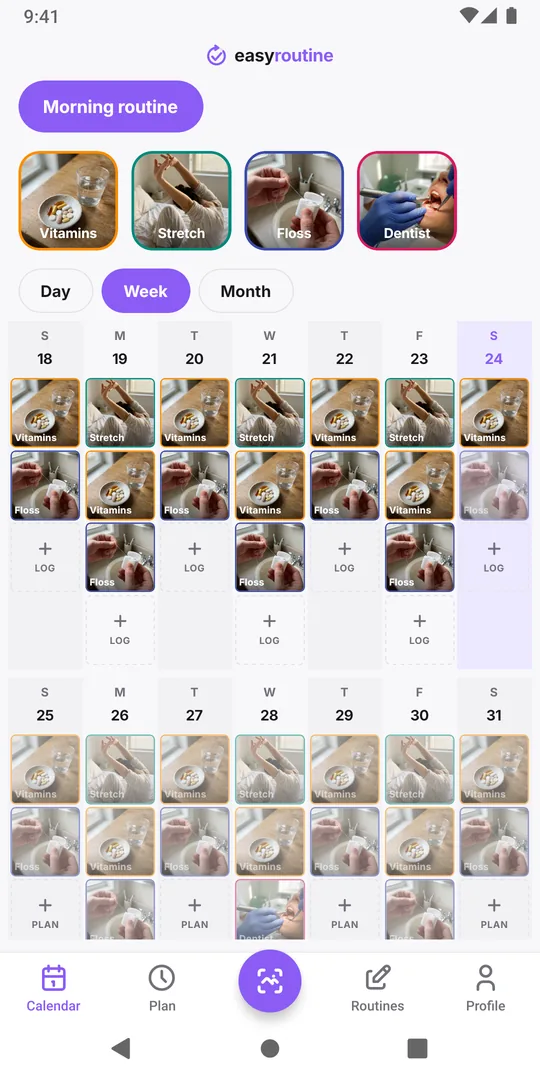
On the Calendar tab, today and past days show your logs. A future day shows only planned entries: faded tiles for each activity whose schedule falls on that day, at its planned time or under Any time. When the day comes and you log the activity, the faded tile turns into a normal one.
If no activity in the routine has a schedule, future days have nothing to show, and the only thing on them is the Plan button. On the free plan, tapping Plan or a planned entry on a future day opens the Premium screen. You also cannot log on a future day: logging is for now and the past only.
Give an activity a schedule (Premium)
A schedule is what puts an activity on future days:
- Open the Plan tab and pick the routine.
- Tap the activity, for example Stretch.
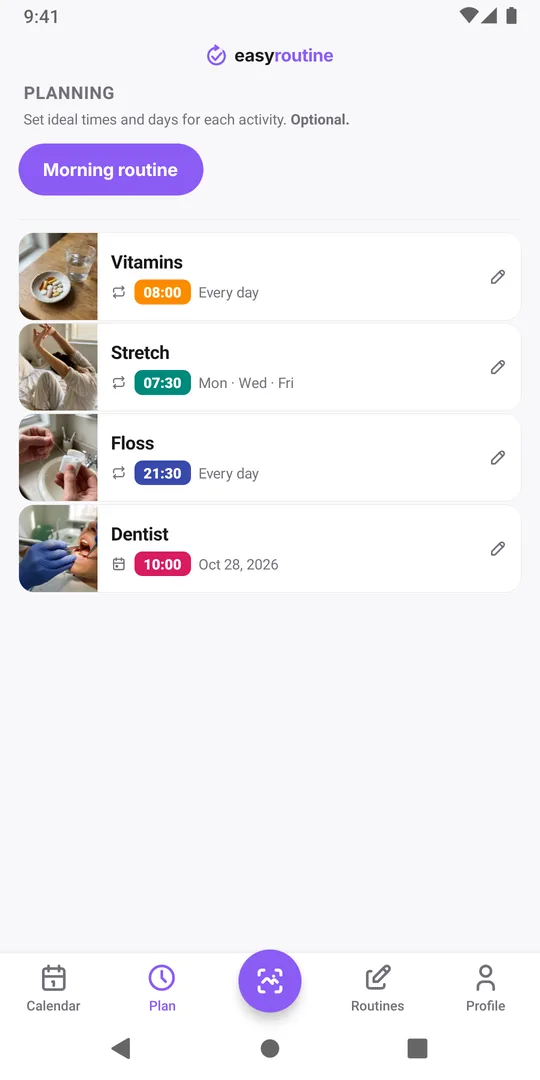
- Under Recurring, choose the weekdays and, if you like, a time: Monday, Wednesday and Friday at 07:30. Leave the time empty for Any time.
- For a one-off, use Single day instead and pick the date.
- Save. The coming weeks now show Stretch on those days.
A recurring time can also get an active period with From and Until, so a two-week treatment shows only during those two weeks. Repeats are by weekday; there is no "every 3 days" option, so for longer cycles add the dates as single-day plans. More in Scheduling.
Scheduled, but the days ahead are still empty?
If you did set a schedule and the activity still does not appear, check these in order:
- Is the right routine selected? The calendar shows one routine at a time. Pick the routine the activity belongs to with the buttons above the calendar.
- Does the weekday match? A recurring slot only shows on the weekdays ticked for it. Open the activity on the Plan tab and look at the days.
- Has the active period ended? A slot with an Until date stops after that date, and one with a From date starts only then.
- Is it a single day? A single-day plan shows on that one date only.
- Is the activity archived? Archived activities are hidden from the calendar.
If your Premium has ended, schedules you already made stay, but changing them needs Premium again. If a planned day simply no longer fits your week, see when your schedule doesn't match reality.
Planning the week without Premium
Logging, the photo scan and the calendar are free, so you can keep the record in EasyRoutine and the plan somewhere else. A short weekly habit works well: on Sunday evening, decide which days this week get the harder habits and write them in your phone's calendar or on a note on the fridge. During the week, log what you actually did. At the end of the week, the record shows you how close the plan came. For what a plain calendar app does better and worse, see EasyRoutine vs a calendar app.
Common questions
Why does my calendar only show past days?
Past days show your logs. Future days only show activities that have a schedule, and scheduling is a Premium feature set on the Plan tab. Without a schedule there is nothing planned to show yet.
Can I log something on a future day?
No. Logs are for now or the past. Future days are for planning, which needs Premium.
Why does tapping Plan on a future day open the Premium screen?
Planning future days is part of Premium. On the free plan, tapping Plan or a planned entry on a future day opens the Premium screen instead.
My schedule is set but one future day is empty. Why?
Check the routine selected above the calendar, the weekdays ticked for that time, and any From or Until date. A slot only shows on its weekdays and within its active period.
Keep reading
- I missed a day and lost my habit streak: what now?Missed a day and lost your habit streak? Why one miss does not undo a habit, how to restart without missing twice, and what EasyRoutine keeps when it resets.
- Can't tell which habit you're slipping on? Read the month, one habit at a timeFeel behind on your habits but can't say which one? Read a month of logs habit by habit, find the one that thins out, and fix that habit, not the whole routine.
- Want a completion percentage or streak per habit?Want a completion rate or a streak for each habit? How to work one out by hand in a few minutes, and what EasyRoutine shows instead of per-habit statistics.
- Can you compare habits from different routines on one calendar?Want your gym days next to your skincare nights on one calendar? Why EasyRoutine shows one routine at a time, and how to group habits you want to compare.
- Compare this week to last week: are you doing better?Want to know if this week went better than last week? What to compare, what to ignore, and how to read two weeks side by side in EasyRoutine's calendar.
- How to find an old note you left on a logTrying to find what you wrote weeks ago, like "tingling" or "dry patch on chin"? How to track down an old note in EasyRoutine and keep notes easy to find.
- How do I check if I already did something today?Did I already take it, feed the cat, water the plants? How to get a quick yes or no before doing something twice or skipping it, and where EasyRoutine shows it.
- What do the flag colours mean on my log?Red, amber and green flags on your logs mean whatever you decide. Common ways to use them, how to pick one meaning and stick to it, and where the dots show up.
- Which days did I actually miss this week?Hectic week and not sure what slipped? How to find the days you missed for each habit, tell a real miss from a forgotten log, and decide what to do about it.
Free on iPhone and Android. Sign in with Apple, Google or your email to start.