Forgot to log a habit until later? Backdate it
Yes, you can log a habit later in EasyRoutine: open the day it happened, log the activity, and set the time it really happened. It is free, and the calendar and day streak count it on that day. Below: the steps, when backdating helps and when to leave a day empty, and how to forget less.
Log it on the day it happened
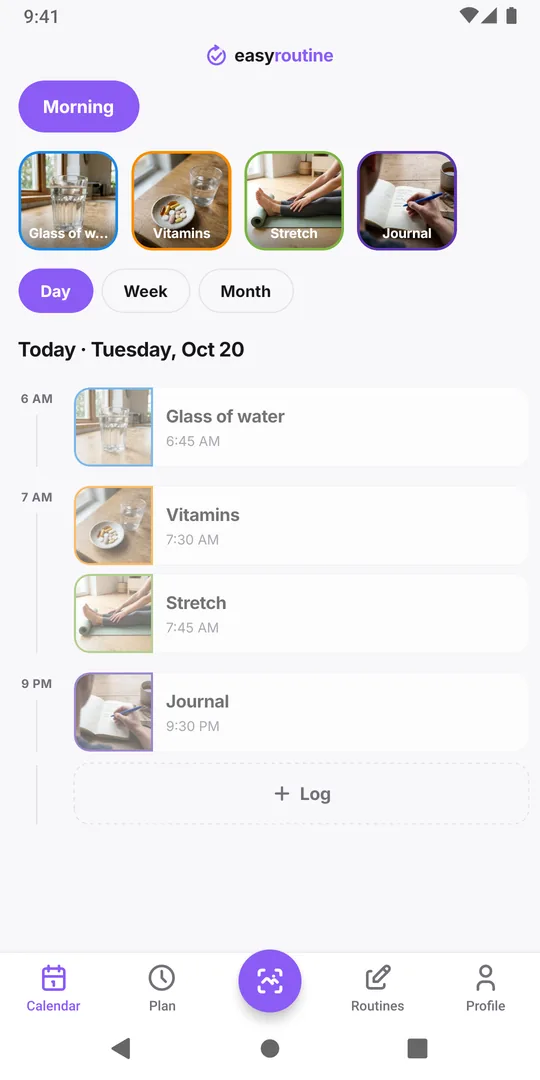
You took your vitamins at 7:30, went to work, and only opened the app at lunch. Or you stretched on Saturday and noticed on Monday that the day is empty. The fix takes a few taps:
- Open the Calendar tab and pick the routine the activity belongs to.
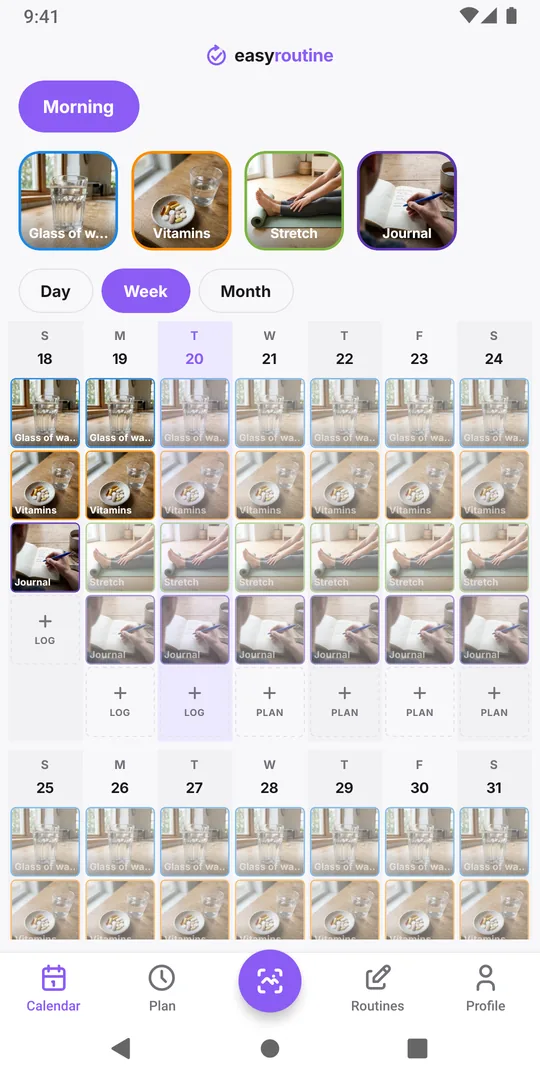
- In Week or Month view, tap the day it happened.
- Tap Log at the bottom of the day and pick the activity. Forgot several? Pick them all at once.
- Confirm. The entries appear on that day.
Then check the time on the new entry and set the real one if it matters to you (next section).
Set the real time of a late log
Every log has a date and a time, and you can change both later:
- Tap the entry on the calendar to open it.
- Pick the moment you actually did it, for example 7:30 instead of 12:41.
- Save.
The entry moves to its new time, or to another day if you changed the date. The same fixes a log made on the wrong day, such as a late-night entry that belonged to yesterday.
The photo scan logs a match straight away with the current time. If you scan the bottle at noon for the pill you took at breakfast, open the new entry afterwards and move it to the real time.
When to backdate, and when to leave the day empty
A habit record is only useful if it is true. A few rules of thumb:
- Backdate what you really did, at the time you did it, as soon as you notice. Same day is easy; after a few days, only fill in what you clearly remember.
- Get the day right first, then the time. For a plant or a workout, the day is what you will look up later. For anything where the gap between two entries matters, like feeding a pet, the time matters too: if you only remember "some time in the morning", say so in the note.
- Leave a day empty if you are not sure. A gap you cannot explain is honest information. A guessed entry turns "when did I last do this?" into a wrong answer.
- Do not log a skipped day to save a streak. Every log counts as done, so a padded streak hides exactly the days worth looking at. If you skipped, leave the day empty and, if the reason matters, write it in the note of your next log ("skipped Tuesday, sore back").
- Write why it was late when it matters, like "logged the next day" or "did it after lunch, not before". Each log can carry a comment and a green, amber or red flag.
If what you track is medication, the record only shows what you entered. If you are unsure whether you already took a dose, do not guess from the app: ask your pharmacist or doctor what to do.
Planned entries make late logging quicker (Premium)
With Premium, activities can have a schedule, such as Vitamins every day at 7:30. Each planned time shows as a faded entry on the calendar until you log it, so a faded entry on a past day is one you have not logged yet. Tap it and the log opens set to the planned time; adjust it if you did it earlier or later, then save. Scheduling.
What it does to your day streak
The day streak goes by the day of each log, not the moment you entered it, so a forgotten Saturday that you add later fills that gap. For days that really were missed, see missed a day? Restarting your streak.
Forget less often
Logging late works, but logging on time is easier to keep up:
- Tie logging to the end of the habit. Put the phone next to the vitamins, the toothbrush or the yoga mat, and log before you walk away.
- Log in one batch. After your morning routine, open today once and log everything together with Log.
- Use a reminder (Premium) on a scheduled time, so your phone prompts you. Reminders.
A worked example: the evening log check
Pick an anchor you never skip, such as plugging in your phone at night, and attach one small step to it: "When I plug in my phone, I check today's log." Then:
- Open the week view of your routine and look at today.
- For each habit you did but did not log, add it with the time you remember.
- Leave anything you did not do empty. Do not decide tonight whether to make it up tomorrow.
- Glance at yesterday: if something is missing there and you clearly remember it, add it now.
It takes a minute or two, and because the anchor is the same every night, there is nothing to decide. If you already know you will be out late, move the check to an anchor that still happens, like brushing your teeth.
Common questions
How far back can I log something?
As far back as 1 January 2020. In practice, only backfill what you clearly remember; the further back, the less reliable the time.
I logged on the wrong day. Do I need to delete it?
No. Open the entry and change its date and time; it moves to the right day. You can also delete a log if it should not be there at all.
Can I log something in advance?
No. Logs are only for now or the past. Future days are for planning, which is part of Premium.
Does a late log show that it was entered late?
No, the calendar shows the time you set, not when you typed it. If that difference matters to you, write it in the comment.
Keep reading
Free on iPhone and Android. Sign in with Apple, Google or your email to start.