Running two skincare treatments at once and getting them mixed up?
Two treatments get mixed up when they share one mental note called "skincare". Give each one its own entry with its own name, color, nights and end date, and log them separately. Then you can tell at a glance which one is due tonight, which one you used, and which one your skin reacted to.
Where two treatments get tangled
A common case: a prescription cream your dermatologist gave you for two weeks, and at the same time a patch test of a new serum on your inner arm, twice a day. Or a spot treatment during a breakout on top of a retinol introduction. Each one alone is simple. Together:
- The schedules differ. One every night, one twice a day, one on certain nights only.
- The end dates differ. The cream stops on a date from the prescription; the patch test after seven to 10 days.
- A reaction has two suspects. If your skin turns red, was it the cream or the serum?
- "Did I do it?" has two answers. Doing one treatment can feel like having done both.
Before you run two at once, ask your dermatologist or pharmacist whether the two may be used together and in which order. The American Academy of Dermatology warns that using too many products may irritate the skin, and dermatologists advise introducing one new product at a time, so starting two new things in the same week makes a reaction hard to trace.
Write down each treatment separately
Whether on paper or in an app, give each treatment its own line:
- Name: short and unmistakable, like "Rx cream" and "Patch test serum". Avoid two names that start the same way.
- When: which nights or times, from the label, the prescription or the test instructions. The AAD's home test is twice a day for seven to 10 days on a small spot.
- Where: face, a specific area, or the test spot. Two treatments on different areas are easier to keep apart.
- Start and end date: written before the first use.
- What to note: anything your skin does, on the day it happens.
If you can, stagger the starts by a week or more, so that any change has one likely candidate.
Give each treatment its own activity
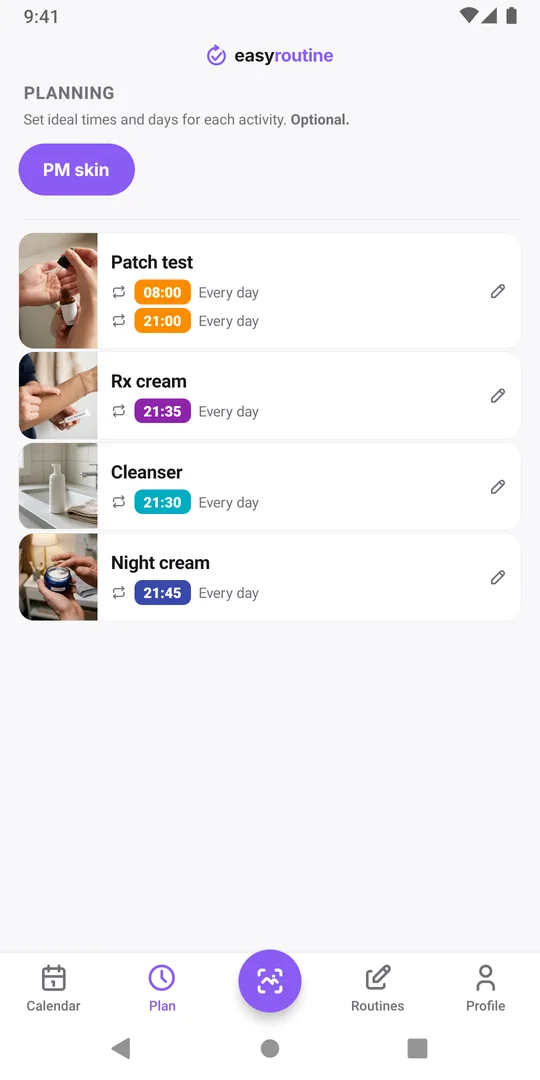
In EasyRoutine, add both treatments as separate activities in your PM skin routine, next to Cleanser and Night cream:
- Its own name and color. Pick two colors that are far apart, for example purple for Rx cream and orange for Patch test. Each one gets its own tile above the calendar and its own color on the calendar.
- Its own photo. Photograph each tube. Besides helping you tell them apart, the photo lets you log a treatment by scanning it with the round AI snap to log button in the middle of the tab bar, and the scan only picks between your own activities that have a photo.
- Its own schedule and active period (Premium). In the Plan tab, give Rx cream every night at 21:35 with a From and Until date from the prescription, and Patch test two daily times with an active period of ten days. Each one appears as planned only on its own days, and stops by itself after its Until date.
Without Premium, add both activities and log every use for free; they just will not show as planned. Write the end date into the name, for example Rx cream until 20 Nov.
Log them separately and flag what you see
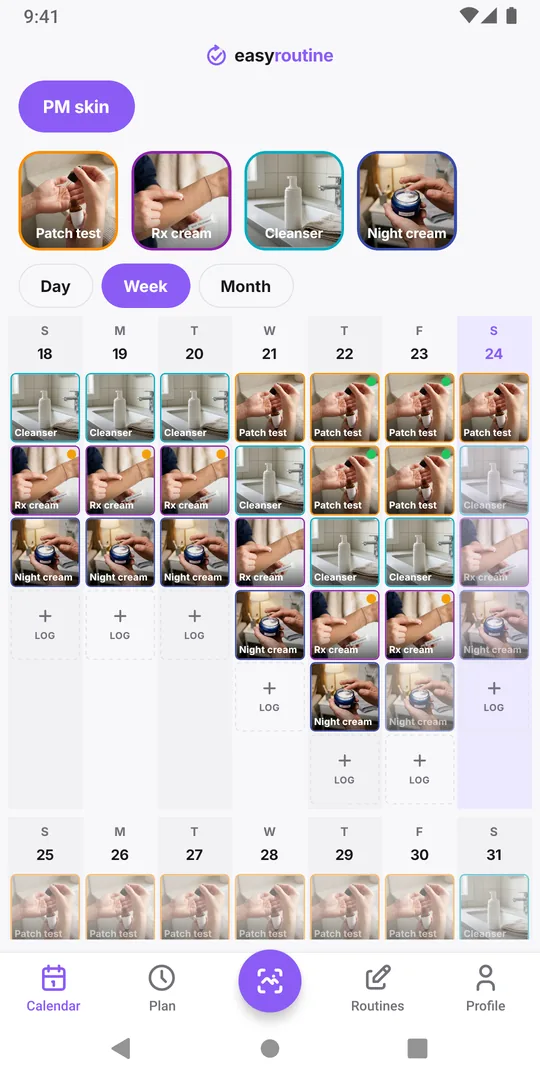
When you log, tick each treatment you actually used, not "skincare done". On a night when you used the cream but forgot the patch test, only the cream gets a log, and the faded planned entry for the test stays visible.
Put notes and flags on the treatment they belong to: an amber flag and "stinging" on the Rx cream log if the area you treat stings, a green flag on Patch test while the test spot stays calm. To check one treatment's history, tap its tile above the calendar and that treatment's entries are highlighted, while the other treatment stays visible next to them.
When one of them ends
After a treatment's Until date it no longer appears as planned, while the other carries on. When you will not use it again, archive the activity: it disappears from the routine and is skipped by the scan and by reminders, and its logs stay on the calendar for your next dermatologist appointment.
For a single treatment with start and end dates, see the skincare treatment tracking template. For the test itself, read forget to patch test new products?
Common questions
Can I use two skincare treatments at the same time?
That is a question for your dermatologist or pharmacist, who knows both products. Some combinations irritate the skin. The app only keeps track of what you use and when.
Can both treatments be in the same routine?
Yes. Put them in the routine you use them with, usually the evening one, each as its own activity. Separate routines only make sense if you use them at different times of day.
What if a treatment's end date changes?
Edit the Until date of its schedule. The other treatment and all past logs stay as they are.
Which treatment caused my reaction?
A log can show which treatments were on your skin in the days before, not which one caused it. Take the dates and notes to your dermatologist.
Keep reading
- Skincare routine tracker apps compared: dedicated app or EasyRoutine?Skincare apps offer ingredient checks and photo diaries; EasyRoutine logs which AM and PM steps you used and when. Features compared, and who fits which.
- Morning skincare routine order: a simple checklistMorning skincare routine order: cleanser, serum, moisturizer, then sunscreen last. A sourced checklist, common mistakes and a simple way to track each step.
- Evening skincare routine checklistAn evening skincare routine checklist in the right order, how it changes on retinol and no-makeup nights, the mistakes to avoid, and how to track the steps.
- How to track a skincare treatment and know when to stop itA template for a skincare treatment that comes and goes: write the plan down, log each use, note how your skin reacts, and know when to stop it.
- Which skincare product caused my skin reaction?Skin reacting to something new? Narrow down the product: compare start dates, know how patch testing works, avoid common mistakes, and keep a dated log.
- Can't tell if your skincare product is actually working?Can't tell if a skincare product is working? Give it a fair trial, log each use and how your skin looked, then read gaps and flags on a calendar.
- Did I do my morning skincare or not?Not sure if you did your morning skincare or put on SPF? Quick checks, what to do when in doubt, and a two-second way to know for sure tomorrow.
- Forget to patch test new skincare products?Keep forgetting to patch test new skincare? How a home patch test works, why it gets skipped, and how to make it a short step of its own on your calendar.
- Keep forgetting your evening skincare routine?Keep forgetting your evening skincare? Why the PM routine slips, how to shrink it and tie it to a cue, and how a reminder can catch you before bed.
- Lose track of where you are in a long retinol introduction?Losing track of which week of your retinol introduction you are on? Write the phases down, put them on a calendar and see which nights you actually used it.
- Should you track morning and evening skincare in the same list?Should you track morning and evening skincare in the same list? When two routines work better, when one is enough, and how to set either up.
- Does your skincare routine fall apart when you travel?Skincare routine falls apart when you travel? Pick a travel minimum, pack for it, adjust for time zones, and keep a record even when steps move around.
Free on iPhone and Android. Sign in with Apple, Google or your email to start.