Skincare routine tracker apps compared: dedicated app or EasyRoutine?
Did I use the retinol last night, or was that the night before? A skincare tracker should answer that in a second. EasyRoutine does it for your morning and evening routine and for treatments that only last a few weeks, but it is a general routine tracker, not a skincare app. Here is what that means in practice.
What a dedicated skincare app tends to be built for
Apps made only for skincare are designed around skin and products. If what you want is centred on the skin itself, for example a gallery of face photos to compare over months, or an app that knows about products and ingredients, look for one built for that. EasyRoutine does not keep progress photos, does not know ingredients and does not give skincare advice.
EasyRoutine is built around a different question: what did I put on, and when? It records each step you log, with the time, and lets you add how your skin reacted. That turns out to be what many people need to judge whether a product is working.
Separate morning and evening steps
The simplest setup is two routines:
- AM skin: Cleanser, Vitamin C, Moisturizer, SPF
- PM skin: Cleanser, Retinol, Night cream
Each step is its own activity with its own color, so the calendar shows exactly which steps you did, not just "skincare done". To log, use the Log button on the day and pick one step, or several at once when you do the whole routine in one go. With a Premium schedule you can also tap a faded planned step and save it. If you prefer one routine, you can also keep all steps together and give AM and PM steps different scheduled times.
For a step-by-step list, see the morning skincare routine checklist and the evening skincare routine checklist.
Daily routine and a short-term treatment, side by side
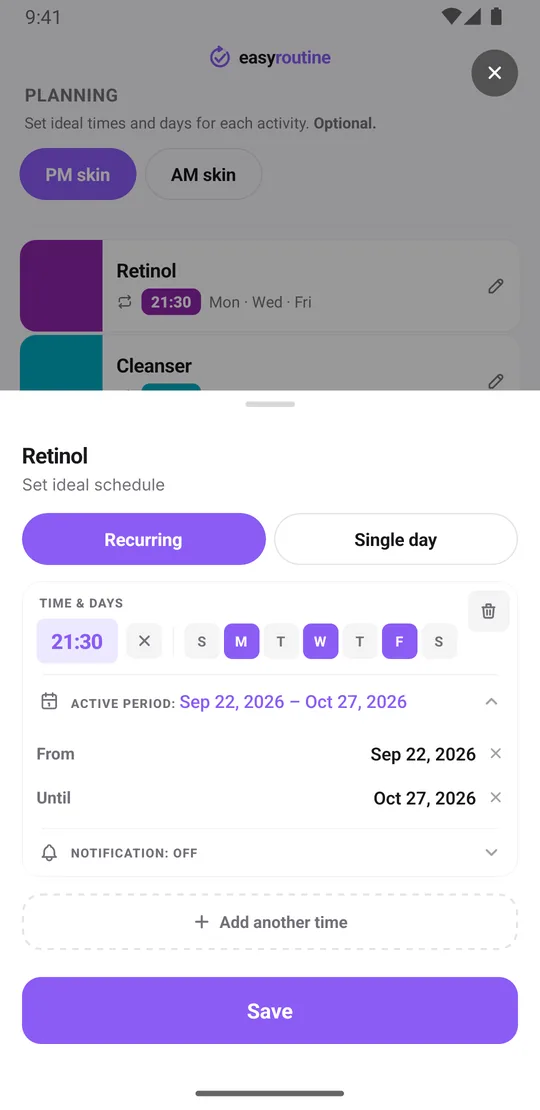
Treatments come and go: a prescription cream for two weeks, a few weeks of introducing a retinol, a spot treatment while a breakout lasts. In EasyRoutine you add the treatment as an activity next to your regular steps. With Premium you give it a schedule (weekdays and a time, say Monday, Wednesday and Friday at 21:30) and an active period with a start and an end date. Add a reminder to that time, on time or up to 30 minutes before, and your phone nudges you on retinol nights.
The treatment then shows up as planned on your calendar only between those dates and stops appearing after the last day, while your daily steps carry on. Your logs stay where they are. When you no longer need the activity, archive it: it disappears from the routine, the scan and reminders, and you can bring it back later. How scheduling works.
Does it let me photograph my skin progress?
No, and that is a real difference. Photos in EasyRoutine belong to activities: you photograph the product, so you can log it later by pointing the camera at it in the Scan tab. The scan matches against your own products that have a photo and logs the one it recognizes, which works for any brand. Scan photos are not stored. About the photo scan.
What you can record about your skin is in words: each log can have a note, like "tingling" or "dry patch on chin", and a green, amber or red flag. If progress photos are the heart of how you track your skin, a skincare app with a photo diary will serve you better, or keep those photos in your phone's gallery alongside EasyRoutine. The log sheet also shows your last few notes for that step, so before saving tonight's retinol you can see whether the tingling is fading.
The calendar as your progress record
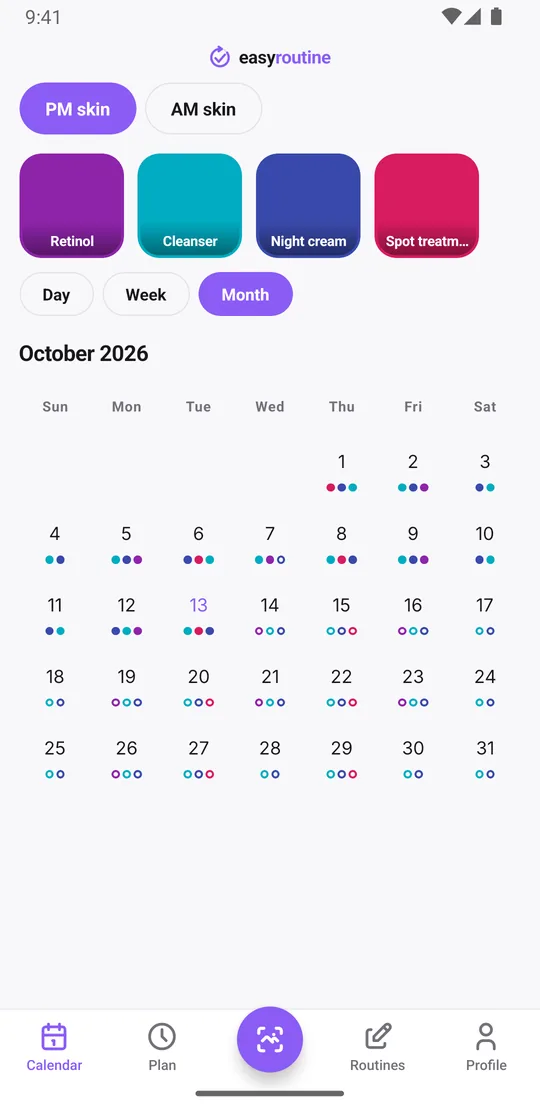
The month view shows colored dots for the steps you logged each day (up to four per day), and the day and week views add your flags. When a reaction starts, you can look back day by day and see exactly what you used in the days before, and whether the new serum really went on every night or only three times a week. That kind of record is useful to show a dermatologist.
To answer "when did I last use the retinol?" directly, tap the Retinol tile at the top of the calendar. The calendar then shows only that activity, and the most recent entry is the last time you used it.
The week view answers the everyday question: did I do my PM routine last night? Planned steps you have not logged yet appear faded, so a skipped retinol night is easy to spot.
Skincare only, or other routines too?
EasyRoutine is not skincare-only. The same app tracks supplements, medication, the gym, plants or household chores, each in its own routine. The calendar shows one routine at a time, and you switch with the routine pills at the top. If your vitamin D sits next to the moisturizer, it can live in the same app. See the supplement tracker.
Logging, notes, flags, the photo scan and the calendar are free. Scheduling, active periods and reminders are part of Premium.
Who should pick which
Choose a dedicated skincare app if you want progress photos, product or ingredient information, or an app focused entirely on skin.
Choose EasyRoutine if you want a reliable record of which steps you actually did, AM and PM, treatments with a start and an end date, notes on how your skin reacted, and your other routines in the same place. More on the skincare routine tracker.
Common questions
Can it handle both my daily routine and a short-term treatment?
Yes. Add the treatment as its own activity next to your daily steps. With Premium, give it a schedule with a start and end date, and it only appears as planned between those dates.
Does it let me photograph my skin progress?
No. Photos belong to activities, so you photograph the product to log it by scanning. To record how your skin looks, use notes and red, amber or green flags, or keep progress photos in your gallery.
Can I separate morning and evening steps?
Yes. Create an AM skin and a PM skin routine, or keep one routine and give the morning and evening steps different scheduled times.
Is it skincare-only or does it do other routines too?
It tracks any routine: supplements, medication, workouts, plants or chores, each in its own routine, all in one app.
Keep reading
Free on iPhone and Android. Sign in with Apple, Google or your email to start.