Forget to patch test new skincare products?
The patch test gets skipped because it is a separate, boring step that sits between buying a product and the part you are excited about. Make it its own short activity with a start and an end date, so it shows up on your calendar for the test days only, and log each application with a note on how the spot looks.
How a home patch test works
The American Academy of Dermatology describes a simple test before you use a new product:
- Choose a quarter-sized spot where the product won't be rubbed or washed off.
- Apply the product there twice a day for seven to 10 days.
- If you see no reaction, such as redness, itching or swelling, you can start using it.
- If a reaction appears, wash the product off as soon as possible and don't use it again.
The AAD also notes that some ingredients, such as retinol and glycolic acid, can irritate the skin, especially sensitive skin. If a reaction is severe or does not settle, see a dermatologist. A home test is not the same as patch testing at a dermatologist's office, which tests for specific allergens; which product caused a reaction explains the difference.
Why the patch test is the step that gets skipped
- It is two weeks of waiting for a product you want to use today. Seven to 10 days feels long when the bottle is on the shelf.
- Twice a day is easy to half-do. The morning application happens; the evening one gets forgotten, or the other way round, and on day six you can't say how many you missed.
- It lives outside your routine. Your cleanser and moisturizer have a place in the morning; the test spot on your inner arm has none.
- There is no clear end. Without a written last day, the test either drags on or ends on day three because you got impatient.
The fix for all four is the same: treat the test as a short routine of its own, with its own times, a start date and an end date.
Give the patch test its own activity
In EasyRoutine, open the routine you use most, say Skin, and tap Add activity. Call it Patch test (or the product's name, like Patch test serum), and add a photo of the new bottle so you can log it by scanning it later.
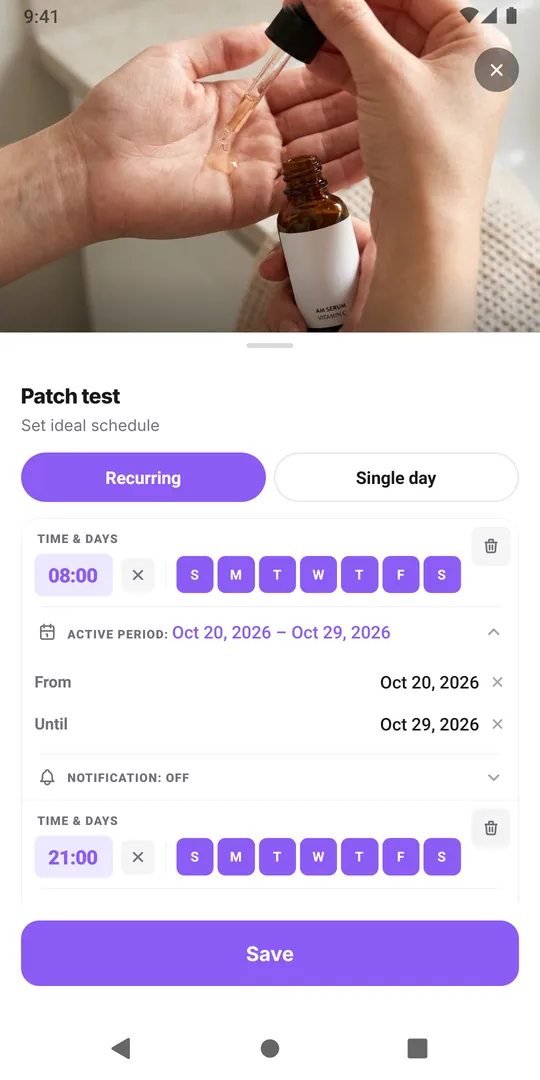
With Premium, open the Plan tab and give the activity two Recurring times: every day at 8:00 and every day at 21:00, the morning and evening applications. Set the same active period on both, a From date on the day you start and an Until date ten days later. The test then appears on the calendar for those days only, as faded entries in the Week and Day views (a hollow ring in the Month view) until you log them, and you can put a reminder on each time. After the Until date it disappears by itself, and the product can join your routine.
Scheduling, active periods and reminders are Premium. On the free plan you can still add the activity and log each application; it just will not show as planned, so write the end date into the name, for example Patch test until 14 Nov.
Log each application and flag any reaction
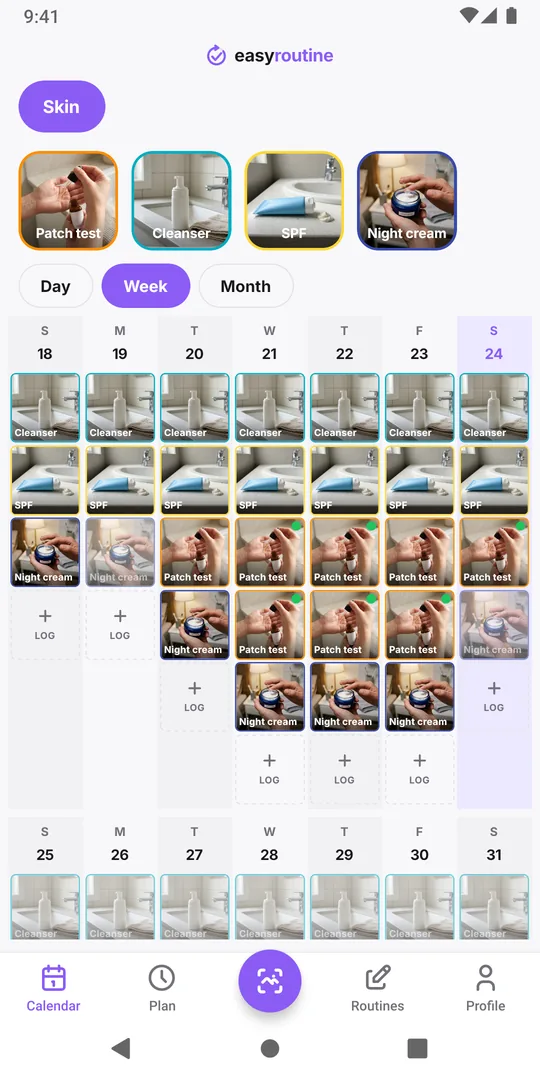
Each time you apply the product to the test spot, tap the faded Patch test entry and save it, or scan the bottle. Add a flag on the log: green for no change, amber for something you want to watch, red for a reaction. A note like "slight redness, gone in an hour" is much more useful later than a memory of "something on day four".
The week view then shows the test next to your usual steps, with a flag dot on each entry. Missed applications are visible as faded entries that were never logged. If you missed several, extend the Until date instead of cutting the test short.
If the spot reacts, stop the test and wash the product off, as the AAD advises. Archive the activity so it no longer shows; its logs and notes stay on the calendar if you want to show them to a dermatologist.
One test at a time
Testing two new products on the same spot, or in the same week on different spots, makes a reaction harder to pin on one of them. Finish one test before you start the next, and introduce products one at a time after that too. If you already have a treatment running while you test something new, keep the two apart. More on the skincare routine tracker.
Common questions
How long should a home patch test last?
The American Academy of Dermatology suggests applying the product to a test spot twice a day for seven to 10 days. If the product's label gives its own instructions, follow those.
What if I forget one application?
Leave it unlogged and carry on. If you missed several, move the Until date back a few days so the test still covers enough applications.
Can I patch test without Premium?
Yes. Add the activity and log each application for free. Only the planned times, the active period and reminders need Premium; on the free plan, put the end date in the activity's name.
Does EasyRoutine tell me if my skin reacted?
No. It records your applications, notes and flags. If the spot reacts, wash the product off, and see a dermatologist if the reaction is severe or does not settle.
Keep reading
- Skincare routine tracker apps compared: dedicated app or EasyRoutine?Skincare apps offer ingredient checks and photo diaries; EasyRoutine logs which AM and PM steps you used and when. Features compared, and who fits which.
- Morning skincare routine order: a simple checklistMorning skincare routine order: cleanser, serum, moisturizer, then sunscreen last. A sourced checklist, common mistakes and a simple way to track each step.
- Evening skincare routine checklistAn evening skincare routine checklist in the right order, how it changes on retinol and no-makeup nights, the mistakes to avoid, and how to track the steps.
- How to track a skincare treatment and know when to stop itA template for a skincare treatment that comes and goes: write the plan down, log each use, note how your skin reacts, and know when to stop it.
- Which skincare product caused my skin reaction?Skin reacting to something new? Narrow down the product: compare start dates, know how patch testing works, avoid common mistakes, and keep a dated log.
- Can't tell if your skincare product is actually working?Can't tell if a skincare product is working? Give it a fair trial, log each use and how your skin looked, then read gaps and flags on a calendar.
- Did I do my morning skincare or not?Not sure if you did your morning skincare or put on SPF? Quick checks, what to do when in doubt, and a two-second way to know for sure tomorrow.
- Keep forgetting your evening skincare routine?Keep forgetting your evening skincare? Why the PM routine slips, how to shrink it and tie it to a cue, and how a reminder can catch you before bed.
- Lose track of where you are in a long retinol introduction?Losing track of which week of your retinol introduction you are on? Write the phases down, put them on a calendar and see which nights you actually used it.
- Should you track morning and evening skincare in the same list?Should you track morning and evening skincare in the same list? When two routines work better, when one is enough, and how to set either up.
- Running two skincare treatments at once and getting them mixed up?Running two skincare treatments at once and mixing them up? Give each its own entry, nights and end date, and keep a record you can tell apart later.
- Does your skincare routine fall apart when you travel?Skincare routine falls apart when you travel? Pick a travel minimum, pack for it, adjust for time zones, and keep a record even when steps move around.
Free on iPhone and Android. Sign in with Apple, Google or your email to start.