Lose track of where you are in a long retinol introduction?
A slow retinol start is a plan with phases, and phases are hard to hold in your head for twelve weeks. Write each phase down with its nights and its dates, put them on a calendar so tonight's answer is shown rather than remembered, and log each use so you can see how many nights you really did.
Why a retinol introduction is easy to lose
Dermatologists quoted by the American Academy of Dermatology suggest using the least intense retinoid you can find, every other night to start, and building up slowly; starting too strong tends to irritate the skin. That advice turns one product into a moving target:
- The frequency changes. Two nights a week, then three, then every other night: the right answer to "is tonight a retinol night?" depends on the week.
- Every other night does not fit weekdays. It shifts each week, so a "Monday, Wednesday, Friday" habit quietly becomes something else.
- Irritation pauses the plan. A few nights off because your skin stings, and the original dates no longer match where you are.
- Weeks blur. By week seven, "I started in early October" is not precise enough to know which phase you are in.
How fast to build up, and when to move to the next step, comes from the label or your dermatologist. The steps below only help you keep track of the plan you were given.
Write the plan down as phases
Before the first night, write the introduction as a short list of phases, each with its nights and its dates. An example of how such a plan can look on paper:
- Phase 1: Monday and Thursday, 3 to 30 November.
- Phase 2: Monday, Wednesday and Friday, 1 to 28 December.
- Phase 3: the frequency your dermatologist or the label gives for after that.
These dates only show the format; your own phases come from your plan. Two rules make the list useful:
- Use weekdays for each phase. "Every other night" drifts across the week; two or three fixed weekdays are easy to check and roughly match it.
- Move the dates when you pause. If irritation means a week off, push the next phase back rather than skipping ahead.
Put the phases on the calendar
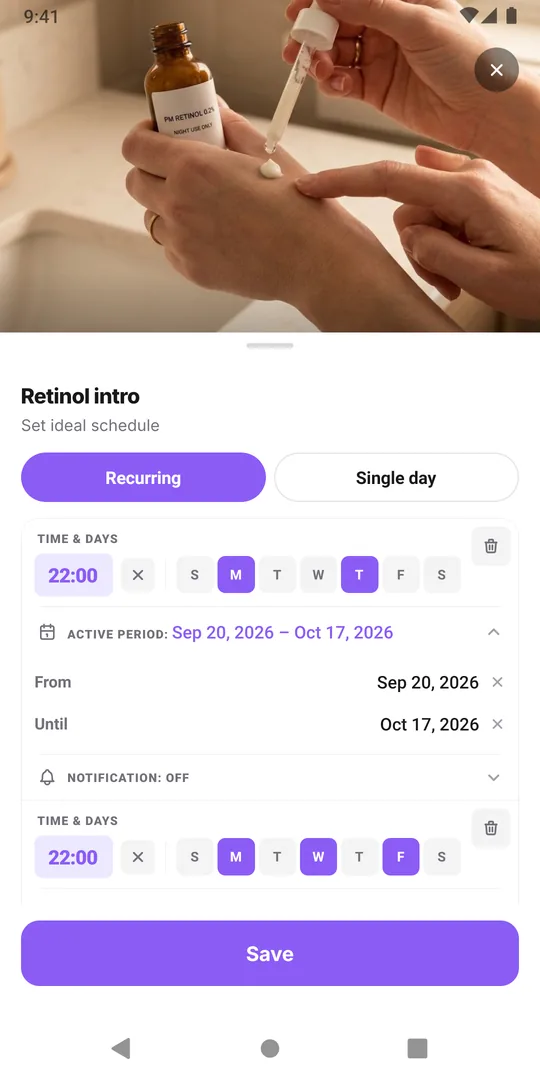
In EasyRoutine, add Retinol intro as an activity in your PM skin routine. With Premium, open the Plan tab and give it one Recurring time per phase: Monday and Thursday at 22:00 with an active period from the first to the last day of phase 1, then Monday, Wednesday and Friday at 22:00 for phase 2. An activity takes up to four recurring times, each with its own From and Until dates, so a three- or four-phase introduction fits in one activity.
Now the question "which week am I in?" answers itself. On a retinol night, the planned entry appears on the calendar; on an off night it does not. Open the activity's schedule to see which phase is active and when it ends. You can also add a reminder to each phase's time.
Scheduling and active periods are Premium. On the free plan, log each use and write the phase in the note of its first night, for example "Phase 2 starts, 3 nights a week"; the log sheet shows your last 5 notes for the activity when you log it.
See which nights you actually used it
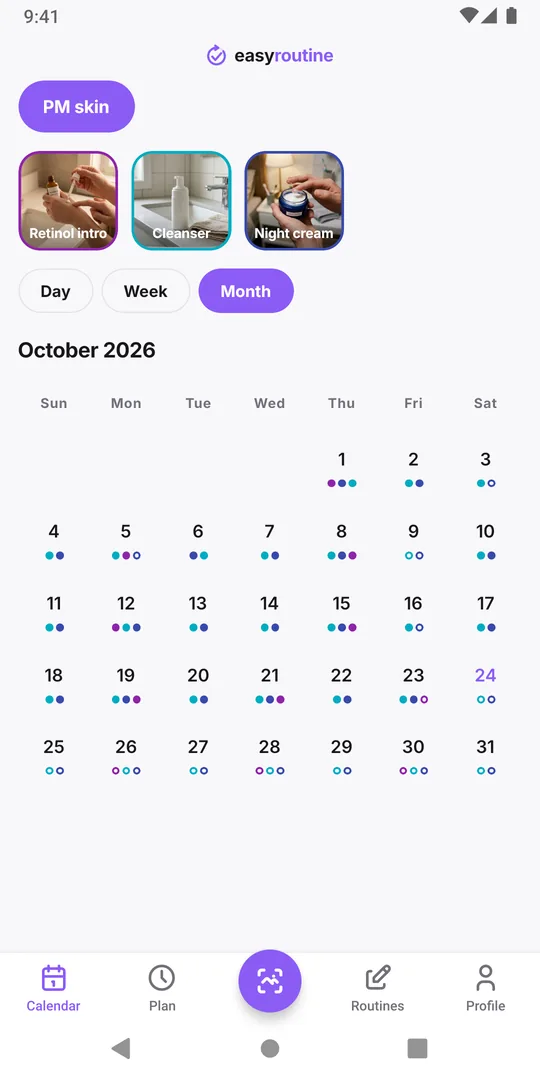
The plan says what should happen; the log says what did. Log each retinol night from the faded planned entry, or with + Log together with the other evening steps. Add an amber flag and a word or two ("stinging around the nose") when your skin reacts, which is useful when you decide with your dermatologist whether to move on.
To review a phase, tap the Retinol intro tile above the calendar to highlight its entries, and switch to the month view. Each night you used it has a dot in its color; planned nights you did not log show as hollow rings. Count the dots for the current phase before moving to the next: four nights logged out of eight planned is not the same phase two as eight out of eight. The calendar views.
When the introduction is over
After the last phase's Until date, the introduction stops showing as planned. If you carry on with retinol long term, add a new recurring time without an end date for your regular nights, or start a separate Retinol activity and archive Retinol intro; its logs stay on the calendar. The skincare treatment tracking template walks through a full example with phases and planned end dates. More on the skincare routine tracker.
Common questions
Can EasyRoutine schedule every other night?
Not as a rule. Schedules repeat on chosen weekdays or on single dates. Pick weekdays that roughly match your plan, or add single-day plans for the exact dates, up to 20 per activity.
How fast should I build up retinol?
That depends on the product and your skin, so follow the label or your dermatologist. The app only holds the plan you enter and records the nights you used it.
What if I need to pause the introduction?
Edit the Until date of the current phase and move the next phase's From date back. Nights you already logged stay where they are.
Do I need Premium?
Logging each retinol night, notes and flags are free. Phases with active periods and reminders need Premium.
Keep reading
- Skincare routine tracker apps compared: dedicated app or EasyRoutine?Skincare apps offer ingredient checks and photo diaries; EasyRoutine logs which AM and PM steps you used and when. Features compared, and who fits which.
- Morning skincare routine order: a simple checklistMorning skincare routine order: cleanser, serum, moisturizer, then sunscreen last. A sourced checklist, common mistakes and a simple way to track each step.
- Evening skincare routine checklistAn evening skincare routine checklist in the right order, how it changes on retinol and no-makeup nights, the mistakes to avoid, and how to track the steps.
- How to track a skincare treatment and know when to stop itA template for a skincare treatment that comes and goes: write the plan down, log each use, note how your skin reacts, and know when to stop it.
- Which skincare product caused my skin reaction?Skin reacting to something new? Narrow down the product: compare start dates, know how patch testing works, avoid common mistakes, and keep a dated log.
- Can't tell if your skincare product is actually working?Can't tell if a skincare product is working? Give it a fair trial, log each use and how your skin looked, then read gaps and flags on a calendar.
- Did I do my morning skincare or not?Not sure if you did your morning skincare or put on SPF? Quick checks, what to do when in doubt, and a two-second way to know for sure tomorrow.
- Forget to patch test new skincare products?Keep forgetting to patch test new skincare? How a home patch test works, why it gets skipped, and how to make it a short step of its own on your calendar.
- Keep forgetting your evening skincare routine?Keep forgetting your evening skincare? Why the PM routine slips, how to shrink it and tie it to a cue, and how a reminder can catch you before bed.
- Should you track morning and evening skincare in the same list?Should you track morning and evening skincare in the same list? When two routines work better, when one is enough, and how to set either up.
- Running two skincare treatments at once and getting them mixed up?Running two skincare treatments at once and mixing them up? Give each its own entry, nights and end date, and keep a record you can tell apart later.
- Does your skincare routine fall apart when you travel?Skincare routine falls apart when you travel? Pick a travel minimum, pack for it, adjust for time zones, and keep a record even when steps move around.
Free on iPhone and Android. Sign in with Apple, Google or your email to start.