Evening skincare routine checklist
Did I put the retinol on last night? Evening routines often have more going on than mornings: makeup to remove, treatments on some nights, a cream you are only using for a few weeks. Here is a simple evening checklist, and how to track it in EasyRoutine so you know which steps really happened.
The evening checklist, in order
A typical evening routine has three or four steps:
- Remove makeup and sunscreen. A micellar water, cleansing balm or oil, if you wore makeup or sunscreen during the day. Many people call this the first cleanse.
- Cleanse. Your regular cleanser.
- Treat. The treatment you use at night, for example a retinol, or a serum. Some treatments are used every night, others only on certain nights.
- Night cream or moisturizer. The last step.
The usual rule of thumb still applies: thinner products before thicker ones. Unlike the morning, there is no sunscreen at the end.
This is general guidance, not dermatological advice. For actives like retinoids, acids or prescription creams, follow the product label or your dermatologist on how often to use them and what not to combine.
How the evening differs from the morning
The morning is about getting ready for the day: cleanse, treat, moisturize, sunscreen. The evening is about taking the day off and, for many people, the treatments they do not use in daylight. That is why evening routines tend to change more from night to night: retinol on Monday and Thursday, a hydrating mask on Sunday, a spot treatment only while a breakout lasts.
If you have not set up your mornings yet, see the morning skincare routine checklist.
Set up your evening routine in EasyRoutine
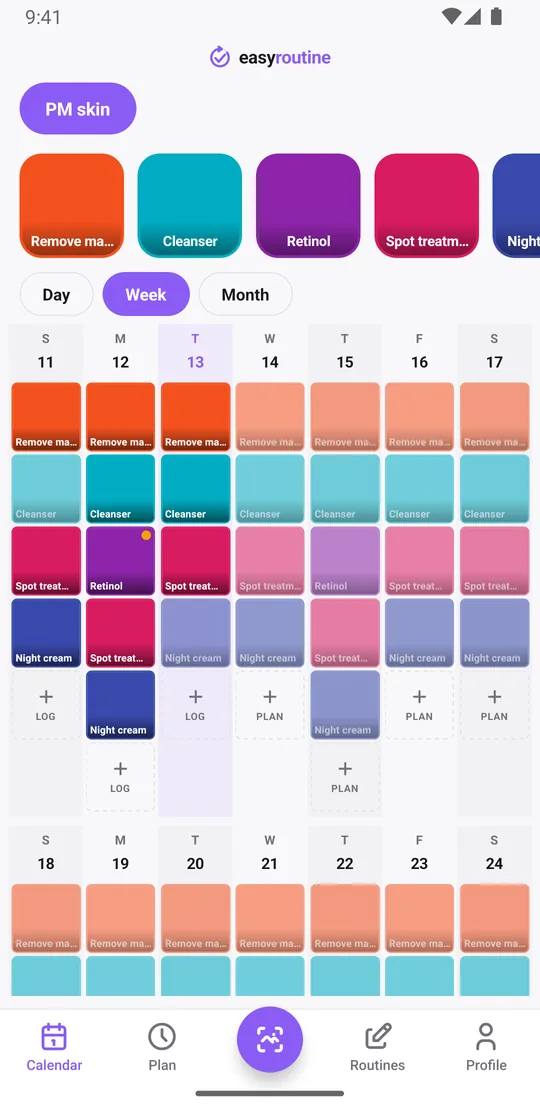
Create a separate routine called PM skin and add each step as an activity: Remove makeup, Cleanser, Retinol, Night cream. Keeping it apart from your AM skin routine keeps both lists short, and each step's color shows on the calendar, so you can see that the cleanser happened but the retinol did not.
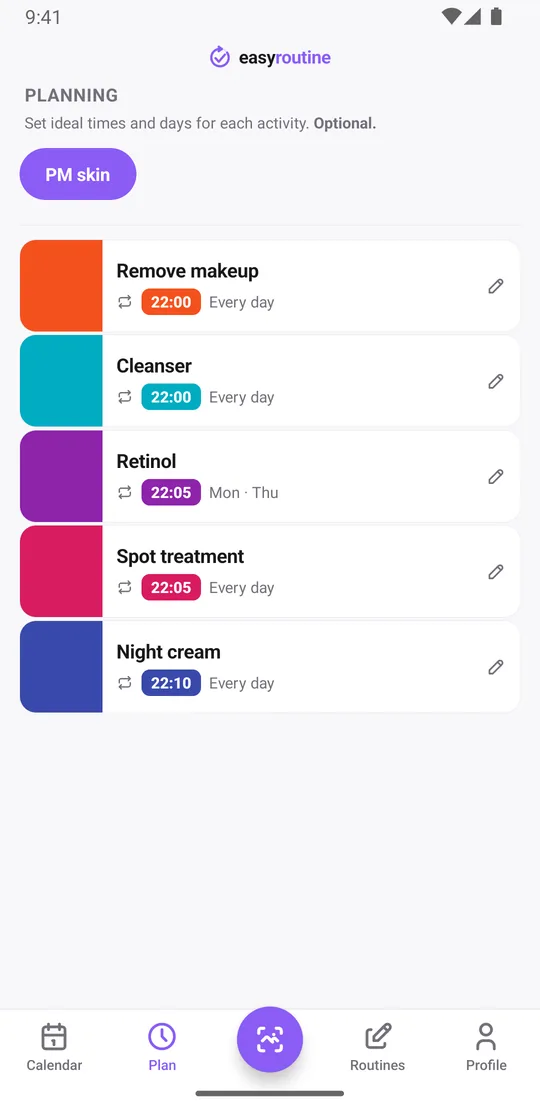
In the app, an evening routine works the same way as a morning one. What differs is the plan: with Premium, give steps an evening time, and give steps you use on some nights only just those weekdays. A step with no time shows as "Any time" at the top of the day and cannot have a reminder.
At night, tap each step's faded planned entry as you go and save it, or use the "+ Log" button on the day to tick the whole routine at once before bed. Forgot to log it? Add it the next morning for last night with the right time.
When did you last use retinol?
Logging is free, and the calendar answers the questions that are hard to remember at 22:00. Tap the Retinol tile at the top of the calendar and the calendar shows only that step, so the last entry is the last night you used it. That helps when you space an active out and cannot recall whether it was two nights ago or four. The same works for steps you do now and then, like a weekly mask or exfoliant, once they have their own activity.
Switch to the month view for the longer pattern: how often the retinol really went on this month, or the week the night cream kept getting skipped. Each day shows up to four colored dots, one per logged step.
Notes, flags and photos
Night is when reactions to treatments tend to show, so notes help. Add a note to a log, like "tingling" or "skipped, skin irritated", and a green, amber or red flag. The log sheet shows your last few notes for that step, and the day and week views show flagged logs as colored dots, so you can see when a reaction started and what you used in the days before. That is useful to show a dermatologist.
If you give each product a photo, you can log a step by pointing the camera at the bottle in the Scan tab. The scan matches against your own products that have a photo. It does not keep pictures of your skin. How the photo scan works.
Logging, notes, flags, the scan and the calendar are free. Scheduling, active periods and reminders are Premium. More on the skincare routine tracker.
Log nightly steps and occasional treatments separately
Give each kind of step its own activity, even if they sit in the same routine:
- Nightly steps like Cleanser and Night cream: scheduled every day.
- Some-nights steps like Retinol: scheduled only on their weekdays, say Monday and Thursday at 22:05, so a night without retinol is not a missed step.
- Short-term treatments: their own activity with a start and an end date (below).
This keeps the calendar honest. Planned steps you have not logged appear faded, and only on the nights they belong to.
Fitting in a short-term treatment
A prescription cream for two weeks, a spot treatment during a breakout, a new serum you are trying for a month. Add it as its own activity in your PM skin routine, so it shows next to your nightly steps, for example Spot treatment.
With Premium, open the Plan tab, give it a time and the nights you use it, and set an active period with a start and an end date. The treatment then shows up as planned only between those dates and stops appearing after the last day, while your regular steps carry on. You can add a reminder to it, on time or 5, 10, 15 or 30 minutes before.
When it is over, your logs stay on the calendar. If you will not use the activity again, archive it: it is hidden from the routine, the scan and reminders, and you can unarchive it later. The skincare treatment tracking template walks through a full example.
Common questions
What should an evening skincare routine include?
Usually removing makeup and sunscreen, cleansing, a treatment if you use one, and a night cream or moisturizer. Follow product labels or your dermatologist for actives like retinoids.
How do I see when I last used a treatment?
Tap its tile at the top of the calendar to show only that activity. The latest entry is the last night you logged it. This works on the free plan.
How do I add a short-term treatment to my nightly routine?
Add it as its own activity in your PM skin routine. With Premium, give it its nights, a time and an active period with start and end dates, so it only appears while the treatment lasts.
How is an evening routine different from a morning one in the app?
It works the same way, as its own routine with one activity per step. The difference is in the plan: evening times, and some steps scheduled only on certain nights.
Should nightly steps and occasional treatments be separate activities?
Yes. Separate activities let each one have its own schedule, so a night without retinol does not look like a missed step and a treatment can end on its own date.
Keep reading
Free on iPhone and Android. Sign in with Apple, Google or your email to start.