Morning skincare routine order: a simple checklist
Cleanser, then serum, then moisturizer, then sunscreen. That is the order most morning routines follow. Here is the checklist, with a note on each step, and how to set it up in EasyRoutine so you can tick it off every morning and see which steps you actually did.
The morning checklist, in order
Most morning routines are built from the same four steps. The common rule of thumb is to go from the thinnest, most watery product to the thickest, and to finish with sunscreen.
- Cleanse. A gentle cleanser, or just a rinse with water if that is what suits you in the morning.
- Treat. A serum or other treatment you use in the morning, for example a vitamin C serum. If you use more than one, the thinner one usually goes first.
- Moisturize. A moisturizer to finish your skincare. Some people add an eye cream before it.
- Sunscreen. The last skincare step, before any makeup.
That is a general order, not a prescription. Your skin and your products may call for something different. For active ingredients (acids, retinoids, prescription creams), follow the product label or your dermatologist on what to use, when, and what not to combine.
What each step on the list is for
Cleanser
The first step clears the way for everything after it. In the morning there is no makeup or sunscreen to remove yet, so many people keep this step short.
Serum or treatment
This is where the product you are most curious about usually sits, and it is the step most worth tracking. If you started a new serum, a log of the mornings you actually used it tells you more than a vague feeling.
Moisturizer
Applied after serums and before sunscreen. It is often the thickest product in a morning routine, which is why it comes late in the order.
Sunscreen
It goes on last, after moisturizer and before makeup. How much to use and when to reapply is on the label, so follow that.
What a morning checklist should include
Keep it to the steps you really do. A checklist with eight steps you skip half the time is less useful than four steps you can tick every day. A good test: if you would not notice it missing, it probably does not need to be on the list.
Add optional steps only when they matter to you, like an eye cream, a toner or a treatment you use on some days only. Those are good candidates for their own schedule (see below), so they show up on the days you use them and not every morning.
Turn the checklist into a routine you can track
In EasyRoutine, the checklist becomes a routine with one activity per step:
- Create a routine called AM skin.
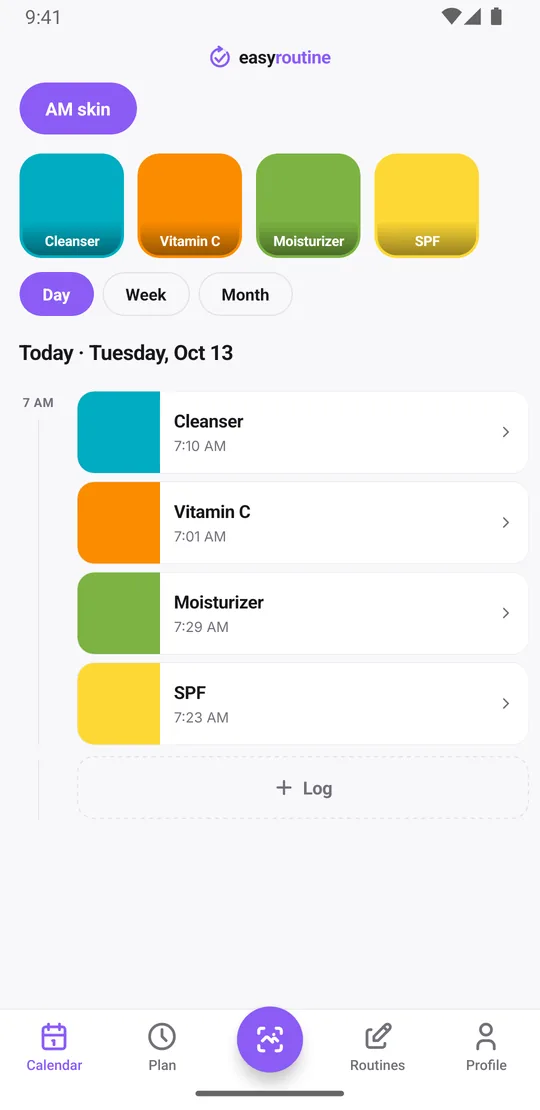
- Add Cleanser, Vitamin C, Moisturizer and SPF as activities. Each gets its own color, so the calendar shows which steps you did.
- Optionally, add a photo of each product. EasyRoutine can suggest the name from it, and later you can log a step by pointing the camera at the bottle in the Scan tab. The scan matches against your own products that have a photo. How the photo scan works.
- Each morning, log the steps as you go by tapping their faded planned entries if you scheduled them (Premium), or use + Log on the day to tick all four at once when you are done.
If you only want to know that the routine happened, not which steps, one activity called Morning skincare works too. Separate steps are worth it when you are testing a product.
See which steps you actually do
Logging and the history are free. In the day and week views each logged step sits on its morning in its own color. Tap a step's tile at the top of the calendar, SPF for example, and the calendar shows only that step, so the latest entry answers "when did I last put on sunscreen?" right away.
The month view shows the longer pattern, with up to four dots per day, one for each step of this routine. A month where Vitamin C has gaps every weekend tells you something no single morning does. Forgot to log on a busy day? Add the log afterwards and set the date and time back to that morning.
Add notes and flags when something changes
Each log can carry a short note and a green, amber or red flag. Use them when there is something to remember: "new vitamin C bottle", "stung a little", "skin felt tight". The log sheet shows your last few notes for that step, and the month view lets you look back at when a reaction started and what you used in the days before. That record is useful if you see a dermatologist.
Notes and flags belong to each log, not to the product, so every morning can say something different.
Optional: a time and a reminder
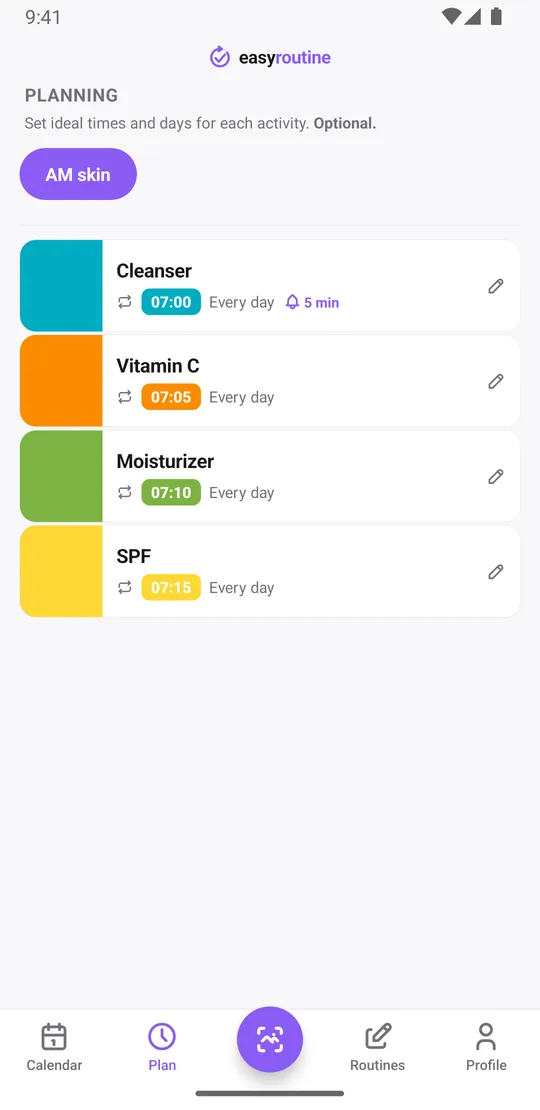
With Premium you can schedule the steps. Give each one a time on the days you use it, for example every day from 7:00 for the cleanser to 7:15 for sunscreen, and put a reminder on the first step only so you get one nudge, not four. A step with no time shows as "Any time" at the top of the day; it cannot have a reminder. Steps you use on some days only, like an exfoliating toner on Monday and Thursday, get just those weekdays. Testing a new serum for eight weeks? Give its slot a From and Until date and the plan and its reminder stop on their own after the last day.
Planned steps you have not logged yet appear faded on the calendar, so a skipped sunscreen stands out. Scheduling and reminders are Premium; logging, notes, flags, the scan and the calendar are free. Scheduling.
The evening is a different list
Evening routines often look different: makeup and sunscreen come off, and treatments like retinoids often go on at night. Keep them in a separate PM skin routine, so each list stays short. See the evening skincare routine checklist, and for products you only use for a few weeks, the skincare treatment tracking template. More on the skincare routine tracker.
Common questions
What order should I apply morning skincare products in?
The common order is cleanser, then serum or treatment, then moisturizer, then sunscreen as the last skincare step. Follow the product labels or your dermatologist for active ingredients.
What should a morning skincare routine checklist include?
The steps you actually do every morning, usually cleanse, treat, moisturize and sunscreen. Add optional steps only if they matter to you, and give occasional ones their own days.
How do I turn this checklist into a routine I can track?
In EasyRoutine, create an AM skin routine and add each step as an activity. Log each step with + Log on the day, several at once if you like, or tap its planned entry if you scheduled it. With Premium, add times and a reminder.
How do I see when I last used a product?
Tap that step's tile at the top of the calendar. The calendar then shows only that step, and the latest entry is the last time you logged it. This is free.
Can I add photos and notes to each step?
Each step can have a photo of the product, which lets you log it by scanning. Notes and a green, amber or red flag can be added to any log.
Keep reading
Free on iPhone and Android. Sign in with Apple, Google or your email to start.