Keep forgetting your evening skincare routine?
The evening routine slips because it comes at the end of the day, when you are tired and the cue is weak. Make it shorter, move it earlier and tie it to something you never skip, then add a nudge that arrives before you are in bed, not after.
Why the evening routine is the one that slips
Morning skincare has a natural slot: you are in the bathroom anyway, and you leave the house afterwards. The evening has no such door. Typical reasons it gets skipped:
- It comes last. By the time you think of it, you are already lying down.
- The evening changes shape. Dinner out, a late call, falling asleep on the sofa: the moment the routine was tied to does not happen.
- It is longer than the morning. Makeup removal, cleanser, a treatment, night cream. Five steps at 23:30 feel like a lot.
- Treatment nights are irregular. A retinoid on some nights only is easy to forget because there is no fixed pattern to remember.
A skipped night is not a reason to give up. The American Academy of Dermatology notes that consistency matters more than a 10-step routine, so the aim is a short routine you actually do, not a perfect one. For a prescription treatment with its own rule for a missed night, follow the label or ask your dermatologist or pharmacist.
Make the evening routine easier to remember
- Shrink it. The basic evening skincare checklist is four steps: remove makeup and sunscreen if you wore any, cleanse, apply any treatment, moisturize. Anything beyond that is optional on a tired night.
- Move it earlier. Do it right after dinner or when you get home, not just before sleep. A routine done at 21:30 survives a late night better than one planned for 23:30.
- Tie it to a fixed cue. Brushing your teeth is the classic one: products next to the toothbrush, cleanser before you pick it up.
- Keep a minimum version. On nights you really can't, cleanse and moisturize, and skip the rest on purpose instead of skipping everything.
- Put the products where you will see them. A night cream on the bedside table is a reminder in itself.
Set up a PM skin routine in EasyRoutine
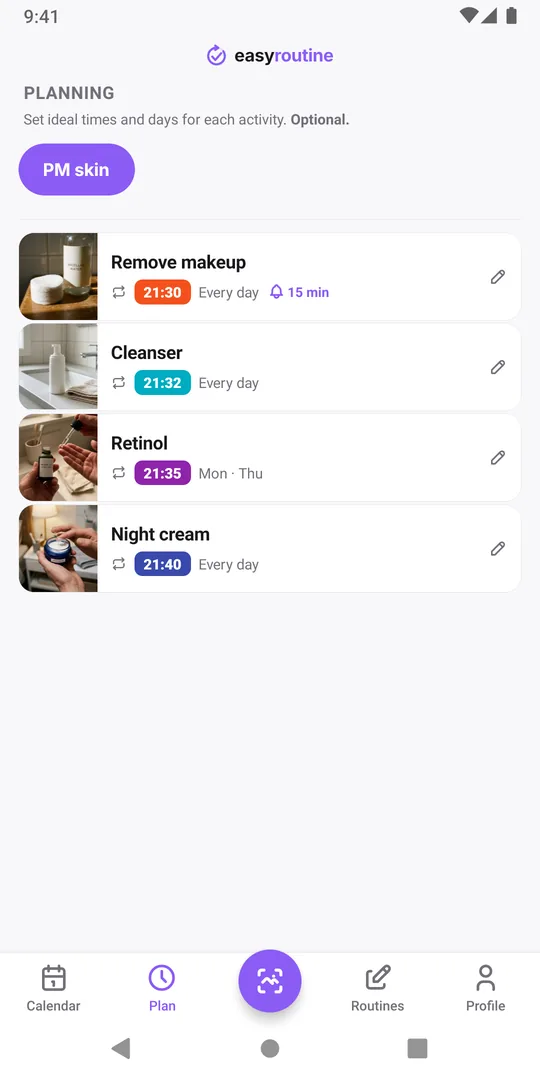
Create a routine called PM skin and add each step as its own activity, in the order you use them: Remove makeup, Cleanser, Retinol, Night cream. When you finish, tap + Log on the day and tick the steps you did. Fell asleep and did them half asleep, or the next morning you are not sure? Log them later on the right date; logging is free.
Separate activities mean a cleanse-and-moisturize night still shows as two steps done, and a retinol night stands out from the others. Keep it apart from your morning steps, so each list stays short (one list or separate AM and PM routines?).
Add an evening reminder (Premium)
With Premium, open the Plan tab and schedule the steps for the evening: the nightly steps every day, for example Remove makeup at 21:30, and a some-nights step like Retinol only on its weekdays, say Monday and Thursday. Then turn on a reminder on the first step only, 15 minutes before or on time, so you get one nudge rather than four.
Pick a time when you are still up and near the bathroom, not your bedtime. A reminder that arrives when you are already in bed gets dismissed. Reminders need a set time; an "Any time" slot cannot carry one. The notification reads "Routine reminder" and tapping it opens the routine. How reminders work.
See which nights slip
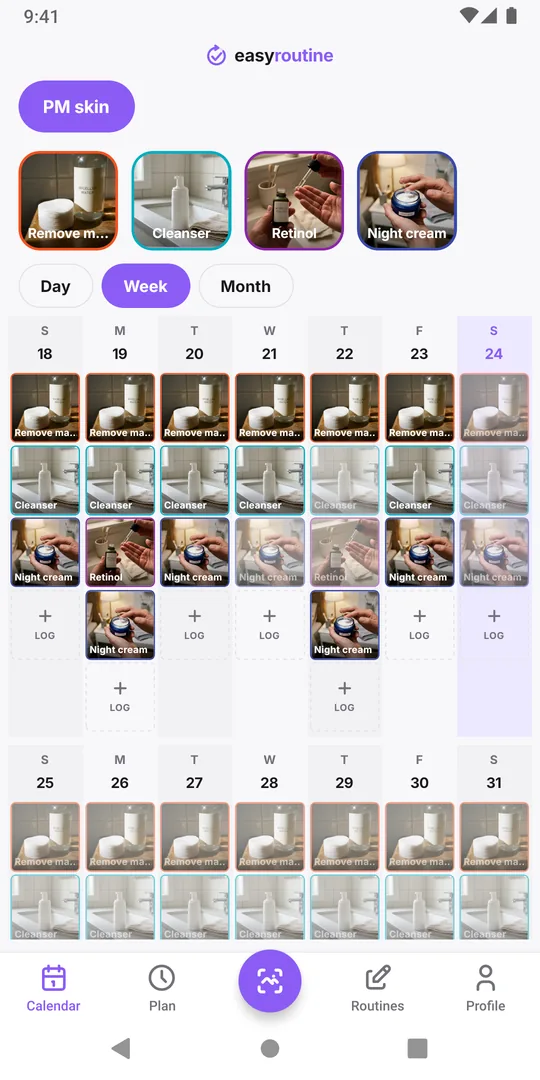
After two or three weeks, open the week or month view of PM skin. With Premium, planned steps you did not log stay faded, so the gaps are easy to see. Look for a pattern: if the misses cluster on Friday and Saturday, or on nights with makeup, the routine needs a shorter version for those nights or an earlier slot, not more willpower.
If the morning is the shaky part instead, see did I do my morning skincare or not?
Common questions
What should I do after a skipped night?
Pick up the routine again the next night. For a prescription treatment, follow the label or ask your dermatologist or pharmacist what to do after a missed night.
Can I get a reminder on certain nights only?
Yes, with Premium. Schedule the step on the weekdays you use it and turn on its reminder. The reminder fires only on those nights.
Do I need Premium to track my evening routine?
No. Logging every step is free. Scheduling and reminders are Premium.
Why did my reminder not arrive?
Check that notifications for EasyRoutine are allowed in your phone's settings and that the step has a set time, since an Any time slot cannot carry a reminder.
Keep reading
- Skincare routine tracker apps compared: dedicated app or EasyRoutine?Skincare apps offer ingredient checks and photo diaries; EasyRoutine logs which AM and PM steps you used and when. Features compared, and who fits which.
- Morning skincare routine order: a simple checklistMorning skincare routine order: cleanser, serum, moisturizer, then sunscreen last. A sourced checklist, common mistakes and a simple way to track each step.
- Evening skincare routine checklistAn evening skincare routine checklist in the right order, how it changes on retinol and no-makeup nights, the mistakes to avoid, and how to track the steps.
- How to track a skincare treatment and know when to stop itA template for a skincare treatment that comes and goes: write the plan down, log each use, note how your skin reacts, and know when to stop it.
- Which skincare product caused my skin reaction?Skin reacting to something new? Narrow down the product: compare start dates, know how patch testing works, avoid common mistakes, and keep a dated log.
- Can't tell if your skincare product is actually working?Can't tell if a skincare product is working? Give it a fair trial, log each use and how your skin looked, then read gaps and flags on a calendar.
- Did I do my morning skincare or not?Not sure if you did your morning skincare or put on SPF? Quick checks, what to do when in doubt, and a two-second way to know for sure tomorrow.
- Forget to patch test new skincare products?Keep forgetting to patch test new skincare? How a home patch test works, why it gets skipped, and how to make it a short step of its own on your calendar.
- Lose track of where you are in a long retinol introduction?Losing track of which week of your retinol introduction you are on? Write the phases down, put them on a calendar and see which nights you actually used it.
- Should you track morning and evening skincare in the same list?Should you track morning and evening skincare in the same list? When two routines work better, when one is enough, and how to set either up.
- Running two skincare treatments at once and getting them mixed up?Running two skincare treatments at once and mixing them up? Give each its own entry, nights and end date, and keep a record you can tell apart later.
- Does your skincare routine fall apart when you travel?Skincare routine falls apart when you travel? Pick a travel minimum, pack for it, adjust for time zones, and keep a record even when steps move around.
Free on iPhone and Android. Sign in with Apple, Google or your email to start.