Not training legs enough compared to your other days?
A split can drift out of balance without you noticing: push and pull happen every week, legs only when the week goes well. To find out whether you really skip leg day more, log each split day as its own activity and compare a month of them side by side. Counting beats guessing, and the fix is usually a scheduling one.
Why one day of a split falls behind
Leg day is the classic example, but the pattern applies to any session you like less. The usual reasons:
- It sits on the weakest day of the week. Friday evening legs compete with plans, tiredness and the weekend.
- It is the hardest session. When energy is low, the easier session wins: "I'll do upper today and legs tomorrow", and tomorrow never comes.
- It comes last in the rotation. If the week gets cut short, the last session is the one that drops.
- Missed sessions are not made up. A skipped push day gets moved; a skipped legs day just disappears.
None of this shows if your log only says "gym". Three sessions a week looks fine until you see that two were push and one was pull.
Count the split days separately
The answer needs one thing: each split day logged under its own name. Then compare the counts over a few weeks:
- One entry per split day: Push, Pull, Legs (or Upper and Lower).
- Log the day you actually did, not the one the plan said. If you swapped legs for upper, log Upper.
- Look at four weeks at once. One week is noise; a month shows the pattern.
- Compare the counts. On a three-day split you would expect roughly the same number of each. Twelve sessions with five Push, five Pull and two Legs is your answer.
Doing it in EasyRoutine
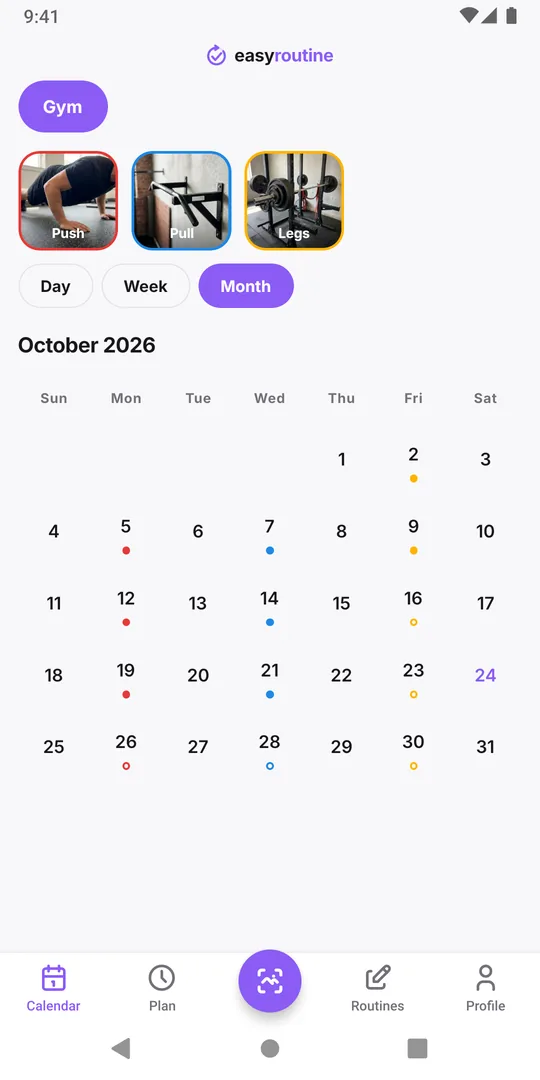
Create a Gym routine with one activity per split day: Push, Pull and Legs, each with its own color, so they are easy to tell apart on the calendar. After each session, tap Log on today and pick the one you did. Logging and the calendar are free.
At the end of the month, open the Calendar in the Month view. Each session is a dot in its activity's color. Tap the Legs tile above the calendar to highlight it, count its dots, then do the same for Push and Pull. The app does not add them up or show percentages for you, but a month of dots is quick to count, and a missing color is easy to see. Which days you actually trained this month covers reading the month in more detail.
Fixing the imbalance
Once the count confirms it, change the setup rather than relying on willpower:
- Move legs to your most reliable day, often the start of the week, and push the session you never skip to the end.
- Make a missed legs day move, not disappear: if Monday falls through, it goes first on the next training day.
- Shorten it if its length is the problem. A shorter leg session you do beats a long one you skip.
With Premium you can put each split day on its weekdays in the Plan tab, for example Legs on Monday at 18:00. A planned session you did not log shows as a hollow ring in the Month view and faded in the Week view, so a skipped leg day is visible the next morning instead of at the end of the month. The weekly workout split template has splits with their weekdays.
Check again next month
After a month on the new plan, count again. If the three are close, the change worked. If not, look at which weekday the gaps fall on: that is usually the day the plan does not fit, and your schedule doesn't match your actual routine is the next step. The workout log page has the full setup.
Common questions
Can the app tell me how many leg sessions I did this month?
Not as a number. Open the month view, tap the Legs tile to highlight its sessions and count the dots. There are no per-activity totals or percentages.
Should I log each exercise or each split day?
Each split day. One activity per day of the split keeps logging quick and is exactly what you need to compare them. Put the exercises in the note if you want them.
I swapped legs for upper body today. What do I log?
Log what you actually did, Upper. Logging the planned session instead would hide the very imbalance you are trying to see.
Can I compare my split across two routines?
The calendar shows one routine at a time, so keep all split days in the same Gym routine.
Keep reading
- Simple workout log app or full tracker: which one is best for you?Gym tracker app or simple workout log? What a full set and rep tracker does well, when logging that you trained is enough, and how to keep it useful.
- Weekly workout split template: three splits to copy and logCopy a 3, 4 or 5 day weekly workout split template with weekdays and times, see who each one suits, and check which sessions you actually did each week.
- Track a new gym routine when you are just starting outJust joined a gym? A first-month plan that starts small, fixed gym days, and a simple tracker that shows whether you went. No sets or reps to fill in.
- Does a rest day break your workout streak?A planned rest day only breaks the Day streak if nothing at all is logged that day. How the streak counts, what keeps it going, and a better measure.
- Always quit a new gym routine after a few weeks?Strong start, then the gym fades out by week four? Why it happens, how to restart smaller, and a log so light you keep using it after the first rush.
- Forget which exercises you did last session?Can't recall what you did at the gym last time? Write one line per session, like the key lifts and weights, and read it back before the next one.
- Your gym routine falls apart when you travel?Every trip breaks your training habit? Plan a smaller travel version, log hotel room and park workouts too, and pick the routine up the day you get home.
- Losing motivation because you can't see your workout streak?Need to see your gym streak to keep going? Make consistency visible with a running streak, a total of sessions and a month of logged workouts.
- Which days did you actually train this month?Reviewing a training block or deciding whether to keep a plan? See every session you logged this month at a glance and read what the pattern says.
Free on iPhone and Android. Sign in with Apple, Google or your email to start.