Simple workout log app or full tracker: which one is best for you?
Did I actually make it to the gym three times this week? If that is the question you care about, you do not need to log every set and kilo. EasyRoutine is a simple workout log app: it records that a session happened and when, in a few taps. A full workout app records much more, and for some people that is exactly right.
Can I track sets, reps and weights?
No. EasyRoutine has no fields for sets, reps, weights, distance or time under tension. Each log stores that you did an activity and when, plus an optional note and a green, amber or red flag.
If you want a rough record anyway, the note takes free text: "5x5 squat at 60 kg" or "easy 5 km". The app keeps it as written and shows your last few notes for that activity next time you log it, but it does not add anything up or chart it.
What a simple workout log means
A full workout tracker turns each session into data entry: pick the exercise, enter the weight, enter the reps, repeat for every set. That is valuable if you program your training around the numbers. It is also the reason many people stop logging after two weeks.
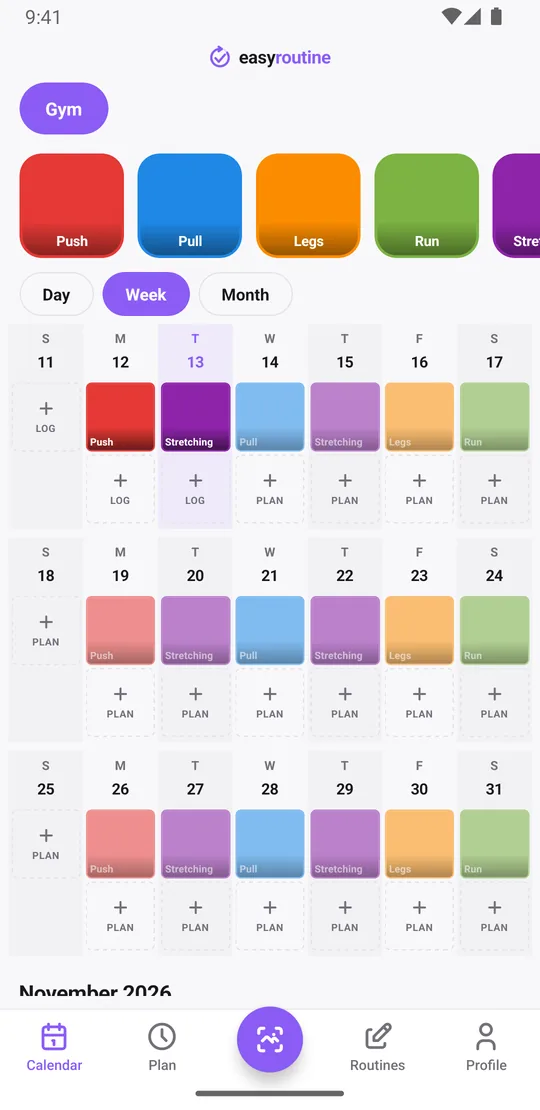
EasyRoutine keeps only the part that answers "did I train?". You set up a routine, for example Gym, with activities for what you want to see on the calendar. That can be the whole session, or your split:
- Push on Monday
- Pull on Wednesday
- Legs on Friday
- Run on Saturday morning
- Stretching on Tuesday and Thursday
After the session you log it, and you are done. Nothing to fill in between sets.
How you log a session
Open the Calendar, tap Log on today and pick Push: it is logged with the current time. If you did more than one thing, for example legs plus a stretch, pick several activities and log them together. If Push is on your Premium schedule, you can instead tap its faded planned entry and save it. Finished at 19:30 but only remembered at home? Tap the logged entry to adjust the time, or add the log for yesterday if you forgot completely.
You can also log by photo. Give an activity a photo when you create it, say the squat rack, your kettlebell or your running shoes, and EasyRoutine suggests a name from it. Later, point the camera at it in the Scan tab and the matching activity is logged at once. The scan compares against your own activities that have a photo; it does not recognize exercises or count anything. Machines that look alike are easier to log from the calendar. How the photo scan works.
Can I still see a streak of workout days?
Partly, and it is worth being precise. The calendar shows every logged session: the week view answers "how many times this week", and the month view shows whether you kept it up over the last weeks. That is the most reliable picture of your training.
Want to know when you last trained legs? Tap the Legs tile at the top of the calendar and only that activity is shown, so the latest entry is your last leg day. A workout app answers the same question with an exercise history; here it takes one tap, on the free plan.
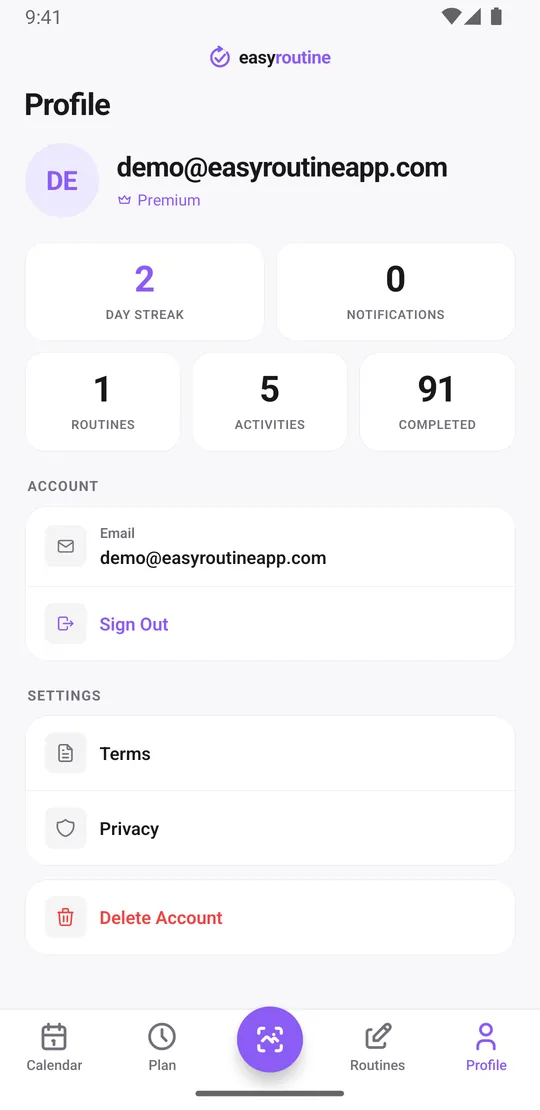
Your profile also shows a Day streak, the number of days in a row you logged anything, plus a Completed total of all logs. The streak counts all your routines together, not workouts only, and it is not tied to your plan. A planned rest day without any log breaks it, and logging a different routine that day keeps it going. If you train three times a week, the week view is the better measure. Calendar and streaks.
Plan training days, if you want
With Premium you can put each activity on fixed weekdays and a time, like Push on Monday at 18:00, and get a reminder on time or 5, 10, 15 or 30 minutes before. Planned sessions show faded on the calendar until you log them, so a skipped Wednesday is easy to spot. Logging, notes, the photo scan, the calendar and the streak are free. Scheduling. For a ready-made split, see the weekly workout split template.
Which is the best workout log app for you?
A full workout tracking app is better if you:
- follow a program with progressive overload and want to see your weights and volume over time,
- want the app itself to guide you through exercises and rest between sets,
- compete or work with a coach who reads your numbers.
EasyRoutine suits you if you:
- mainly want to show up consistently, and a few taps are all the logging you will keep doing,
- are building a new gym habit and need to see the weeks fill up (new gym habit tracker),
- want training next to other routines, like supplements, stretching or skincare, in one app,
- prefer a log with nothing to type.
Some people use both: a lifting app on heavy days and EasyRoutine for the overall picture, including walks and stretching that a lifting app would not record.
Common questions
What is the best workout log app?
It depends on what you want to record. If you program around weights and volume, a full strength tracker that logs every set is the better choice. If you mainly want to see that you trained and when, a simple workout log app like EasyRoutine takes a few taps per session and is free for logging.
Can I track sets, reps and weights with EasyRoutine?
No. It records that a session or exercise happened and when. You can write sets and weights in the note, but the app does not total or chart them. For that, use a dedicated lifting app.
What does it track instead?
Each session or exercise you log, with its date and time, an optional note and a green, amber or red flag. The calendar shows which days you trained.
Why would I want a lighter log?
Because a log you keep is better than a detailed one you abandon. If your goal is consistency, a few taps after the session are enough.
Can I see a streak of workout days?
The profile shows a day streak of consecutive days with any log, across all routines, so rest days break it. The week and month views show your actual workout days.
Keep reading
Free on iPhone and Android. Sign in with Apple, Google or your email to start.