Losing motivation because you can't see your workout streak?
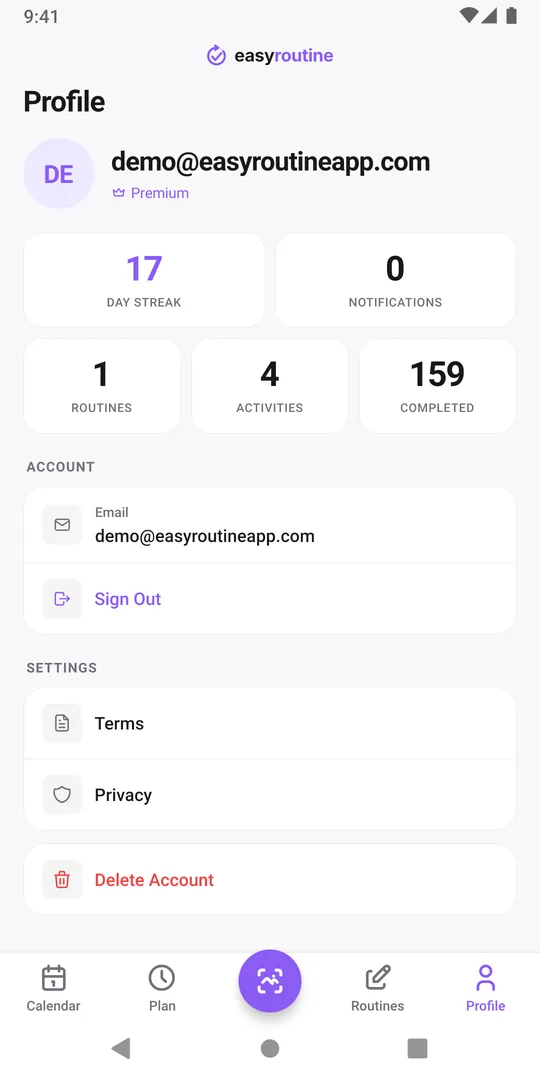
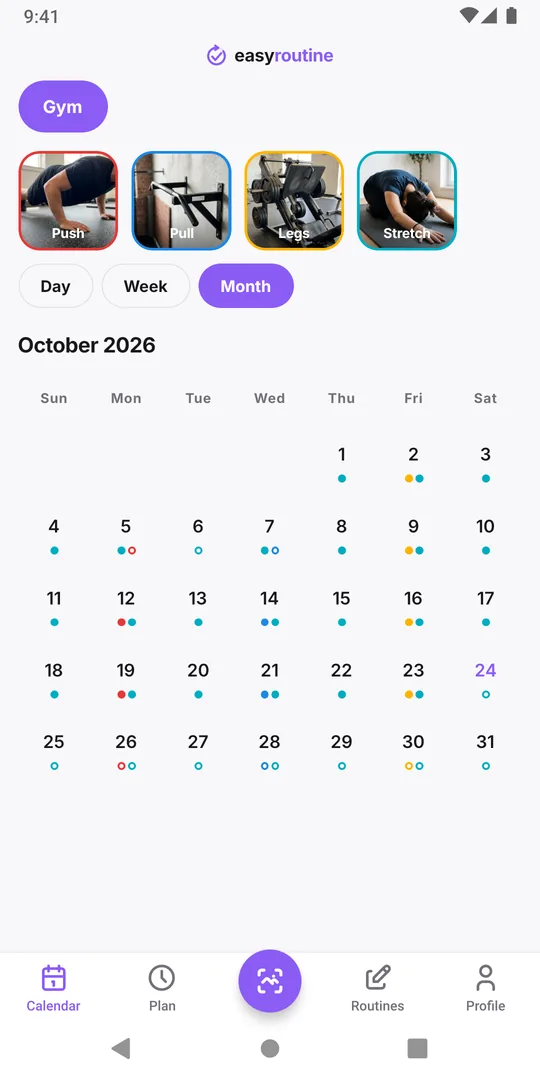
If progress only lives in your head, a bad week can make the last two months feel like nothing. Put it somewhere you can see it: log each session, and let a running streak, a total and a month of filled-in days show what you have done. In EasyRoutine the profile shows a Day streak and your total of completed logs, and the calendar shows every session.
Why seeing it helps
Strength and fitness change slowly. In the first weeks you rarely see a difference in the mirror or on the bar, so the effort feels like it goes nowhere. A visible record fills that gap: it shows that you kept showing up, which is the part you control and the part that comes first.
There is a second effect. A row of logged days is something you do not want to interrupt. That pull is useful, as long as the measure fits your training. A daily streak and a three-day-a-week plan do not fit by default, which is where many people get discouraged.
Pick a measure that fits how you train
Three kinds of visible progress, from most fragile to most robust:
- A daily streak. Motivating if you do something every day. With rest days in your plan, it resets on every one of them unless you log something else on those days.
- Sessions per week. "3 of 3 this week" fits almost every training plan and survives a rest day.
- A running total. "60 sessions since January" only ever goes up. A missed week cannot take it away.
Most people do best with a weekly target as the main measure and the total as the long-term reward. The streak is a bonus if your routine is daily.
What EasyRoutine shows you
Logging is free and so are all of these:
- Day streak on the Profile tab: the number of days in a row with at least one log, in any routine. Log an evening stretch or a supplement on rest days and they count too.
- Completed on the Profile tab: the total number of logs you have ever made. It only grows.
- The week and month views of your Gym routine: each session as a tile in the week, as a dot in the month. A month with three dots in every week is the clearest proof of consistency the app can show.
There are no charts, percentages or per-exercise records. The proof is the calendar itself. Calendar and streaks has the details.
Make it a habit to look
A record only motivates if you see it. Two moments work well:
- Right after logging. Glance at the week: one more tile.
- On the last day of the month. Open the month view and look at the whole thing before planning the next month. If the month was thin, look at which week broke and why, rather than at the count alone.
If the streak is what you watch and a rest day just reset it, read does a rest day break your workout streak before you decide it was a bad week.
When the record shows a slump
Visible progress also makes slumps visible, and that can sting. Treat a thin week as information: was it work, sleep, travel, or a plan that was too big? Adjust the plan, not your opinion of yourself. The total and the past months stay exactly as they were. If you keep dropping off after a few weeks, always quit a new gym routine is the next read, and the workout log page shows the full setup.
Common questions
Where do I see my streak in EasyRoutine?
On the Profile tab, as the Day streak. It counts days in a row with at least one log in any routine.
Is there a streak for each workout type?
No. There is one Day streak for everything. To see one session type, open the calendar and tap its tile above it to highlight it.
Does a missed day reset my total?
No. Completed counts every log you have made and never goes down because of a missed day.
Is the streak a Premium feature?
No. The Day streak, the totals and the calendar are free. Premium adds planned days, reminders and removes ads.
Keep reading
- Simple workout log app or full tracker: which one is best for you?Gym tracker app or simple workout log? What a full set and rep tracker does well, when logging that you trained is enough, and how to keep it useful.
- Weekly workout split template: three splits to copy and logCopy a 3, 4 or 5 day weekly workout split template with weekdays and times, see who each one suits, and check which sessions you actually did each week.
- Track a new gym routine when you are just starting outJust joined a gym? A first-month plan that starts small, fixed gym days, and a simple tracker that shows whether you went. No sets or reps to fill in.
- Does a rest day break your workout streak?A planned rest day only breaks the Day streak if nothing at all is logged that day. How the streak counts, what keeps it going, and a better measure.
- Always quit a new gym routine after a few weeks?Strong start, then the gym fades out by week four? Why it happens, how to restart smaller, and a log so light you keep using it after the first rush.
- Forget which exercises you did last session?Can't recall what you did at the gym last time? Write one line per session, like the key lifts and weights, and read it back before the next one.
- Your gym routine falls apart when you travel?Every trip breaks your training habit? Plan a smaller travel version, log hotel room and park workouts too, and pick the routine up the day you get home.
- Not training legs enough compared to your other days?Think you skip leg day more than the rest of your split? Log each split day separately and count a month of push, pull and legs sessions side by side.
- Which days did you actually train this month?Reviewing a training block or deciding whether to keep a plan? See every session you logged this month at a glance and read what the pattern says.
Free on iPhone and Android. Sign in with Apple, Google or your email to start.